
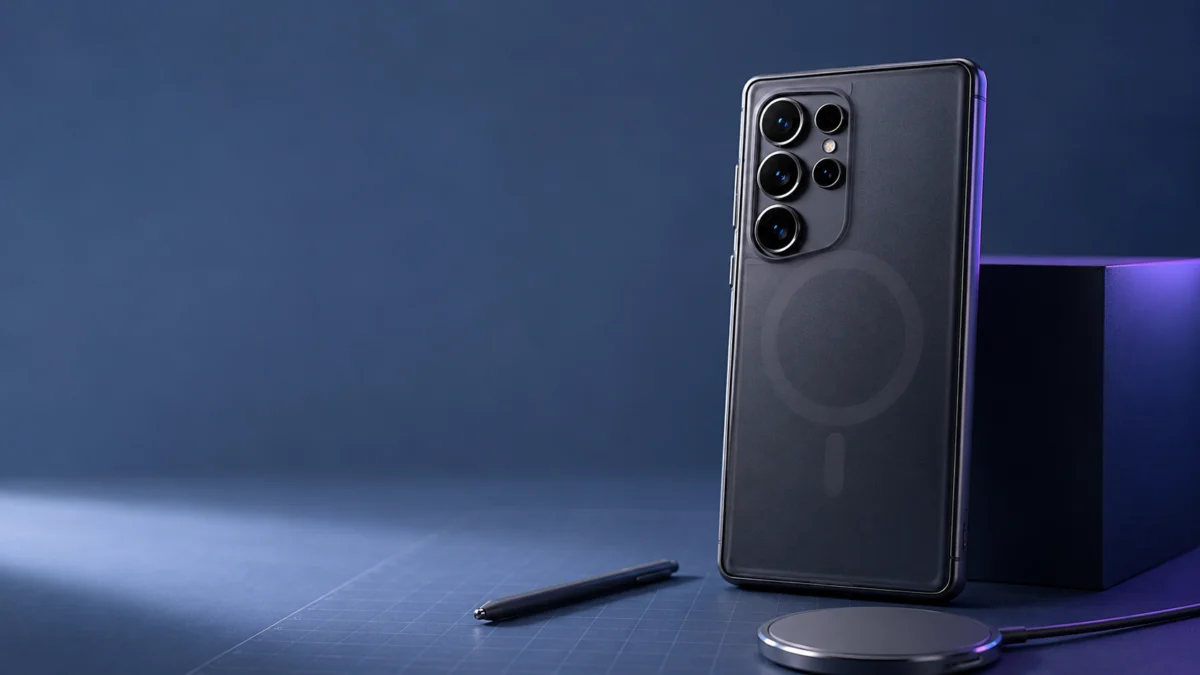
The Galaxy S26 Ultra has no built-in magnets. To use Qi2 magnetic alignment, MagSafe-style mounts, or snap-on accessories, you need a case with a built-in magnetic ring. That ring creates two competing problems: its magnetic field can interfere with the S Pen’s EMR digitizer, and if the shielding inside the case is too strong, it will block the Hall IC sensor that activates 25W wireless charging.
No single case resolves both constraints completely. The right choice depends on what you prioritize — the S Pen for precise input, 25W charging for speed, or magnetic accessories for daily convenience. This guide explains why the conflict exists at the hardware level, compares official Samsung cases against third-party options, and provides step-by-step troubleshooting if your S Pen stops responding or your charger fails to reach 25W.
| Case Type | S Pen Safety | 25W Charging | Accessory Compatibility | Best For |
|---|---|---|---|---|
| Non-magnetic (Spigen Liquid Air etc.) | ✅ Full accuracy | ❌ 15W max | ❌ No magnetic snap | Heavy S Pen users |
| Samsung Official Magnetic Case | ⚠️ Safe without accessories | ✅ 25W (with EP-P2900) | ⚠️ Moderate magnetic strength | 25W charging priority |
| Third-Party Qi2 (Spigen / ESR / Ringke) | ⚠️ Safe case-only; risky with accessories | ⚠️ Varies by shielding design | ✅ Strong snap | Car mounts, kickstands, daily accessories |
| Rugged (UAG / SUPCASE) | ⚠️ Higher interference risk | ⚠️ FOD interruptions possible | ✅ Strong snap | Drop protection priority |
Does the Galaxy S26 Ultra Have Built-In Magnets?
No. The Galaxy S26 Ultra does not include built-in alignment magnets. Qi2 magnetic positioning and MagSafe-style accessory attachment require a separate magnetic case. Samsung made this choice deliberately — internal research found that approximately 83% of Galaxy users attach a protective case, making it more practical and safer for S Pen performance to place the magnets in the case rather than the device itself. According to Samsung official communications and multiple verified industry sources, two principal reasons drove this decision.
Samsung Galaxy S26 Ultra official page
First, since the large majority of users protect their device with a case, equipping the case with magnets makes more practical sense than embedding them in hardware most users never contact directly.
Second, and more technically significant: the S Pen relies on EMR (Electromagnetic Resonance) technology to detect stylus position, pressure, tilt, and hover through a digitizer grid beneath the display. Embedding strong permanent magnets directly into the device body would create a persistent magnetic field in close proximity to this grid, degrading S Pen accuracy in ways that software cannot compensate for. Samsung prioritized stylus reliability over native magnetic integration.
The practical consequence is clear: standard Qi wireless charging — placing the phone on any compatible pad — works without a case. But the snap-and-align behavior of Qi2, and the attachment of magnetic wallets, mounts, or accessories, requires a case with a magnetic ring.
Why Magnetic Cases Can Affect the S Pen
The S Pen uses an EMR digitizer grid beneath the display to detect position, pressure, tilt, and hover. Neodymium magnets inside Qi2 cases distort this electromagnetic field. When the distortion is strong enough, it creates dead zones where the stylus registers no input, causes drawing offset, or disables hover recognition — particularly in screen areas near where the magnetic ring sits inside the case.
One important context change in the S26 Ultra: Samsung removed the Bluetooth module from the S Pen entirely. Previous Ultra models from the S21 Ultra through the S25 Ultra included Bluetooth for Air Actions — remote camera shutter, media playback, and presentation control. The S26 Ultra’s S Pen is a pure EMR stylus. It has no wireless connectivity, no internal battery, and no pairing process.
This matters for diagnosing problems. If the S Pen is slow to respond, loses sensitivity in a specific area, or stops recognizing hover input, the cause is not a pairing failure or a software error. It is a physical electromagnetic interference problem: the magnetic field from the case or attached accessory is distorting the digitizer’s ability to read the stylus signal accurately.
High-quality third-party case manufacturers apply a ferromagnetic shielding layer on the interior face of the magnetic ring — the side facing the phone’s back panel. This shielding redirects magnetic flux outward, toward the accessory-facing side, reducing the field that reaches the digitizer. When this shielding is well-executed, users wearing only the case can typically use the S Pen without noticeable issues.
This same EMR-versus-magnet conflict is not unique to slab phones. Samsung’s foldables that support the S Pen face the identical hardware tension, which becomes especially relevant when a magnetic case is required for Qi2 charging. For how this plays out across foldable models, see our guide to foldable phones and Qi2 charging compatibility.
Common Patterns Reported by Users
According to multiple reports across r/GalaxyS26Ultra and hardware community forums, users with Spigen Ultra Hybrid MagFit, ESR Classic Hybrid Stash Stand, and Ringke Onyx Magnetic cases generally describe normal S Pen behavior during single-case use — writing, precise selection, and annotation without dead zones or drawing offset.
Related discussion: Hall IC and 25W charging
/
Related discussion: 25W case list
/
Related discussion: magnetic sticker / case behavior
The picture changes when magnetic accessories are added on top. Several users describe S Pen dead zones appearing immediately after attaching a MagSafe-compatible wallet or magnetic car mount to the case back. This pattern holds even with premium cases marketed specifically on their S Pen shielding — adding a second strong magnetic source overcomes the single-case shielding layer. In all documented cases, removing the accessory restored normal S Pen function without any additional steps required.
Samsung’s OS reflects this physical reality. When the system detects a strong magnetic field near the digitizer area, it displays a pop-up: a warning that a magnetic accessory has been detected and may interfere with S Pen signal. This alert has been present since the Galaxy S24 Ultra and carries forward unchanged in the S26 Ultra. It is Samsung’s acknowledgment, at the software level, that strong external magnets and the S Pen cannot fully coexist without the user being informed.
Samsung S Pen magnetic accessory support
/
Samsung S26 accessories support
One clarification for users concerned about permanent hardware damage: magnetic interference with the S Pen is temporary. Removing the magnetic accessory restores full digitizer function. Consumer-grade accessory magnets are not strong enough to permanently alter the EMR grid or damage the stylus hardware.
The 25W Charging Problem: What the Hall IC Sensor Does
The Galaxy S26 Ultra enables 25W wireless charging only after its internal Hall IC (magnetic sensor) detects that a compatible magnetic case is attached. Cases designed with heavy S Pen shielding can block this sensor entirely. When the Hall IC receives no signal, the device treats the charger as a standard Qi pad and caps output at 15W or below — even when a Qi2 25W-rated charger is being used.
This is the hardware trade-off that most case reviews do not address directly, and it is the single most important technical fact for buyers of third-party Qi2 cases to understand.
Three conditions must all be met for 25W wireless charging to activate on the Galaxy S26 Ultra:
- The wireless charger must be rated for Qi2 at 25W output — such as Samsung’s official EP-P2900
- The power adapter supplying the charger must deliver sufficient wattage — USB Power Delivery at 45W or higher is generally required to support 25W wireless output
- The device’s Hall IC must successfully detect the magnetic signature of the case and complete the 25W charging handshake
The third condition is where conflicts with third-party cases originate. The Hall IC is a small magnetic field sensor embedded in the phone chassis. When it detects the appropriate magnetic field through the back of the device, the charging firmware upgrades from standard Qi output to the full 25W Qi2 profile. Without that detection — regardless of which charger is used — charging remains at the Qi ceiling.
Third-party case manufacturers face a direct design contradiction here. To protect the S Pen, they engineer shielding on the interior face of the magnetic ring that reduces flux toward the digitizer. This shielding works as intended for stylus protection. But the same shielding also reduces the magnetic field available to the Hall IC. In cases where the shielding is especially thorough — as is the case with products explicitly marketed on their S Pen protection — the Hall IC may receive a field too weak to trigger the 25W handshake.
Samsung’s official cases address this by calibrating the shielding geometry: enough shielding to reduce stylus interference during normal use, but with a magnetic window deliberately preserved for Hall IC detection. This design advantage is not visible from product photos or spec sheets, but it is a meaningful functional difference between official and third-party options.
How to Test Hall IC Detection on Your Case
If you are experiencing slower-than-expected wireless charging with a third-party case, a built-in diagnostic is available. Open the phone dialer and enter *#0*#. From the hardware test menu, select Hall IC. Attach your magnetic case to the device while the test is running. If the sensor readout does not change state, the case’s interior shielding is blocking the Hall IC and 25W charging will not activate on that case, regardless of the charger used.
A workaround reported by multiple users: place the device on the Qi2 charger with the case attached, then unplug and replug the charger’s power cable. In some charger and case combinations, this power cycle resets the charging negotiation and successfully triggers 25W output. Results vary by configuration — this is a workaround, not a fix.
One unresolved public dispute worth noting: a major skin and case brand publicly claimed that the Galaxy S26 Ultra fails to reach 25W even with Samsung’s own official cases, citing what it described as a hardware-level limitation. Community testing using the Hall IC diagnostic has produced contradictory results, with a number of users successfully confirming 25W activation with official cases. This remains an active, unverified dispute in the community — it is not a confirmed fact — and is treated here accordingly.
Official Samsung Cases vs. Third-Party Magnetic Cases
Samsung’s official magnetic cases are optimized for reliable 25W charging and minimal S Pen interference when used without additional accessories. Third-party magnetic cases offer stronger magnetic attraction and practical add-ons like kickstands and ring grips, but vary significantly in shielding quality — and some designs inadvertently block Hall IC detection, limiting charging to 15W or below.
Samsung Official Magnetic Cases
Samsung offers four magnetic case options for the Galaxy S26 Ultra: the Rugged Magnet Case (EF-RS948CBEGUS), the Silicone Magnet Case (EF-ES948CBEGUS), the Clear Magnet Case, and the Slim Magnet Case (EF-SS948CJEGUS). All four are designed to correctly trigger the Hall IC for 25W charging when paired with a compatible Qi2 25W charger and sufficient power adapter.
Official site: Rugged Magnet Case
/
Official site: Silicone Magnet Case
Each covers a different use profile. The Rugged Magnet Case provides the highest drop protection in the official lineup. The Silicone Magnet Case offers a soft-grip finish; community reports note that silicone materials attract lint and may show wear around the S Pen insertion slot over extended use. The Clear Magnet Case keeps the device’s back panel finish visible. The Slim Magnet Case is the thinnest option but leaves the top and bottom edges of the device largely unprotected.
A consistent limitation applies across all official cases: none include built-in kickstands, ring grips, or mechanical accessories. If a ring stand or viewing stand is part of your daily setup, that requires a separate addition. Official Samsung cases also carry a price premium relative to third-party options at equivalent protection levels, and are available in a limited color range.
Third-Party Magnetic Cases
Spigen Ultra Hybrid MagFit: A transparent-back case with a clearly visible magnetic ring. One of the most widely adopted third-party Qi2 options for Galaxy devices. Product specifications list S Pen compatibility and up to 25W wireless charging support. The majority of user reports indicate normal S Pen function during single-case use. Hall IC trigger consistency is generally positive across most user accounts, though results can vary by charger and configuration.
ESR Classic Hybrid Stash Stand (Halolock): Distinguished by a camera-ring kickstand that protects the lens array and functions as a viewing stand — a practical differentiator for video viewing and video calls that Samsung’s official lineup does not offer. S Pen function in single-case use is reported as normal across multiple user accounts. 25W charging is listed as supported, though consistency across all charger configurations has not been uniformly confirmed in community testing.
Ringke Onyx Magnetic: A matte-finish case at a lower price point than most dedicated Qi2 options. Magnetic strength is moderate, which reduces S Pen interference risk relative to cases using stronger N52-grade magnets, but also limits retention force for heavier accessories. User reports on S Pen compatibility during single-case use are largely positive.
TORRAS Ostand L1 / Spin: Features a 360-degree rotating ring stand integrated directly into the case. The ring provides a stable kickstand and comfortable grip for one-handed use. Magnetic strength trends toward the stronger end of consumer options (N52-grade neodymium), which benefits accessory retention but increases S Pen interference risk relative to moderate-magnet cases. S Pen reports with this case are more mixed than with Spigen or Ringke, particularly near the magnetic ring area.
UAG Civilian / Trooper: Military-grade drop-protection cases with built-in magnetic rings. Drop resistance significantly exceeds any Samsung official case. The added bulk increases the physical distance between the Qi2 charger pad and the device’s wireless charging coil, which can reduce charging efficiency and occasionally triggers the charger’s FOD (Foreign Object Detection) — the built-in safety feature that pauses charging when it detects unusual conditions. Best suited for users who prioritize physical protection over charging speed.
SUPCASE UB Grip / Pro Mag: Very thick, high-protection cases with built-in kickstands and magnetic rings. Similar FOD and charging efficiency concerns as UAG at this protection level. Best for demanding physical environments where slim profile is not a priority.
Non-magnetic protective cases (Spigen Liquid Air, Caseology Parallax, and similar): These cases contain no magnetic ring. The S Pen operates with complete accuracy and zero magnetic interference risk. Wireless charging functions normally up to 15W standard Qi. Since the Hall IC has nothing to detect, 25W charging does not activate. Qi2 alignment and MagSafe-style accessory attachment are not available. For users who use the S Pen frequently and do not depend on magnetic accessories or 25W charging, this eliminates the conflict entirely.
Best Case Types for Different Galaxy S26 Ultra Users
No single case covers every use case without compromise. The four categories below represent meaningfully different trade-off positions. Choose based on which limitation you are most willing to accept.
This section contains affiliate links. We may earn a commission if you purchase through these links, at no additional cost to you.
If S Pen Accuracy Is Your Priority
Best option: a non-magnetic protective case such as Spigen Liquid Air or Caseology Parallax.
For users who write, draw, annotate documents, or rely on precise stylus input daily, a non-magnetic case is the most reliable solution. With no magnets present, there is no electromagnetic interference with the digitizer. S Pen performance is identical to using the device without any case. The trade-off is that wireless charging tops out at 15W standard Qi and magnetic accessories are not compatible.
✅ Buy this if…
- You use the S Pen daily for detailed writing, drawing, or document annotation
- You want to eliminate S Pen interference risk entirely without managing what accessories are attached
- You do not use magnetic car mounts, Qi2 chargers, or MagSafe accessories
- 15W wireless charging speed is acceptable for your daily routine
❌ Don’t buy this if…
- You want Qi2 magnetic alignment for fast, precisely positioned charging
- You use a magnetic car mount or MagSafe wallet as part of your daily setup
- 25W wireless charging speed is important to your workflow
If 25W Wireless Charging Is Your Priority
Best option: Samsung official magnetic case paired with the Samsung EP-P2900 charger.
For users who want reliable 25W super-fast wireless charging without configuration uncertainty, the Samsung official case and EP-P2900 pairing is the most direct solution. The official cases are engineered to correctly trigger the Hall IC handshake, and the EP-P2900 is the reference charger for this device. The trade-offs are a premium combined price and no built-in kickstand or ring grip.
Official site: Rugged Magnet Case
/
Official site: Silicone Magnet Case
Check on Amazon
/
Official site
✅ Buy this if…
- 25W wireless charging is important to your daily routine and you want it to work reliably without troubleshooting
- You use the S Pen occasionally but not for extended precision tasks
- You prefer a Samsung-to-Samsung hardware pairing for compatibility confidence
- You are comfortable with the premium price for the combined case and charger
❌ Don’t buy this if…
- You need a built-in kickstand or ring grip — Samsung’s official lineup does not include these
- Maximum drop protection is the primary requirement — official cases do not match UAG or SUPCASE impact resistance
- Budget is a primary concern — the combined purchase carries a significant price premium over third-party alternatives
If Magnetic Accessories and Ecosystem Use Are Your Priority
Best option: third-party Qi2 magnetic case from Spigen, ESR, or Ringke.
For users who mount the phone in a car daily, use a MagSafe wallet, or want strong magnetic attachment for accessories, a reputable third-party Qi2 case offers stronger magnets and practical add-ons that official cases lack. The trade-offs are real: 25W charging may not activate consistently depending on the case’s shielding design, and attaching heavy magnetic accessories while using the S Pen will likely produce dead zones in the affected screen area.
✅ Buy this if…
- You use a magnetic car mount daily and need strong retention that holds through vibration
- You want a built-in kickstand (ESR) or ring grip that Samsung’s official cases do not provide
- You use the S Pen only occasionally and are willing to detach magnetic accessories when precision stylus input is needed
- Budget is a consideration — reputable third-party options are typically more affordable than official Samsung cases
❌ Don’t buy this if…
- You need the S Pen to be fully reliable at all times without managing what accessories are attached
- You expect 25W charging to activate automatically — run the Hall IC test on your specific case first
- You plan to use a MagSafe wallet and the S Pen simultaneously without removing the wallet first
If Physical Drop Protection Is Your Priority
Best option: UAG Civilian / Trooper or SUPCASE UB Grip / Pro Mag.
For users in physically demanding environments — construction, outdoor activities, or settings with frequent drop risk — rugged cases from UAG and SUPCASE provide significantly greater impact resistance than any Samsung official case. Both include magnetic rings for accessory compatibility. The trade-offs involve case thickness: additional bulk can reduce wireless charging efficiency and occasionally triggers the charger’s Foreign Object Detection, pausing the charge temporarily.
✅ Buy this if…
- You work in environments with frequent drop or impact risk
- Physical device protection is the single most important case requirement
- You use wireless charging but are not dependent on reaching 25W every session
❌ Don’t buy this if…
- Wireless charging reliability at full speed is important — thick rugged cases frequently reduce charging efficiency or trigger FOD interruptions
- Slim profile or low added weight is important — rugged cases add substantial bulk and mass to the device
- You use the S Pen for detailed work — the thicker body and stronger magnetic rings in this category increase the risk of interference near the shielded zones
How to Check If Your Case Is Causing S Pen Problems
Start by removing all magnetic accessories from the case back. In most reported cases, this alone restores full S Pen accuracy. If the problem persists after removing accessories, remove the case entirely and test on the bare device. For 25W charging issues, run the built-in Hall IC diagnostic using *#0*# before replacing the charger or case.
If the S Pen is not registering input correctly after you attach a new case or magnetic accessory, work through these steps in order before assuming hardware failure.
- Remove all external magnetic accessories. If you have a wallet, car mount, power bank, or ring stand attached to the case back, remove everything and test the S Pen immediately. In the majority of reported interference cases, removing the external accessory alone resolves dead zones and restores normal accuracy. If S Pen function returns to normal without the accessory, the accessory’s magnetic field is the cause — not the case itself.
- Remove the case entirely. If S Pen issues persist after removing accessories, take the case off and test on the bare device. If the stylus works correctly without the case, the case’s magnetic ring placement or shielding is causing interference. This indicates the specific case is not well-suited to your S Pen usage pattern, and a non-magnetic or better-shielded alternative should be considered.
- Review the OS alert history. Samsung’s system displays a “Magnetic accessory detected” warning when strong interference is sensed near the digitizer. If you received this alert after attaching an accessory or case, it confirms that the system detected a problematic field level. This is the system functioning as designed, not a software error — it indicates the magnetic field around the device has crossed the threshold Samsung considers risky for S Pen operation.
- Suppress the alert if the interference source is understood (optional). If you want to stop the pop-up from appearing while continuing to use a specific magnetic setup, go to Settings → S Pen → Notifications and disable the S Pen interference alert. Note that suppressing the notification does not change the physical magnetic interference or improve S Pen accuracy. Use this option only if you have already identified and accepted the source of interference.
If 25W Wireless Charging Is Not Activating
- Verify the charger output and power adapter wattage. Confirm that your wireless charger is rated for Qi2 25W output and that the USB-C power adapter connected to the charger supports USB Power Delivery at 45W or higher. A 25W charger paired with an insufficient adapter will not reach full output regardless of the case.
- Run the Hall IC diagnostic. Open the phone dialer and enter *#0*#. Select Hall IC from the hardware test menu. Attach the magnetic case to the device while the test is active. If the sensor readout does not change state, the case’s interior shielding is blocking the Hall IC. That case cannot trigger 25W charging regardless of which charger is used. A different case — or the Samsung official case — is required to reach 25W on this device.
- Try the power cycle workaround. Place the device on the Qi2 charger with the case attached, then unplug the charger’s power cable from the wall and replug it. In some case and charger combinations, this resets the charging negotiation and activates 25W output. Results vary by configuration and the effect is not guaranteed to persist across sessions.
- Contact Samsung Support if neither step resolves the issue. If the Hall IC test shows no response even with the official Samsung case attached, or if wireless charging does not begin on a completely bare device, these may indicate a hardware defect. Run the Samsung Members device diagnostic, then contact Samsung official support for a service assessment.
Samsung S Pen magnetic accessory support
/
Samsung S26 accessories support
Cases and Accessories to Be Careful With
The highest-risk items are no-name budget magnetic cases with no interior shielding, large MagSafe wallets that sit unevenly over the camera module, and uncertified third-party chargers that advertise Qi2 output without WPC certification. Avoid these regardless of price, as their failure modes directly affect the S Pen and charging speed — the two features that define this device.
No-Name Budget Magnetic Cases
Unbranded or very low-cost magnetic cases distributed through online marketplaces frequently omit the ferromagnetic shielding layer entirely. Without interior shielding, the magnetic ring’s full field faces the digitizer directly. This significantly increases the risk of persistent S Pen dead zones across a wide screen area — not only near the ring itself. The price difference does not reflect a minor quality variance; in many cases it reflects the complete absence of a component that reputable manufacturers treat as essential.
Large MagSafe Wallets and Wide Snap-On Accessories
The Galaxy S26 Ultra has a large, protruding camera module cluster. Tall or wide magnetic accessories — particularly card wallets that extend below the camera housing — may rest unevenly against the case back, with part of the accessory contacting the camera lens protrusion. This creates a physical tilt where the magnetic faces cannot sit fully flush, reducing attachment force and adding mechanical stress to the case around the camera cutout. Multiple users have noted an awkward lean and occasional slippage with wide wallet accessories on this specific device, more so than on previous Ultra models.
Ring Stand Accessories Combined With Active S Pen Use
Magnetic ring stands attach to the case back using strong neodymium magnets. When a ring stand is deployed for video viewing while simultaneously using the S Pen, the ring’s magnet is positioned close to the display and the digitizer. Multiple users report that S Pen accuracy degrades noticeably in this configuration and returns to normal after the ring is folded flat. If your daily workflow combines a ring stand and stylus use, test this combination in a store or within a return window before committing.
Third-Party Chargers Without Qi2 Certification
Some third-party wireless chargers advertise “25W wireless charging” or “Qi2-compatible” output without carrying formal Qi2 certification from the Wireless Power Consortium (WPC). Without WPC Qi2 certification, a charger is not required to implement the full 25W Qi2 protocol, and charging output may be capped at lower speeds regardless of what the product listing states. For reliable 25W output, look specifically for WPC Qi2 certification markings or use the Samsung official charger.
WPC Qi wireless charging standard
/
WPC Certified Product Database
How We Researched
This guide is based on Samsung’s official Galaxy S26 Ultra product specifications and accessory documentation
Samsung Galaxy S26 Ultra official page
Samsung S Pen magnetic accessory support
/
Samsung S26 accessories support
, Wireless Power Consortium (WPC) Qi2 specification materials
WPC Qi wireless charging standard
/
WPC Certified Product Database
, and a pre-production research review covering technology media reporting, manufacturer product documentation for Spigen, ESR, Ringke, TORRAS, UAG, and SUPCASE, and community reports from r/GalaxyS26Ultra and related hardware forums
Related discussion: Hall IC and 25W charging
/
Related discussion: 25W case list
/
Related discussion: magnetic sticker / case behavior
. We have not conducted hands-on lab testing. Performance figures and charging outcomes cited in this article reflect Samsung’s official claims, third-party manufacturer documentation, and results reported across multiple independent user accounts. Individual results may vary depending on charger hardware, power adapter output, and specific case configuration.
Final Recommendation: S Pen Reliability or Charging Speed?
The Galaxy S26 Ultra rewards focused prioritization. There is no case that delivers complete S Pen accuracy, reliable 25W wireless charging, strong magnetic accessory attachment, and premium drop protection simultaneously — the Hall IC trade-off makes that impossible with current shielding technology.
If the S Pen is central to how you use this device, a non-magnetic case is the cleanest path. The stylus works exactly as designed, the OS stays quiet, and the only cost is the absence of magnetic accessory compatibility and the loss of 25W charging speed.
If you want 25W charging and magnetic alignment without configuration uncertainty, the Samsung official case and EP-P2900 charger is the engineered solution. It costs more than most alternatives, but Hall IC compatibility is built into the design rather than dependent on third-party shielding tolerances.
If you want the flexibility of third-party magnetic accessories — car mounts, kickstands, wallets — a reputable case from Spigen, ESR, or Ringke is a reasonable middle ground for case-only use. Understand before purchase that attaching heavy magnetic accessories while using the S Pen will likely produce dead zones, and confirm 25W charging activation with the Hall IC test before assuming it will work with your configuration.
The one scenario to avoid regardless of budget: an inexpensive unbranded magnetic case purchased to save money on a high-end device. The omission of interior shielding is not a minor variance — it directly affects the primary feature that distinguishes the Ultra model from the rest of the S26 lineup.

Comments