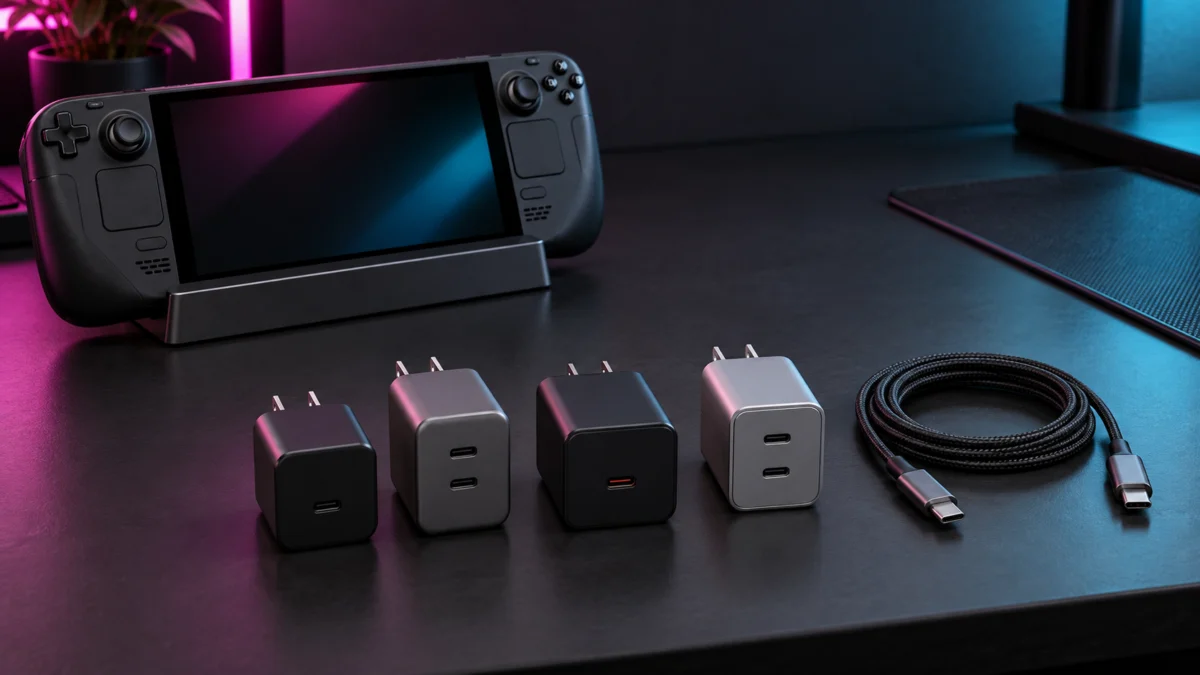
A Steam Deck LCD and a Steam Deck OLED are both specified for a 45W USB-C PD 3.0 power supply, and Valve supplies one in the box with each model. A 65W rating alone does not mean faster charging for the Deck, and connecting a 65W charger does not mean the Deck receives 65W. What a 65W charger can buy you is input headroom: enough to cover the dock and the peripherals attached to it, and enough per-port output that the port feeding your dock keeps its allocation when a second device is plugged in. Whether you actually get that headroom depends on four things in sequence, which we walk through below: how the charger splits power across its ports, what input the dock accepts, how much the dock and its USB devices consume, and what the Deck negotiates over USB-C Power Delivery. Check the output of the exact port combination you plan to use, not the number printed on the box.
AD / Affiliate disclosure: This guide contains affiliate links. If you buy through one, Fixory may earn a commission at no extra cost to you. Product selection and every conclusion below are based on manufacturer documentation, not paid placement.
Quick Answer: The Best Charger for a Steam Deck Dock
Buy a 65W charger only if you need one brick to cover the dock plus a second device. Among the chargers compared here, only Anker publishes how its ports split power, which is the single most useful spec for dock use. For a Deck alone, 45W is what Valve specifies.
- How much power a dock setup needs
- The four chargers, port by port
- Power-sharing and cable traps
- Which charger should you buy?
- FAQ
The table below is the core of this guide. Read the two-port output allocation row first: it decides whether a 65W charger does anything useful for you, and it is where these four products differ most.
| Attribute | Valve 45W supply (baseline) | Anker 735 (Nano II 65W) | UGREEN Nexode 65W 3-Port | JSAUX 65W USB-C Foldable Charger | Baseus GaN5 Pro 2C+U 65W |
|---|---|---|---|---|---|
| Model | Valve-supplied 45W PD 3.0 adapter | A2667 | Nexode 65W 3-Port | CH6505 | GaN5 Pro 2C+U 65W |
| Maximum total output | 45W | 65W | 65W | 65W | 65W |
| Output from the primary USB-C port | 45W | 65W (USB-C1) | 65W (USB-C1 or USB-C2) | 65W (single USB-C) | Not published on the official product page checked |
| Two-port output allocation | Not applicable (single output) | C1 + C2 = 45W + 20W; C1 + USB-A = 40W + 22.5W; C2 + USB-A = 12W + 12W | Not published on the official product page checked | Not applicable (one USB-C port) | Not published on the official product page checked |
| USB-C / USB-A ports | Captive cable, no separate ports | 2 x USB-C, 1 x USB-A | 2 x USB-C, 1 x USB-A | 1 x USB-C | 2 x USB-C, 1 x USB-A |
| USB-C cable included | Yes (captive) | No, sold separately | No in the charger-only configuration | Yes | Not confirmed on the page we checked |
| Cable length | 1.5 m (LCD) / 2.5 m (OLED) | Not applicable | Not applicable | 2 m braided USB-C to USB-C | Not confirmed |
| Foldable US plug | Not listed in the tech specs | Not listed in the official specifications table | Not listed in the official specifications table | Yes, plus US, UK and EU adapters | Not confirmed |
| Best for | Closest match to Valve’s specification; replacement use | Dock plus a phone from one brick | Single-port-first use | Travel and replacement, cable included | Two-pack household or spare use |
| Main limitation | No headroom for a second device | No cable in the box; port choice changes the result | Multi-port split is not documented on the official product page checked | One USB-C port, so no simultaneous second device | Per-port allocation and cable contents are not documented on the official product page checked |
| Amazon US availability | Sold via Valve’s official partner, not as an Amazon listing | Confirm current listing | Confirm current listing | Confirm current listing | Confirm listing and pack configuration |
| Current price band | Check current price | Check current price | Check current price | Check current price | Check current price |
| Evidence status | Official specification | Official specification, including a published multi-port allocation table | Official product page checked; no numeric multi-port allocation table found | Official specification; single USB-C port confirmed | Official product page checked; no numeric per-port allocation table found |
One thing the table cannot show matters more than any number in it: a 65W rating is a ceiling for the charger, not a promise about the handheld. Steam Deck negotiates its own profile over USB-C PD, with a dock in between. More watts at the wall does not automatically mean faster charging at the Deck.
45W vs 65W vs 100W: How Much Power Does a Steam Deck Dock Need?
Valve specifies a 45W PD 3.0 supply for both Deck models, so 45W covers the Deck by itself. Extra wattage matters only when it survives the path from charger port to dock input to peripherals. UGREEN recommends 65W for its own Steam Deck dock, SKU 75126, not for docks generally.
Valve’s tech-specs pages list the power input for both models as a PD 3.0 Type-C power supply at 45W. The LCD model ships with a 1.5 m cable and the OLED model with a 2.5 m cable. If you want the closest possible match to that specification for a replacement or spare, the genuine Valve 45W adapter is sold through Valve’s official repair partner rather than as a general retail item.
When you add a dock, the useful way to think about wattage is as a path rather than a single figure. Work through it in this order before you buy:
- The charger’s total output. The headline number, and the least informative one on its own.
- The simultaneous output allocation of the ports you will actually use. A 65W charger can drop the port your dock is on to a fraction of that once a second device is connected.
- The input the dock accepts. Docks have their own PD input rating, and it is a ceiling, not a guarantee.
- What the dock itself and its attached USB peripherals consume. Ethernet, storage, keyboards and controllers all draw from the same budget.
- What the Steam Deck actually negotiates and receives. This is the only figure that affects your battery, and it is downstream of all four steps above.
That path is why 65W is a reasonable target rather than a magic number: it adds room at steps 2 and 4 but does not guarantee a higher figure at step 5.
UGREEN’s guidance for its own Steam Deck dock is a useful illustration of how manufacturers actually phrase this. On the product page for its 6-in-1 Steam Deck dock, SKU 75126, UGREEN lists a 45W PD charger as the minimum for Steam Deck LCD and OLED and recommends a 65W PD charger for stability and faster charging when accessories are attached. The same notes table calls for a 100W PD charger for ROG Ally, ROG Xbox Ally and MSI Claw, and again for Legion Go and Legion Go S. Read that as guidance for that specific dock. It is not a Valve requirement, and it does not carry over to Valve’s official dock or to other third-party docks.
Valve’s own dock tech-specs page describes the power section as a USB-C Power Delivery passthrough input and notes that a PSU is included, but it does not publish an input wattage figure on the page we checked. We are not going to fill that gap with a guess. If you are still choosing the dock itself, compare HDMI 2.1 models and their published power-input limits first, since the dock sets the ceiling everything else works under.
As for 100W: on a Deck specified for a 45W supply, it is headroom you are unlikely to convert into anything. It becomes relevant when the same charger must also serve a ROG Ally or a Legion Go, which is exactly the distinction UGREEN draws.
Best 65W Chargers for Steam Deck Docks
We sorted these four chargers by three things that matter for dock use: whether the manufacturer publishes a per-port allocation table, whether a USB-C cable is included, and how many USB-C ports there are. Confirm the current listing and price before buying, since configurations change.
Anker 735 (A2667) — Best for a Deck and a Phone on One Charger
Of the four chargers in this guide, the A2667 is the only one whose manufacturer publishes what happens when more than one port is in use, and that transparency is the reason to pick it for dock use. Anker lists 65W total across two USB-C ports and one USB-A port. On a single port, USB-C1 and USB-C2 each deliver up to 65W and USB-A up to 22.5W. With two in use, USB-C1 plus USB-C2 allocates up to 45W to C1 and 20W to C2. So with the dock on C1 and a phone on C2, up to 45W is allocated to the port your dock is plugged into. How much reaches the Deck depends on what the dock and its peripherals consume, so treat 45W as the budget entering the dock, not a figure arriving at the handheld.
The combinations you want to avoid are published too, and they are dramatic. USB-C1 plus USB-A gives 40W and 22.5W. USB-C2 plus USB-A gives 12W and 12W. With all three ports occupied, C1 drops to 40W, C2 to 12W and USB-A to 12W. Anker’s official compatibility list names Steam Deck. Cables are sold separately, so budget for one. The unit measures roughly 1.5 by 1.15 by 2.6 inches.

Please check the Amazon product page for the latest price and availability.
Buy if: you want one brick for the dock and a phone, and you are willing to always use the C1 port for the dock.
Don’t buy if: you want a cable in the box, or you know you will plug things in without checking which port you are using.
UGREEN Nexode 65W 3-Port — Best for Single-Port-First Use
UGREEN’s Nexode 65W 3-Port is a strong single-port charger with two spare ports for occasions when the Deck is not docked. Its published specification gives USB-C1 and USB-C2 a 65W maximum each, across a full PD profile range from 5V/3A up to 20V/3.25A, with USB-A rated at 22.5W maximum. Protocol support is broad: PD 3.0 and 2.0, Quick Charge 4.0+ down to 2.0, AFC, SCP and PPS. It is compact at roughly 2.59 by 1.57 by 1.22 inches and 4.58 ounces.
The gap is the one that matters for docked use. The official product page we checked describes the multi-port behaviour as intelligent distribution rather than providing a numeric allocation table, so it does not document what the dock’s port retains once a second device is connected. UGREEN’s own note asks owners to unplug cables that are not in use, because other ports’ maximum output may otherwise be restricted. Treat the spare ports as convenience rather than a guaranteed simultaneous budget.

Please check the Amazon product page for the latest price and availability.
Buy if: the Deck or dock will normally be the only thing plugged in, and you want a compact charger with spare ports for travel.
Don’t buy if: your plan is to charge the dock and a phone at the same time and you want a documented number for what each port gets.
JSAUX CH6505 — Best Steam Deck-Focused Travel Pick
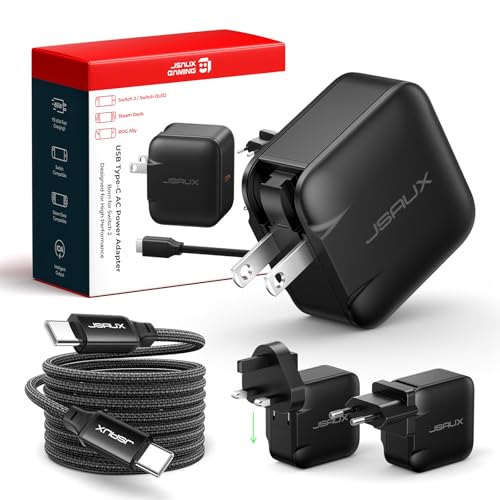
JSAUX sells this one explicitly for handhelds, and its official compatibility list names Steam Deck and Steam Deck OLED. The specifications give a single USB-C port rated 5V/3A through 20V/3.25A for a 65W maximum, on PD 3.0. A 6.6 ft (2 m) braided USB-C to USB-C cable is in the box — the practical advantage over the Anker and UGREEN options, at a length that suits a desk-mounted dock. The plug folds and US, UK and EU adapters are included. Weight is around 175 g.
The trade-off is structural rather than a flaw. One USB-C port means one device. It cannot serve the dock and a phone simultaneously, so it belongs in the replacement-and-travel category, not the power-sharing one. JSAUX has revised this product line, so identify the model carefully before ordering.
Please check the Amazon product page for the latest price and availability.
Buy if: you want a straight replacement or travel charger with a cable included and only ever charge one device from it.
Don’t buy if: you need a second port, now or later.
Baseus GaN5 Pro 2C+U 65W — Two-Pack Option
Baseus lists the GaN5 Pro 2C+U 65W with two USB-C ports and one USB-A port on PD 3.0, in a two-pack configuration on its US store. The appeal is straightforward: two identical chargers, one for the desk and one for a bag, in the same multi-port format as the other picks here.
What we could not establish is the part this guide cares about most. The Baseus product page we checked does not provide a numeric per-port allocation table. Its FAQ offers approximate figures and paraphrased customer comments, which is not a documented output split, so we have not carried those numbers into this article. Cable contents are not confirmed on the page we checked either. Buy it as a spare-and-secondary pair, not as the charger you rely on to keep a dock fed while something else is plugged in.

Please check the Amazon product page for the latest price and availability.
Buy if: you want two chargers at once and a second port is a convenience rather than a requirement.
Don’t buy if: you need a documented figure for what the dock’s port keeps when another device is connected.
Power-Sharing and Cable Traps That Cause Slow Charging
Total output and per-port output are different numbers. Anker publishes a combination on the A2667 where two ports deliver only 12W each. UGREEN tells owners to unplug unused cables. And a dock’s input rating is not what reaches the handheld: UGREEN rates its dock at 100W in, up to 85W out.
Those three facts cover most of what goes wrong. Taken one at a time:
- Port choice can matter more than charger choice. On the A2667, the same charger delivers 45W to USB-C1 alongside a second USB-C device, or 12W to USB-C2 alongside a USB-A device — a documented change from 45W to 12W within one product, decided by which sockets you use.
- Unused cables can count. UGREEN asks Nexode 65W 3-Port owners to unplug cables that are not in use, because other ports’ maximum output may otherwise be restricted. A cable left in a spare port is not necessarily neutral.
- A dock’s input rating is a ceiling for the dock, not a figure for the handheld. UGREEN states its Steam Deck dock takes 100W PD 3.0 in and powers the host at up to 85W while also running the dock. That difference shows why the dock’s input rating is not the same as the power available to the host.
- Peripherals draw from the same budget. Gigabit Ethernet, bus-powered storage, keyboards and charging controllers all consume power that arrives through the same input.
If your Deck shows a slow-charging indicator while docked, any of the above can contribute, and so can factors outside them. We are not going to tell you which one it is. Change one variable at a time: use the charger’s highest-rated port, remove other devices from the charger, remove peripherals from the dock, and swap in a cable whose rating you know. Whether a combination is supported at all is something only your charger’s and dock’s own specifications can answer, so check those before buying.
Which Charger Should You Buy?
If you want the closest match to what Valve specifies, buy a 45W supply. If you want one brick for the Deck and a phone, use a charger that publishes its two-port split and plug the dock into the higher-output port. If there is no wall outlet, you need a power bank instead.
- You want fidelity to the official specification, or a straight replacement. The genuine Valve 45W adapter is the baseline. Nothing here argues you need more than 45W for a Deck on its own.
- You want the Deck and a phone on one charger. The Anker A2667, with the dock on USB-C1 — the option here where you can look up in advance what the dock’s port is allocated.
- You travel, or you want a cable in the box. The JSAUX CH6505, with the caveat that one USB-C port means one device.
- You want a compact charger and the Deck is normally the only thing plugged in. The UGREEN Nexode 65W 3-Port, treating the extra ports as convenience rather than as a simultaneous budget.
- You want two chargers at once. The Baseus GaN5 Pro two-pack, as a spare-and-secondary pair.
One case falls outside this guide. If there is no wall outlet where you play, a wall charger is the wrong category and a higher-wattage one will not help. You want a PD power bank rated for handheld use — a different product with different selection criteria.
FAQ
Can I safely use a 65W charger with a Steam Deck Dock?
USB-C Power Delivery is a negotiated standard: a compliant charger and device agree on a profile rather than the charger forcing its maximum onto the device. Anker’s compatibility list names Steam Deck for the 65W A2667, and JSAUX names Steam Deck and Steam Deck OLED for the CH6505. Check your own charger’s and dock’s documentation rather than assuming compatibility from the wattage.
Will a 65W charger charge a Steam Deck faster than 45W?
Not by virtue of being 65W. Valve specifies a 45W PD 3.0 supply for both models, and a higher-rated charger does not mean the Deck receives more. A 65W charger helps upstream: headroom for the dock’s own consumption and peripherals, and — on chargers that publish a two-port split — a usable allocation on the dock’s port while a second device charges.
Does the official Steam Deck Dock require the official charger?
Valve’s dock tech-specs page states that a PSU is included, so a separately purchased charger is not a requirement out of the box. The same page describes the power section as a USB-C Power Delivery passthrough input without publishing an input wattage figure, so it does not tell you the ceiling for a third-party charger. To replace or supplement the supplied unit, start from the 45W Valve specifies.
Can one charger power a Steam Deck Dock and a phone?
Yes, if the charger has at least two ports and you know how it splits power between them. The Anker A2667 publishes that split: USB-C1 plus USB-C2 allocates up to 45W to C1 and 20W to C2, so put the dock on C1. Where no split is published the outcome is undocumented, and a single-port charger such as the JSAUX CH6505 cannot do this at all.
How We Researched
This article is based on manufacturer documentation and official specification pages, which we read directly rather than through search summaries. The sources were Valve’s Steam Deck tech-specs pages for the LCD, OLED and docking station; Anker’s product page for the A2667; UGREEN’s US product pages for the Nexode 65W 3-Port charger and the 6-in-1 Steam Deck dock, SKU 75126; JSAUX’s product page for the CH6505; and Baseus’s US product page for the GaN5 Pro 2C+U 65W.
We have not conducted hands-on lab testing, and no figure here comes from measurement by Fixory. Every wattage, port allocation and compatibility claim is attributed to the manufacturer that publishes it. Where no figure appeared on the official pages we checked, we say so rather than estimate one, which is why several cells in the comparison table read as not published.
We also looked for recurring owner reports and independent measurement video, and included neither. We could not open and verify the community threads and video sources we identified, and our standard is that a pattern must be confirmed across multiple original sources before it appears here. So we left that section out and built the guidance above from published specifications alone.
Availability, pricing and pack configurations change frequently. Check the current listing before ordering, and confirm the manufacturer’s stated compatibility for your specific charger, dock and handheld combination before you rely on it. Nothing here guarantees a particular charging speed or uninterrupted operation in your setup.
Final Recommendation
For a Steam Deck on its own, 45W is what Valve specifies and there is no case in this guide for spending more. For a docked Deck, a 65W charger is worth buying when it gives you input headroom for the dock and its peripherals, or when it maintains a usable allocation on the dock’s port while a second device is connected. Neither of those is guaranteed by the number on the box.
That is why the Anker 735 (A2667) is the pick for dock use among the chargers here: not because 65W is inherently better, but because Anker publishes the two-port and three-port allocation, so you can check before buying that your dock’s port is allocated up to 45W rather than 12W. Put the dock on USB-C1. If you only ever charge one device, the JSAUX CH6505 adds a cable and a folding travel plug, and the UGREEN Nexode 65W 3-Port is the compact choice when the extra ports are convenience rather than a plan.