
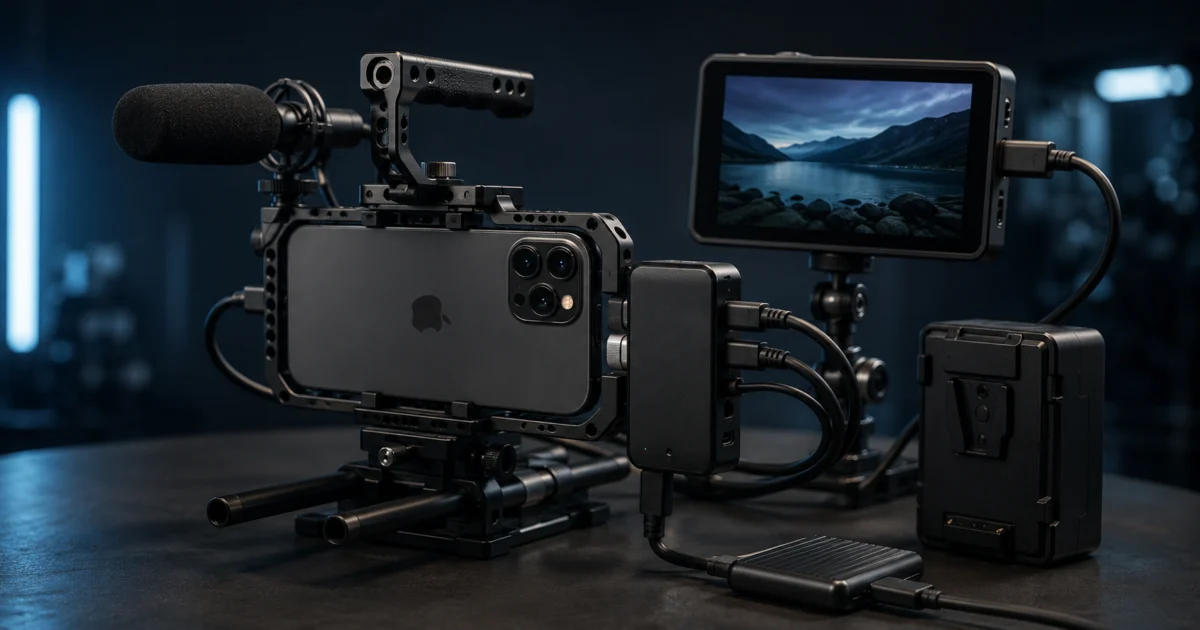
The Blackmagic Camera ProDock is a professional production dock, not a general-purpose iPhone accessory. It turns iPhone 17 Pro into a synchronized, monitor-ready camera node in a multi-camera or virtual production setup by adding genlock, timecode, HDMI output, external SSD recording, and dedicated audio I/O. Its main strengths are removing the connectivity bottlenecks that keep iPhones off professional sets and enabling frame-accurate synchronization that no adapter or app alone can deliver. The biggest trade-offs are the app lock-in — everything requires the Blackmagic Camera app — and a form factor that offsets some of iPhone’s portability advantage. This guide covers what the ProDock actually adds, who genuinely needs it, what to pair it with, and who should skip it entirely.
✅ Pros
- Adds genlock (BNC) and timecode inputs — previously unavailable on any iPhone
- Full-size HDMI output for on-set monitors; outputs at app-selected resolution and frame rate
- Three USB-C (USB 3.2) ports for external SSD recording, lens control, and accessories
- Single 12V locking power input runs ProDock, iPhone, and all connected USB-C accessories simultaneously
- Works with iPhone 15 Pro and 16 Pro too (all features except genlock)
- ATEM Mini integration: video, tally, and camera control via a single HDMI cable
- Tally light on front panel for on-set recording indication
⚠️ Cons
- Genlock requires iPhone 17 Pro or Pro Max — not available on earlier models
- All features require the Blackmagic Camera app; incompatible with native Camera, Filmic Pro, or Leica app
- Fixed L-shaped USB-C connector causes clearance problems with some iPhone cages
- Only two ¼-20 mounting points (one top, one bottom)
- Adds bulk and a required power supply to every setup
- Does not improve image quality — sensor, optics, and codec are unchanged
What Is the Blackmagic Camera ProDock for iPhone 17 Pro?
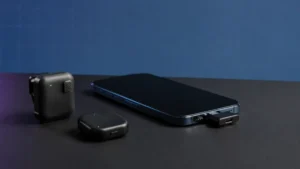
The Blackmagic Camera ProDock is a compact breakout box that connects to iPhone 17 Pro or iPhone 17 Pro Max via a fixed 11.8-inch (300mm) USB-C cable and expands the phone’s single port into a full professional I/O panel. It works exclusively with the Blackmagic Camera app on iPhone and is designed to bring the connectivity that cinema cameras take for granted — genlock, timecode, HDMI monitoring, audio I/O, and locking power — to Apple’s flagship iPhone.
Think of it as a port replicator built for a production rig rather than a desk. The iPhone’s single USB-C port means you are always choosing between charging, external storage, or a monitor output — but not all three at once. The ProDock solves that tradeoff with a package weighing 270g (9.5 oz) that measures roughly 163 × 66 × 25.4 mm. The ProDock is available in the sub-$300 range from Blackmagic Design resellers and the Apple Store, and comes with a 12V 60W power supply, a ¼-inch mounting adapter, and seven international plug adapters.
Blackmagic Design announced the ProDock alongside the iPhone 17 lineup at IBC 2025, and Apple’s own senior vice president of worldwide marketing highlighted it by name during the iPhone 17 keynote, noting that genlock on iPhone is supported specifically via the Blackmagic Camera ProDock.
Check on Amazon
/
Apple Store
/
Official site
What Connections and Ports Does the ProDock Add?
The ProDock converts iPhone’s single USB-C connection into seven distinct professional I/O pathways. Each port serves a specific production role — none of them duplicate what the iPhone already provides, and none require a separate adapter to function.
| Port / Connection | What It Does in Practice |
|---|---|
| HDMI output (full-size) | Connects to on-set monitors or EVFs; outputs at the resolution and frame rate selected in the Blackmagic Camera app — not locked to 60 fps. Blackmagic Camera app status overlays (mic levels, storage, battery) can display on the external monitor. |
| 3× USB-C (USB 3.2 high speed) | High-speed external SSD recording, lens control accessories, Blackmagic zoom and focus demand units (daisy-chainable), or an Ethernet adapter for cloud offload and low-latency live streaming. |
| BNC genlock input | Accepts Tri-Sync or Black Burst signal to synchronize all frames with other cameras, live switchers, or an LED volume. Genlock requires iPhone 17 Pro or iPhone 17 Pro Max — this is a hardware limitation, not a software restriction. |
| BNC timecode input | Receives LTC timecode for frame-accurate sync across multiple iPhone cameras in post-production. The 3.5mm audio input also accepts timecode, giving two input paths for timecode signals. |
| 3.5mm audio input | Standard analog microphone input for handheld, lapel, or shotgun mics, as well as wireless receiver outputs. No adapter required. |
| 3.5mm audio output | Headphone monitoring output for confidence listening during recording. |
| 12V DC locking power input | Runs the ProDock, iPhone, and all connected USB-C accessories from a single source. A 12V 60W power supply is included. D-Tap adapters are compatible for use with V-mount batteries on mobile setups. |
Two ¼-20 pin-lock mounting points — one on the top surface and one on the bottom — allow the ProDock to attach to a cage, tripod plate, or articulating arm. A tally light on the front face illuminates when recording is active in the Blackmagic Camera app. When connected to an ATEM Mini switcher, a single HDMI cable handles video signal, tally, and full camera control without additional configuration.
The optional Blackmagic zoom and focus demand units, sold separately, connect to the ProDock’s USB-C ports and can be daisy-chained, giving operators broadcast-style lens control from tripod handles.
Who Actually Needs This Dock?
The ProDock is a production tool for crews, not a consumer upgrade for solo creators. The clearest use cases involve multi-camera synchronization, broadcast-standard connectivity, and external storage workflows at the ProRes RAW level. If you shoot alone, charge-while-you-film, and post straight to social media, the ProDock adds complexity without adding value to your workflow.
Use cases where the ProDock makes practical sense
- Multi-camera live switching: Genlock keeps every iPhone camera frame-aligned with other cameras and with a live switcher. Without genlock, cutting between non-locked cameras can result in a brief dropped or held frame in the program output — an issue that is especially visible in broadcast and streaming contexts. The ProDock’s BNC genlock input brings a broadcast-standard solution to a device that previously had no sync signal input at all.
- Virtual production and LED wall shoots: LED panels refresh at set frequencies. A non-genlocked camera captures that refresh cycle as visible flicker or tearing in the recorded image. Genlock eliminates the artifact entirely. According to Blackmagic Design, this is one of the core use cases the ProDock was designed to address.
- Multi-camera documentary and interview: Timecode input allows each iPhone to record independently and then sync automatically in DaVinci Resolve using recorded timecode — no audio-waveform matching required. A B&H reviewer confirmed this workflow functions correctly with a Tascam FR-AV2 audio recorder.
- Mobile journalism and event coverage: A single V-mount battery connected via D-Tap can power the ProDock, iPhone, and HDMI monitor simultaneously. Footage can be offloaded to Blackmagic Cloud over an Ethernet adapter connected to one of the USB-C ports immediately after a shoot wraps. Blackmagic Design’s own sales team has cited mobile journalism as a primary growth area for this type of setup.
- ProRes RAW to external SSD: The iPhone 17 Pro’s A19 Pro chip enables ProRes RAW recording, which generates large files that can saturate internal storage quickly at high frame rates. Recording directly to an external SSD via the ProDock’s USB 3.2-capable ports removes that storage constraint.
Use cases where the ProDock is likely overkill
- Solo vloggers and single-camera YouTube creators: A single iPhone on a tripod with wireless audio does not need frame-accurate genlock, a timecode generator, or an HDMI field monitor. The ProDock addresses production-crew problems, not individual creator problems.
- Users of other camera apps: The ProDock works only with the Blackmagic Camera app on iPhone. If you rely on the native Camera app, Filmic Pro, the Leica app, or any other third-party camera application, none of the ProDock’s features are accessible. This is not a workaround — it is a design constraint confirmed by official specifications.
- Shooters where agility is the priority: Adding the ProDock means adding the dock body, a cable, and a power supply (or battery solution) to every setup. The iPhone’s single-device portability advantage is partially traded away in exchange for professional connectivity.
How Does the Blackmagic Camera ProDock Compare to Using iPhone 17 Pro Alone?
The question is not whether the ProDock is a capable accessory, but whether you need what it adds. The following table maps the three scenarios — iPhone alone, iPhone with the Blackmagic Camera app, and iPhone with ProDock plus app — against the capabilities that matter most to production shooters.
| Capability | iPhone 17 Pro alone | + Blackmagic Camera app only | + ProDock + Blackmagic Camera app |
|---|---|---|---|
| ProRes / ProRes RAW recording | ProRes (internal storage) | ProRes + ProRes RAW, Blackmagic Cloud | ProRes + ProRes RAW to external SSD + Blackmagic Cloud |
| External monitor output | Requires USB-C adapter; uses only USB-C port | Same limitation | Full-size HDMI output; USB-C ports remain free |
| External microphone | USB-C adapter required; occupies only port | Same limitation | Dedicated 3.5mm audio input; no adapter needed |
| Continuous power while recording | USB-C charging only (occupies only port) | Same limitation | 12V locking power; runs ProDock, iPhone, and all USB-C accessories |
| Genlock (frame sync) | Not available | Not available | BNC Tri-Sync / Black Burst (iPhone 17 Pro / Pro Max only) |
| Timecode input | Not available | Not available | BNC timecode + 3.5mm timecode input |
| ATEM Mini integration | Not available | Not available | Video + tally + camera control over a single HDMI cable |
| Remote camera control | Not available | Not available | Second Blackmagic Camera app instance on iPad for remote monitoring and control |
| Production rigging | Standard tripod thread only | Same | ¼-20 pin-lock mounting points on top and bottom |
Best Accessories to Pair With the Camera ProDock
Five accessory categories address the most common capability gaps filmmakers encounter when building a ProDock rig. The ProDock provides the I/O; these peripherals make those connections useful.
1. External SSD (USB-C)
An external SSD is the most immediate companion for the ProDock. ProRes RAW files from the iPhone 17 Pro are large, and internal storage can fill quickly at higher frame rates. Look for a bus-powered USB-C SSD that is confirmed compatible with the Blackmagic Camera app’s high-speed recording requirements. A B&H reviewer confirmed 4K ProRes RAW recording to a Crucial SSD works as expected.
Check Samsung T9 on Amazon
/
Check Crucial X9 Pro on Amazon
2. Compact shotgun or wireless microphone receiver
The ProDock’s dedicated 3.5mm audio input accepts any standard analog microphone or wireless receiver output without an adapter. A compact on-camera shotgun is the most practical choice for most single-operator rigs. For wireless audio, a 9to5Mac hands-on evaluation confirmed that a Rode Wireless Pro receiver connects directly via the 3.5mm input and delivers significantly better audio quality than the iPhone’s internal microphone.
Check Rode VideoMicro II on Amazon
/
9to5Mac hands-on
3. HDMI field monitor (5- to 7-inch)
A compact field monitor connected via HDMI gives directors, focus pullers, and clients a proper reference feed for framing and exposure checks. The Blackmagic Camera app’s status overlay — including microphone levels, recording time remaining, storage, and battery — can display on the external monitor, so the iPhone screen does not need to be visible to the operator.

Please check the Amazon product page for the latest price and availability.
4. V-mount battery with D-Tap output
The ProDock’s 12V DC locking input is compatible with D-Tap battery adapters, making V-mount batteries a practical power source for location shoots. A single V-mount battery can run the ProDock, iPhone, and an HDMI monitor simultaneously, removing the need to manage separate charging cables or battery packs for each device. According to B&H’s product Q&A, the Core SWX SNAP MIGHTY-i (45Wh, D-Tap to barrel cable) is a confirmed compatible option.
Check SmallRig VB50 on Amazon
/
B&H Q&A
5. iPhone camera cage (check connector clearance first)
A cage adds mounting flexibility and protects the iPhone body. However, the ProDock’s fixed USB-C cable uses an L-shaped connector with wide plastic housing that is incompatible with some iPhone cages — at least one SmallRig model has been confirmed as problematic by B&H reviewers, because the cage’s USB-C cutout is too narrow for the thick housing. Before purchasing a cage, verify that it provides sufficient clearance around the iPhone’s USB-C port. If clearance is an issue, an 80Gbps USB-C extension cable is an effective workaround.
What Real Users Are Saying
Based on buyer reviews and Q&A published on B&H Photo and a hands-on evaluation by 9to5Mac published in March 2026, several consistent patterns have emerged from filmmakers who have used the ProDock in production.
What works as expected
- Timecode sync with professional audio recorders works reliably. One B&H reviewer confirmed frame-accurate sync using a Tascam FR-AV2 alongside a Ninja TX on a Canon C500, and recorded 4K ProRes RAW to a Crucial SSD in the same rig (B&H Photo buyer reviews).
- A 9to5Mac hands-on confirmed that all non-genlock features — external SSD recording, HDMI monitor output, 3.5mm wireless mic input, and Ethernet via USB-C — function on iPhone 16 Pro Max. Genlock exclusivity to iPhone 17 Pro and Pro Max is a hardware limitation, not a software one (9to5Mac, March 2026).
- Remote camera monitoring and control via a second Blackmagic Camera app instance on an iPad is operational over the same network, enabling a traditional video village workflow with a smartphone at the center.
- The tally light is noted as a practical addition — it gives a clear recording indicator to anyone on set without requiring them to look at the iPhone screen.
Consistent user concerns
- USB-C connector housing: The cable connecting the ProDock to iPhone uses an L-shaped USB-C plug with a wide plastic housing. Multiple B&H reviewers reported that this connector is physically incompatible with certain iPhone cages, including at least one SmallRig model, because the cage’s USB-C cutout is too narrow for the thick housing. An 80Gbps USB-C extension cable resolves the issue but adds cost and one more connection point to the rig.
- App lock-in: Every ProDock feature requires the Blackmagic Camera app. Buyers who expected compatibility with the native iPhone Camera app or other third-party apps found the restriction to be a firm design limitation, not a solvable workaround.
- Mounting point count: Multiple B&H reviewers flagged that two ¼-20 mounting points — one on top, one on bottom — is limiting for complex rigs. Several noted they would prefer an Arca-style plate integration or additional side mounting points.
B&H buyer reviews and Q&A
/
9to5Mac hands-on evaluation
How We Researched
This article is based on Blackmagic Design’s official product page and technical specifications, the Apple Store product listing, and reporting from No Film School, CineD, Videomaker, AppleInsider, and Redsharknews — all published at or shortly after the ProDock’s announcement at IBC 2025 in September 2025. Community feedback is drawn from buyer reviews and Q&A published on B&H Photo’s product page, and a hands-on evaluation published by 9to5Mac in March 2026. We have not conducted hands-on lab testing. Compatibility details and performance descriptions reflect manufacturer specifications and community-reported results.
✅ Pros
- Adds genlock and timecode — previously unavailable on any iPhone
- Full-size HDMI output; outputs match app-selected resolution and frame rate
- Three USB-C (USB 3.2) ports for SSD recording, lens control, and accessories
- 12V locking power runs ProDock, iPhone, and USB-C accessories from a single source
- Most features work on iPhone 15 Pro and 16 Pro (genlock excepted)
- ATEM Mini integration over a single HDMI cable
- Tally light for on-set recording indication
⚠️ Cons
- Genlock requires iPhone 17 Pro or Pro Max only
- All features require Blackmagic Camera app — no third-party app compatibility
- L-shaped USB-C connector conflicts with some iPhone cages
- Only two ¼-20 mounting points
- Adds bulk and a power supply to every setup
- Does not affect image quality — sensor and optics are unchanged
Should You Buy the Blackmagic Camera ProDock?
The Blackmagic Camera ProDock is worth the price if your work regularly requires any combination of frame-accurate camera synchronization, on-set HDMI monitoring, external SSD recording at ProRes RAW data rates, or professional audio I/O — and you are already using the Blackmagic Camera app, or are willing to commit to it. For crews integrating iPhone 17 Pro into a multi-camera or virtual production rig, there is no direct competitor at this price point that provides all of these connections in a single device.
If your motivation is better video quality, the ProDock will not deliver that. The iPhone 17 Pro’s optics, sensor, and codec are entirely unaffected by whether the ProDock is attached. The dock improves workflow integration, not captured image quality.
✅ Buy if…
- You run multi-camera productions and need genlock or timecode to sync iPhone 17 Pro with other cameras or a live switcher
- You shoot on LED volumes or virtual production stages where flicker-free synchronization is required
- You record ProRes RAW and need to bypass internal storage limits with an external SSD
- You use the Blackmagic Camera app and want an HDMI monitor, dedicated audio input, and continuous power without adapters
- You are integrating iPhone into an ATEM Mini or similar broadcast switcher workflow
❌ Don’t buy if…
- You shoot solo and do not need frame-accurate sync with other cameras or switchers
- You rely on camera apps other than Blackmagic Camera (native iPhone Camera, Filmic Pro, Leica app, etc.)
- Your primary goal is better video quality — the ProDock does not affect image capture
- You prioritize minimal-rig, run-and-gun portability above professional connectivity
- You are on iPhone 16 Pro or earlier and specifically need genlock — that feature requires iPhone 17 Pro or Pro Max hardware

Comments