Which Charger Works With Oura Ring 5?
The Oura Ring 5 needs a charger sold specifically for the Ring 5, in the same size number as your ring. Chargers for the Oura Ring 4, Gen3, and Gen2 are not compatible, even when the size number matches. You can choose the wired Charging Dock or portable Charging Case, but either option must be Ring 5-specific and size-matched.
Oura lists the Oura Ring 5 Charging Dock and Oura Ring 5 Charging Case as compatible only with Ring 5 models. A shared size number across generations does not make the chargers interchangeable.
Before buying, confirm two things: your ring generation (Ring 5) and your exact ring size. Then decide whether you want the everyday Charging Dock or the travel-focused Charging Case. Use the quick table below to see what is compatible and what to check.
| Your ring | Correct charger generation | Size must match? | Dock available? | Case available? | Older charger reusable? | Important note |
|---|---|---|---|---|---|---|
| Oura Ring 5 | Ring 5 | Yes (exact) | Yes | Yes | No | Ring 4, Gen3, and Gen2 chargers are not compatible with Ring 5. |
| Oura Ring 4 | Ring 4 | Yes (exact) | Yes | Yes | No | The Ring 5 Dock and Case are exclusive to Ring 5. |
| Oura Ring Gen3 | Gen3 | Yes (exact) | Yes | N/A | Yes, with a Gen2 dock of the same size | The Gen3 dock supports both Gen3 and Gen2 models. |
| Oura Ring Gen2 | Gen2 | Yes (exact) | Yes | N/A | Yes, with a Gen3 dock of the same size | The Gen3 dock supports both Gen3 and Gen2 models. |
To check your ring generation and size, open the Oura App and go to the My Devices page, or look for the size number engraved on the inside of the ring. Once you know both, jump to the section that matches your situation: compatibility basics below, the Dock vs. Case comparison, how to avoid the wrong purchase, or what to do when a correct charger still will not charge.
Why Ring Generation and Charger Size Both Have to Match
Oura chargers are both generation-specific and size-specific. A charger with the right size number but the wrong generation is not compatible, and a Ring 5 charger in a neighboring size may not hold the ring correctly. Confirm “Oura Ring 5” and the exact size before ordering.
Ring 5 Sizing Is Different From Ring 4
The Oura Ring 5 comes in sizes 6 through 13, a narrower range than the Ring 4’s sizes 4 through 15. Oura says sizing differs slightly between generations, so Ring 4 owners moving to Ring 5 should use the Ring 5 sizing kit rather than reusing an earlier result.
Because of this, do not treat a shared size number as proof of compatibility. A charger listing that only says “Size 10” without naming the generation does not tell you whether it fits your Ring 5. The safest approach is to confirm the size number Oura assigned to your Ring 5 specifically, then match the charger to that.
How to Find Your Oura Ring 5 Size
You can confirm your ring size in the Oura App on the My Devices page, and the size number is also engraved on the inside of the ring. If you have not selected a size yet, use Oura’s current sizing guidance and a Ring 5 sizing kit. If a used charger listing does not clearly state both generation and size, avoid guessing.
If the Ring Gets Stuck on the Charger
Do not pull the ring straight off with force or use a sharp tool. Oura’s charger guidance recommends gently sliding a flat, non-sharp object, such as a credit card, between the ring and charger from the side. Check the ring’s alignment before charging again.
Oura Ring 5 Charging Dock vs. Charging Case
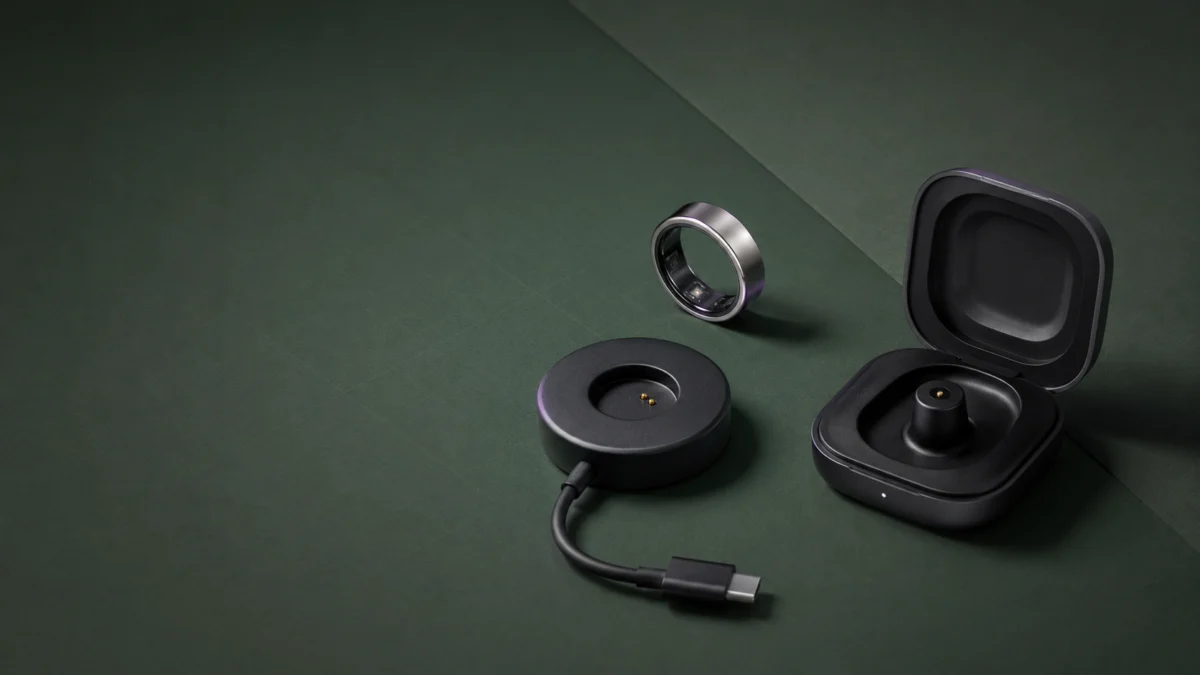
The Charging Dock is a wired everyday charger that connects to USB-C power and includes a cable. The Charging Case is a portable charger with an internal battery that holds up to five full ring charges, connects to the Oura App over Bluetooth, and does not include a cable. The Dock suits home use; the Case suits travel.
These are not two versions of the same product. The Dock needs external power whenever you use it. The Case stores power, pairs with the Oura App, and receives firmware updates through the app. That difference affects both setup and daily use.
| Feature | Charging Dock | Charging Case |
|---|---|---|
| Best for | Everyday home charging | Travel and on-the-go power |
| Power source | Wired USB-C (external power required) | Internal battery; recharges through USB-C or Qi |
| Internal battery | None | Yes (up to five full ring charges) |
| USB-C cable included | Yes | No |
| Bluetooth / App | No pairing required | Pairing required |
| Firmware updates | No separate accessory firmware setup | Yes, through the Oura App |
| Qi wireless charging | No | Yes, for recharging the Case |
| Size requirement | Size-specific (6–13) | Size-specific (6–13) |
The most common surprise is the cable. The standard Charging Dock comes with a USB-C to USB-C cable, but the Charging Case does not include one. Oura says you can use the cable that came with your ring or another compatible USB-C cable that meets the stated safety and 5V DC power requirements.
The Case also needs setup that the Dock does not. Before setting up a Ring 5 Charging Case, Oura says to update the Oura App to version 7.16.0 or later, turn on Bluetooth, pair the Case, and install any available firmware updates.
Which One Should You Buy?
Choose based on where and how you charge. The table below maps common situations to the better option.
| Use case | Better option | Why | Setup / limitation |
|---|---|---|---|
| Primary charger at home | Charging Dock | Simple wired charging, cable included | Needs a nearby outlet or USB port |
| Spare charger at work | Charging Dock | Simple setup with no app pairing | Wired only |
| Weekend travel | Charging Case | Charges the ring without an outlet | Requires app pairing and a charged Case |
| Long trips without reliable outlets | Charging Case | Stores up to five full ring charges | No USB-C cable included |
| Replacement for a lost charger | Match the intended setup | Choose wired simplicity or portable stored power | Confirm Ring 5 and the exact size |
| You do not want another Bluetooth accessory | Charging Dock | No pairing or Case firmware to manage | Not portable without an outlet or power source |
Check the Charging Dock on Amazon (select your size)
·
Check the Charging Case on Amazon (select your size)
Does Oura Ring 5 Support Wireless (Qi / MagSafe) Charging?
Oura documents Qi wireless charging for the Ring 5 Charging Case, not as a direct charging method for the ring itself. The ring charges while seated on its Ring 5 Dock or inside its size-matched Case. The Case supports Qi v1.3, including Apple MagSafe, and can also recharge through USB-C.
This distinction matters when choosing an accessory. If you want wireless convenience, place the Charging Case on a compatible Qi pad, then use the Case to charge the ring through its internal charging tower. Do not treat the ring itself as a Qi device.
What About Apple’s MagSafe?
Oura lists the Ring 5 Charging Case as Qi v1.3 certified, including Apple MagSafe. If charging does not start, follow Oura’s wireless-charging troubleshooting: confirm the pad works, adjust the Case’s position to improve coil alignment, or switch to USB-C.
How to Avoid Buying the Wrong Oura Ring 5 Charger
Confirm four details on the product page: “Oura Ring 5,” the exact size number, whether it is a Dock or Case, and whether the seller is authorized. An older-generation charger, a mismatched size, or an unverified third-party “compatible” product may not provide the fit or charging setup the Ring 5 requires.
What to Watch For on the Product Page
Read the exact variation you are selecting, not just the listing’s family title. Oura Ring chargers are sold by size, so a page for the correct generation can still open on a size that does not match your ring. Inspect the package on arrival and confirm the generation, size, and product type before use.
Third-Party “Compatible” Chargers
Oura’s official Amazon listing warns that unauthorized Oura Ring chargers may permanently damage the ring battery. Because Oura does not validate every third-party listing, the safer purchase is an official Ring 5 charger from Oura or an authorized retailer in your exact size.
Pre-Purchase Checklist
Before you buy, confirm each of these:
- Ring generation: the listing clearly says Oura Ring 5
- Ring size: matches the exact size number of your ring
- Charger type: you are buying the Dock or Case you intended
- Official or third-party: prefer official chargers from authorized sellers
- Cable included: the Dock includes a USB-C cable; the Case does not
- Seller: Oura or an authorized retailer
- Return policy: check the return window and condition rules
- App requirement: the Case needs Oura App pairing and current firmware
What to Do if the Correct Charger Still Does Not Work
If you have the correct Ring 5 charger and size but charging does not start, check the basics in order: generation and size, ring seating, LED behavior, USB-C cable, and power source. For the Charging Case, also confirm its battery, Bluetooth pairing, app version, firmware, and Qi-pad position.
The fix takes 8 steps.
- Reconfirm the charger is for Ring 5 and has the same size number as your ring.
- Seat the ring correctly on the charger’s center tower so the contacts meet, and check the alignment.
- Watch the LED. On a Ring 5 Dock without the ring, a white light that appears and then fades means the Dock is working as expected.
- Try a different USB-C cable, and rotate each end of the cable 180 degrees before reinserting it.
- Try a different power source that provides standard 5V DC output, such as a compatible wall adapter, laptop, or power brick.
- If you are using a Charging Case, confirm the Case itself has battery, then check its charge level in the Oura App under My Devices.
- For a Charging Case, confirm it is paired and connected in the Oura App, and that the app and Case firmware are up to date.
- If a Case will not recharge over Qi, adjust its position on the pad to align the coils, or switch to a wired USB-C connection.
Reading the LED Colors
LED meanings and error patterns differ between the Dock and the Case. Match the color and behavior you see against Oura’s current Dock troubleshooting guide or Case troubleshooting guide. If there is still no LED activity after changing the cable and power source, contact Oura Support.
Resetting the Charging Case
Oura provides a soft reset in the Oura App, a Ring 5 Case hard reset using the side button, and a factory reset that unpairs the Case. Use Oura’s current reset instructions so the button timing and LED confirmation match the latest procedure.
Information to Give Oura Support
If you still cannot charge after these steps, contact Oura Support with the details that help identify the failing part:
- Ring generation and ring size
- Charger generation and charger size
- Whether it is a Dock or a Case
- The LED status you see
- The cable and power source you used
- Your Oura App version, plus ring and Case firmware versions
- Where you purchased the charger
- The troubleshooting steps you already tried
Frequently Asked Questions
Compatibility comes down to two checks: generation and exact size. Ring 5 requires Ring 5 charging hardware, while Qi applies to recharging the portable Case. The answers below cover the most common purchase questions about older chargers, size matching, wireless charging, and the cable included with each option.
Can I use an Oura Ring 4 charger with Oura Ring 5?
No. Oura lists Ring 4 charging hardware as compatible only with Ring 4 models and Ring 5 charging hardware as compatible only with Ring 5. A matching size number does not make the generations interchangeable.
Does the charger size have to match my Oura Ring size?
Yes. Oura chargers are size-specific. Select the charger size that matches your Ring 5 size number exactly. A neighboring size is not an approved substitute and may not seat the ring correctly.
Can Oura Ring 5 charge directly on a Qi or MagSafe charger?
Oura documents Qi v1.3, including Apple MagSafe, as a charging method for the Ring 5 Charging Case. The ring itself is charged while seated on its Ring 5 Dock or inside its size-matched Charging Case.
Does the Oura Ring 5 Charging Case include a USB-C cable?
No. The Charging Case does not include a USB-C cable. Oura says you can reuse the cable that came with your ring or use another compatible USB-C cable. The standard Charging Dock includes a USB-C to USB-C cable.
How We Researched
This guide uses Oura’s current product and support pages for generation and size compatibility, included accessories, Qi support, LED behavior, and reset procedures. Amazon candidates were checked only through direct product pages. We did not conduct hands-on testing; the Amazon product pages provide size selectors, so readers must choose the exact size that matches their Ring 5 before purchasing.
The Bottom Line
Buy a charger made for Oura Ring 5 in your exact ring size. Choose the Dock for straightforward wired charging with an included cable, or the Case for portable power, Bluetooth features, and Qi recharging. Older-generation chargers are incompatible, and Oura documents wireless charging for the Case rather than the ring itself.