
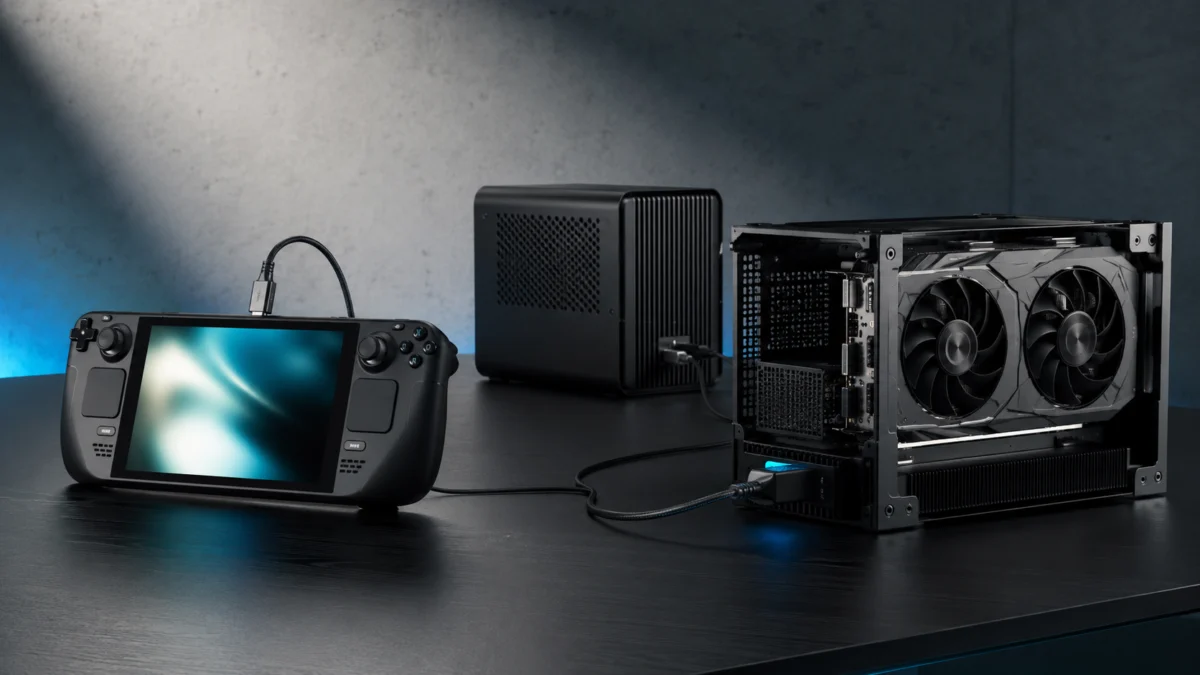
The best eGPU dock for your handheld gaming PC: For ROG Xbox Ally X (2025/2026) with Thunderbolt 5, the Razer Core X V2 is the most compatibility-tested enclosure. For OCuLink devices like GPD Win and ONEXPLAYER, the Minisforum DEG1 delivers the highest raw bandwidth per dollar. For USB4-only devices like the ROG Ally X (2024) and Legion Go, the ADT-Link UT3G is the top-value option. All eight picks with Buy/Don’t Buy breakdowns by device are covered below.
The right eGPU dock for your handheld gaming PC depends entirely on which port your device has and how you plan to use it. ROG Xbox Ally X users with Thunderbolt 5 have the widest options. GPD Win and ONEXPLAYER owners with OCuLink get the highest raw bandwidth. ROG Ally X (2024) and Legion Go users on USB4 get solid mid-range performance — with important caveats. Before buying anything, know this: eGPU performance improves significantly when you output directly to an external monitor. Routing the signal back through your handheld’s built-in screen costs 10 to 25 percent of your frame rate, according to community benchmarks. This guide breaks down every option by connection type, use case, and specific device so you can pick without guessing.
Quick Comparison: Best eGPU Docks for Handheld PCs in 2026
The best eGPU docks for handheld gaming PCs in 2026 are the Razer Core X V2 (Thunderbolt 5, empty enclosure), Minisforum DEG1 (OCuLink, budget), OneXGPU 2 (OCuLink, portable all-in-one), GPD G1 (GPD-native), ADT-Link UT3G (USB4 budget), and ASUS 2025 ROG XG Mobile (TB5 premium). Your device’s available port is the only factor that determines which tier applies.
The table below covers the eight options this guide evaluates. Price ranges are based on publicly reported pricing as of 2025–2026 and exclude separately required GPUs and power supplies where noted.
| Product | Connection | GPU | Power Delivery | Best For | Price Range |
|---|---|---|---|---|---|
| Razer Core X V2 | Thunderbolt 5 | Empty enclosure | Up to 140W | ROG Xbox Ally X, stable TB5 setups | $300–$500 (GPU + PSU extra) |
| ASUS 2025 ROG XG Mobile | Thunderbolt 5 | RTX 5090 or 5070 Ti Laptop (integrated) | Up to 140W | ROG Xbox Ally X, premium all-in-one | $1,299–$2,499 (by GPU model) |
| OneXGPU 2 | OCuLink + USB4 | RX 7800M 12GB (integrated) | Up to 65W | ONEXPLAYER, portable builds | In the $800–$900 range |
| GPD G1 | OCuLink + USB4 | RX 7600M XT (integrated) | Up to 60W | GPD Win series | $700–$800 range |
| Minisforum DEG2 | TB5 + OCuLink (switch) | Empty enclosure | Up to 140W | Mini PCs, TB5/OCuLink hybrid | Around $260 (GPU + PSU extra) |
| Minisforum DEG1 | OCuLink only | Empty enclosure | None | Budget OCuLink builds | Around $99 (GPU + PSU extra) |
| Aoostar AG03 | 2× TB5 + OCuLink | Empty open-frame (PSU included) | 100W / 140W | High-TDP desktop GPU builds | $260–$320 range (GPU extra) |
| ADT-Link UT3G | USB4 | Bare board | None | DIY USB4 builds on a budget | Under $100 (GPU + PSU extra) |
What Is an eGPU Dock — and Do You Actually Need One?
An external GPU dock connects a discrete graphics card to your handheld or mini PC through a high-bandwidth cable, adding desktop-class rendering power to a device designed for portability. On paper, this solves the biggest limitation of handheld gaming PCs: their integrated APUs hit a performance ceiling well below a full desktop GPU. In practice, how much you gain depends on your connection type, which GPU you use, and whether you use an external monitor.
eGPU docks make sense if you regularly game at a desk and want 1080p or 1440p performance without buying a dedicated gaming PC alongside your handheld. They are less useful for portable gaming or any situation where you prefer to stay on the handheld’s built-in screen.
The Internal Display Penalty: What No One Tells You Upfront
When an eGPU renders a frame and sends the video signal back through the cable to your handheld’s built-in display, the cable’s bandwidth is consumed twice — once for GPU data going out, and again for the video signal coming back. This is known as the loopback penalty. Community testing across multiple setups has consistently shown a 10 to 25 percent frame rate reduction compared to connecting a monitor directly to the dock’s own HDMI or DisplayPort output. The penalty applies to Thunderbolt 5, USB4, and OCuLink alike, though OCuLink’s higher raw bandwidth reduces its severity.
The practical rule is simple: if you buy an eGPU dock, connect an external monitor directly to the dock’s video output. Playing on your handheld’s screen while an eGPU is connected works, but you will leave significant performance on the table.
USB4 vs Thunderbolt 5 vs OCuLink: Which Connection Actually Matters?
OCuLink gives the highest raw bandwidth (64 Gbps, zero protocol overhead) for GPD Win and ONEXPLAYER users who have that port. Thunderbolt 5 offers hot-plug, single-cable 140W charging, and minimal bottlenecking even at RTX 5090 class — best for ROG Xbox Ally X. USB4 at 40 Gbps covers most setups but is a measurable bottleneck with desktop GPUs above RTX 4070 Ti.
OCuLink delivers the highest raw bandwidth — PCIe 4.0 x4 at 64 Gbps with zero protocol overhead — but requires a full system shutdown before disconnecting and provides no power delivery. Thunderbolt 5 reaches up to 120 Gbps in asymmetric mode, supports hot-plug, and charges the host through a single cable at up to 140W. USB4 handles most setups at 40 Gbps but becomes a bottleneck with high-end GPUs above the RTX 4070 Ti tier.
| Spec | OCuLink (PCIe 4.0 x4) | Thunderbolt 5 | USB4 / Thunderbolt 4 |
|---|---|---|---|
| Max bandwidth | 64 Gbps | 80–120 Gbps | 40 Gbps |
| Protocol overhead | None (PCIe native) | Low (PCIe tunneling) | Moderate |
| Hot-plug support | No (crash risk) | Yes | Yes |
| Power delivery | None | Up to 140W (PD 3.1) | Up to 100W (varies) |
| Single-cable operation | No | Yes | Yes |
| GPU bottleneck range | RTX 5090 class (minimal) | RTX 4090 class (minimal) | RTX 4070 Ti and above (noticeable) |
Choose OCuLink if your device has the port and you are using a desktop GPU at a fixed location. The absence of protocol overhead gives it the highest real-world GPU throughput per dollar. A separate USB-C charger handles power delivery. The critical rule: never unplug an OCuLink cable while the system is powered on. On standard OCuLink ports — which covers every handheld gaming PC except Lenovo devices with the proprietary TGX interface — a live disconnect causes an immediate system crash. Power off completely before connecting or disconnecting.
Choose Thunderbolt 5 if your device supports it (ROG Xbox Ally X, 2025-era laptops) and you want hot-plug reliability, single-cable desk charging, and headroom for even RTX 5090-class GPUs with minimal bottlenecking.
Choose USB4 if your device lacks OCuLink and Thunderbolt 5 — most ROG Ally X (2024) and Legion Go setups fall here. It delivers solid performance with mid-range GPUs like the RTX 4070 or RX 7800M. For desktop GPUs above the RTX 4070 Ti, the 40 Gbps ceiling becomes measurable under load.
One important note on USB4 compatibility: eGPU operation requires PCIe tunneling to be enabled on the host device’s USB4 controller. Some budget laptops and handhelds with USB4 branding omit this feature. Verify your device’s compatibility against community threads before purchasing an enclosure.
Integrated eGPU vs Empty Enclosure: Which Type Should You Buy?
Integrated eGPUs like the GPD G1 and OneXGPU 2 bundle the GPU, a compact GaN power supply, and docking ports into one portable unit. Empty enclosures like the Razer Core X V2 or Minisforum DEG1 require you to provide a desktop GPU and power supply separately, but support far more powerful hardware and can be quieter at load due to larger GPU cooling solutions.
✅ Buy an integrated eGPU if…
- You want to carry the eGPU alongside your handheld between rooms or on trips
- You don’t already own a desktop GPU and want an all-in-one setup without sourcing separate components
- Your device has an OCuLink port for maximum bandwidth (GPD Win, ONEXPLAYER)
❌ Don’t buy an integrated eGPU if…
- You want the highest possible GPU performance — desktop GPUs significantly outclass mobile options even at the same performance tier
- Fan noise in a quiet room is a concern — compact GaN units run loud under load (46–53 dB reported for OneXGPU 2 at 180W)
- You already own a desktop GPU and want to reuse it
- You plan to upgrade the GPU later — integrated units cannot be opened or upgraded
✅ Buy an empty enclosure if…
- You own or plan to buy a desktop GPU (RTX 4070 and up)
- You want to upgrade the GPU independently of the dock hardware in future years
- Noise matters — a large three-fan desktop GPU typically runs quieter under load than a compact integrated unit
- You are building a fixed desk setup where portability is not required
❌ Don’t buy an empty enclosure if…
- You don’t have a GPU or ATX/SFX power supply — total cost including these components can range from $500 to well above $1,500 depending on GPU tier
- You need plug-and-play simplicity out of the box
- You want a portable setup that travels with your handheld
User Complaints to Check Before Buying
Community reports across Reddit, the ROG official forum, and hardware review threads confirm several recurring issues that do not appear in manufacturer marketing. Each item below is confirmed across multiple independent posts and represents a real setup or stability risk.
1. AMD APU + AMD eGPU: WHEA PCIe Bus Errors
Connecting an AMD Radeon-based external GPU (OneXGPU 2, GPD G1) to an AMD Ryzen-powered handheld (ROG Ally X, Legion Go) via USB4 has been widely reported to trigger Windows hardware errors — specifically WHEA PCIe Bus Errors — causing game stuttering and crashes. The community-documented workaround requires disabling PCIe power management via command line (bcdedit /set {current} pciexpress forcedisable) and setting registry values TdrDelay to 10 and TdrDdiDelay to 20. This is not a plug-and-play configuration. If you have an AMD Ryzen handheld and want to minimize this risk, multiple users report that pairing it with an NVIDIA desktop GPU in an empty enclosure (Razer Core X V2, DEG1) is more stable than an AMD-to-AMD combination.
2. Thunderbolt 5 Firmware Incompatibilities: ROG Xbox Ally X + JHL9480 Docks
The ROG Xbox Ally X uses AMD’s Ryzen AI Z2 Extreme processor. Multiple users on the official ASUS ROG forum and r/eGPU reported that Thunderbolt 5 docks built around Intel’s JHL9480 controller — including certain Aoostar AG03 units — failed to appear in Device Manager or caused BSODs when connected to the ROG Xbox Ally X. ASUS has released firmware updates aimed at improving compatibility, but recognition between AMD-based hosts and Intel-controller TB5 docks is not guaranteed across all firmware versions. Razer’s Core X V2 has fewer reported recognition failures with the ROG Xbox Ally X in current community threads.
3. OCuLink Hot-Plug System Crashes
Unplugging an OCuLink cable while the connected device is powered on will cause an immediate system crash and risk data loss on standard OCuLink ports. This applies to every handheld PC covered in this guide. The only documented exception is Lenovo’s proprietary TGX interface, which adds hot-swap capability within that specific ecosystem. Some product pages list “hot-swap support” as a feature, but this refers exclusively to TGX-compatible Lenovo devices — not general handheld use. Plan all OCuLink connections and disconnections around a full power-off cycle.
4. GPD G1 Driver Conflicts After Windows Updates
Multiple r/gpdwin threads confirm that Windows feature updates occasionally break HDMI and DisplayPort recognition on the GPD G1, requiring a manual AMD Radeon driver reinstall. The issue appears tied to AMD driver version conflicts introduced by major Windows updates. Fan noise at high load is separately and widely reported as intrusive.
5. ASUS 2025 ROG XG Mobile Hotplug Instability
Users on r/ASUSROG reported that hot-plugging the 2025 ROG XG Mobile via Thunderbolt 5 can trigger a BSOD (VIDEO_SCHEDULER_INTERNAL_ERROR 0x119), and that the eGPU’s fans and RGB lighting sometimes remain active after the host has been shut down. The Thunderbolt 5 software stack across platforms is still maturing, and these behaviors suggest firmware-level issues that remain unresolved for some configurations.
Best eGPU Docks for ROG Ally X, GPD, ONEXPLAYER, and Mini PCs in 2026
For ROG Xbox Ally X (Thunderbolt 5): Razer Core X V2 for enclosure flexibility, or ASUS 2025 ROG XG Mobile for all-in-one convenience. For OCuLink devices: GPD G1 or Minisforum DEG1. For USB4-only handhelds (ROG Ally X 2024, Legion Go): ADT-Link UT3G. Avoid JHL9480-based Thunderbolt 5 docks on Z2 Extreme devices until community threads confirm firmware resolution.
The best eGPU dock for your device depends on its port, your GPU plans, and whether portability matters. For ROG Xbox Ally X users on Thunderbolt 5, the Razer Core X V2 is the most stable enclosure with the fewest reported compatibility issues. For OCuLink-equipped devices, the Minisforum DEG1 delivers the highest bandwidth per dollar. Each option below includes a Buy if / Don’t buy if breakdown.
1. Razer Core X V2 — Best Overall for ROG Xbox Ally X and Thunderbolt 5 Devices

Please check the Amazon product page for the latest price and availability.
The Razer Core X V2 is a Thunderbolt 5 empty enclosure that accepts desktop GPUs up to four slots wide and 362.7 mm long — fitting virtually every current card including RTX 5090 AIB models. According to Razer’s official specifications, it delivers up to 140W of power delivery back to the host through a single TB5 cable. Multiple threads on r/eGPU report fewer recognition failures and BSODs with the ROG Xbox Ally X compared to docks using the Intel JHL9480 controller, making it the community’s most-recommended stable option for Z2 Extreme-based handhelds.
It does not include USB hub ports, Ethernet, or any docking functionality beyond the GPU connection itself. An ATX power supply is also not included and must be sourced separately. The enclosure weighs approximately 3.9 kg, making it a desk-only solution. Price range: $300–$500 for the enclosure, before a GPU and ATX PSU.
✅ Buy if…
- You have a ROG Xbox Ally X or a Thunderbolt 5 laptop and want the most stable TB5 enclosure currently available
- You already own a desktop GPU, or plan to buy one and want to upgrade it independently over time
- RTX 5090-class card compatibility and physical size clearance are priorities
❌ Don’t buy if…
- You need built-in USB ports, Ethernet, or docking station features
- You need to carry the setup between locations
- Your device is USB4-only (ROG Ally X 2024, Legion Go) — TB5-specific bandwidth advantages are unavailable
2. ASUS 2025 ROG XG Mobile — Best Premium All-in-One

Please check the Amazon product page for the latest price and availability.

Please check the Amazon product page for the latest price and availability.
The 2025 ROG XG Mobile connects via Thunderbolt 5 and integrates either an RTX 5090 Laptop GPU or an RTX 5070 Ti Laptop GPU into a single compact unit. According to ASUS’s official specifications, it includes a 330W internal AC adapter, up to 140W power delivery to the host, 2.5G Ethernet, and two USB-A ports — a complete docking station in one chassis. It is designed primarily for the ROG Xbox Ally X and Thunderbolt 5 compatible devices.
Price range: RTX 5070 Ti models start around $1,299 and RTX 5090 models reach approximately $2,499, based on ASUS official store pricing. Community reports note that inventory is frequently constrained, with secondary market pricing sometimes exceeding MSRP. Users on r/ASUSROG have reported hotplug-triggered BSODs and post-shutdown fan activity as known stability concerns with current firmware.
✅ Buy if…
- You have a ROG Xbox Ally X and want a single-cable all-in-one solution without sourcing any additional components
- Budget allows for the $1,299–$2,499 range and compact desk footprint alongside peak performance is the priority
❌ Don’t buy if…
- Budget is a concern — the Razer Core X V2 plus a desktop GPU can match or exceed the XG Mobile’s GPU performance at a lower total cost
- You want to upgrade the GPU later — the integrated laptop GPU is not replaceable
- Your device is anything other than a TB5-compatible handheld or laptop
3. OneXGPU 2 — Best Compact Integrated eGPU (ONEXPLAYER and Portable Builds)

Please check the Amazon product page for the latest price and availability.
The OneXGPU 2 integrates an AMD Radeon RX 7800M (12GB VRAM) with dual OCuLink and USB4 connections, an M.2 SSD slot for storage expansion, dual DisplayPort, HDMI, and Ethernet. According to 3DMark Time Spy benchmark data reported by Wccftech and HotHardware, the RX 7800M in this configuration outperforms the RTX 4070 Laptop GPU in synthetic testing. For ONEXPLAYER users connecting via OCuLink, that performance is delivered without protocol overhead. A 330W external GaN power supply is included; the unit weighs approximately 1.61 kg.
Fan noise at high load is a documented trade-off: community reports across multiple r/eGPU and r/OneXPlayer threads describe 46–53 dB at 180W, which is audible in a quiet room without headphones. AMD Ryzen handheld users connecting via USB4 rather than OCuLink have reported WHEA PCIe Bus Error instability requiring registry-level workarounds.
✅ Buy if…
- You have an ONEXPLAYER with OCuLink and want the best portable all-in-one performance without sourcing a desktop GPU and PSU separately
- Storage expansion via M.2 at the dock level is useful for your setup
- Portability matters — it can travel alongside your handheld
❌ Don’t buy if…
- Fan noise in a quiet environment is unacceptable — 46–53 dB at full load is a real-world concern, not a spec sheet caveat
- You are connecting via USB4 from an AMD Ryzen handheld — WHEA error risk is confirmed across multiple reports and requires manual workarounds
- You want to upgrade the GPU later — the RX 7800M is not replaceable
4. GPD G1 — Best for GPD Win Series

Please check the Amazon product page for the latest price and availability.
The GPD G1 pairs an AMD Radeon RX 7600M XT with GPD’s native OCuLink and USB4 implementation. According to GPD’s official specifications, it includes a 240W GaN power supply internally, 60W power delivery, HDMI, dual DisplayPort, an SD 4.0 card reader, and three USB-A ports — making it the most complete docking station in the integrated eGPU category for GPD devices. It also supports GPD’s TGP toggle controls when connected to compatible GPD handhelds via OCuLink, allowing TGP adjustments from the dock itself.
The RX 7600M XT offers a step below the OneXGPU 2’s RX 7800M in raw GPU throughput. Fan noise at high load is widely reported on r/gpdwin as intrusive, and Windows feature updates have intermittently broken HDMI and DisplayPort recognition, requiring manual driver reinstallation.
✅ Buy if…
- You own a GPD Win Mini, Win Max 2, or Win 4 and want native OCuLink performance with TGP toggle support
- You want the most complete set of docking station ports in one portable unit — including an SD 4.0 reader and USB-A ports
❌ Don’t buy if…
- Quiet operation is important — fan noise at full load is consistently and widely reported as significant
- You are on a non-GPD device and cannot guarantee driver compatibility without testing
- You need a more powerful mobile GPU — the OneXGPU 2’s RX 7800M covers that tier
5. Minisforum DEG2 — Best Thunderbolt 5 Dock for Mini PCs

Please check the Amazon product page for the latest price and availability.
The Minisforum DEG2 is an empty GPU enclosure with both Thunderbolt 5 and OCuLink connectivity selectable via a physical switch. According to Minisforum’s official specifications, it includes an Intel JHL9480 TB5 controller, M.2 SSD expansion, 2.5G Ethernet, USB-A ports, and up to 140W power delivery on the TB5 port. A community review on r/eGPU describes it as a capable hybrid solution for mini PC users who need flexibility between connection types without hardware swaps.
It requires a separate ATX or SFX power supply and desktop GPU. The open-frame design leaves components exposed to dust and physical contact. Priced around $260 without GPU or PSU. Users with ROG Xbox Ally X (Z2 Extreme) should note that the JHL9480 chip has reported compatibility issues with that platform.
✅ Buy if…
- You have a mini PC with both OCuLink and Thunderbolt 5 and want to switch between them without buying two separate docks
- M.2 storage expansion and 2.5G Ethernet at the dock level are useful additions to your setup
- You already own a desktop GPU and an SFX or ATX power supply
❌ Don’t buy if…
- You have a ROG Xbox Ally X — JHL9480 compatibility with Z2 Extreme has produced recognition failures and BSODs in multiple community reports
- You want an enclosed, dust-protected setup — the open frame exposes your GPU and PSU
- A power supply is not already in your possession — it must be purchased separately
6. Minisforum DEG1 — Best OCuLink Value
The Minisforum DEG1 is a stripped-down OCuLink-only GPU enclosure — no USB hub, no Ethernet, no power delivery, just a PCIe 4.0 x4 connection at 64 Gbps. It requires a separate ATX or SFX power supply and desktop GPU. At around $99, it is the most cost-effective path to native OCuLink bandwidth for users who already own or plan to buy a desktop GPU. An independent community review on YouTube covering its OCuLink speed performance validates it as a genuine performance upgrade over USB4 alternatives at a fraction of the price of more feature-complete enclosures.
✅ Buy if…
- Your device has OCuLink and you want the highest raw GPU bandwidth at the lowest possible enclosure cost
- You already own a desktop GPU and ATX or SFX power supply
- You are comfortable with a no-frills, DIY-adjacent setup and do not need docking features
❌ Don’t buy if…
- You need power delivery to charge your handheld during gaming — DEG1 provides none, and a separate USB-C charger is required
- You want USB hub ports, Ethernet, or storage expansion at the dock
- Your device only has USB4 and no OCuLink port — the DEG2 or ADT-Link UT3G is the right fit instead
7. Aoostar AG03 — Best for High-TDP Desktop GPU Builds

Please check the Amazon product page for the latest price and availability.
The Aoostar AG03 is an open-frame eGPU dock with an 800W server power supply built into the unit — no separate PSU required. According to Aoostar’s official specifications, it includes two Thunderbolt 5 ports and one OCuLink port, supports GPUs up to 500W TDP (covering RTX 5090 and other extreme-power cards), and provides 100W and 140W power delivery on its respective TB5 ports. For users running the most demanding desktop GPUs without wanting to source a high-capacity PSU separately, it offers the highest TDP ceiling of any dock in this comparison.
Compatibility with the ROG Xbox Ally X (Z2 Extreme) via its JHL9480 TB5 chip has been a significant documented problem. Multiple users across the ROG forum and r/eGPU reported complete device non-recognition and BSODs with this combination. If you have a ROG Xbox Ally X, confirm current firmware resolution status in community threads before purchasing the AG03.
✅ Buy if…
- You want to run an RTX 5090 or another high-TDP desktop GPU without sourcing a separate 800W power supply
- Your host is a mini PC with OCuLink, or a laptop with confirmed AG03 compatibility
- Dual TB5 port daisy-chain capability or 140W PD charging on two ports is useful for your setup
❌ Don’t buy if…
- You have a ROG Xbox Ally X — JHL9480 compatibility failures with Z2 Extreme are well documented and unresolved for many users
- A tidy, fully enclosed setup is important — the open frame leaves your GPU and cabling fully exposed
- M.2 storage expansion at the dock is needed — AG03 does not include an M.2 slot
8. ADT-Link UT3G — Best Budget USB4 Option

Please check the Amazon product page for the latest price and availability.
The ADT-Link UT3G is a bare USB4 adapter board — no case, no power supply, no ports — that accepts a desktop GPU and external ATX power supply. It uses the ASM2464PD controller, which community benchmarks on r/LegionGo and r/eGPU consistently show outperforming older Thunderbolt 3 and Thunderbolt 4 adapters in USB4 environments by 20 to 50 percent in gaming tests. The open PCB design requires careful physical handling. For ROG Ally X (2024) and USB4-only device users who want the highest USB4 GPU performance without an enclosure premium, it is the most cost-effective path, priced well under $100 for the board alone.
✅ Buy if…
- Your device has USB4 only and you want maximum GPU bandwidth at minimal enclosure cost
- You already own a desktop GPU and ATX power supply
- Handling a bare PCB in a DIY setup is acceptable
❌ Don’t buy if…
- You want a finished, physically protected enclosure — the UT3G is a circuit board, not a case
- You need power delivery or docking features of any kind
- Your device has OCuLink — the DEG1 at a comparable price delivers higher bandwidth with zero protocol overhead
Which eGPU Dock Works With Your Device?
Your device’s available port determines its fastest eGPU connection. The table below summarizes recommended picks by host device, based on interface specifications and community-reported compatibility from multiple threads.
| Host Device | Best Available Port | Recommended Dock | Key Notes |
|---|---|---|---|
| ROG Xbox Ally X (2025/2026, Z2 Extreme) | Thunderbolt 5 | Razer Core X V2 / ASUS 2025 XG Mobile | Avoid JHL9480-based docks (AG03, some DEG2 builds) until community confirms firmware resolution |
| ROG Ally X (2024) | USB4 | ADT-Link UT3G (stationary) / OneXGPU 2 (portable) | AMD APU + AMD eGPU via USB4 triggers WHEA errors; NVIDIA desktop GPU in enclosure is more stable |
| ROG Ally (original, Z1 Extreme) | XG Mobile proprietary only | Legacy ASUS XG Mobile (2021–2023 models) | USB4 and OCuLink docks are incompatible; 2025 TB5 XG Mobile does not connect physically |
| GPD Win Mini / Win Max 2 / Win 4 | OCuLink + USB4 | GPD G1 / Minisforum DEG1 | GPD G1 provides native TGP toggle control; DEG1 offers higher value if you already own a desktop GPU |
| ONEXPLAYER / ONEXFLY | OCuLink + USB4 | OneXGPU 2 | OCuLink delivers full RX 7800M performance; AMD + AMD USB4 WHEA workaround still applies |
| Lenovo Legion Go / Go 2 | USB4 / Thunderbolt | Razer Core X V2 / TH3P4G3 | No OCuLink on Legion Go; single-cable TB5 PD charging is the main practical advantage |
| Mini PC with OCuLink (e.g., Minisforum UM890 Pro) | OCuLink | Minisforum DEG2 / Aoostar AG03 | DEG2 adds M.2 and LAN without requiring a separate PSU for OCuLink use; AG03 eliminates the PSU sourcing requirement entirely for high-TDP GPU builds |
Common eGPU Problems: Driver Issues, Hot-Plug Failures, Display Loss, and Power Limits
The four most common eGPU problems in 2026: AMD APU plus AMD GPU combinations triggering WHEA PCIe Bus Errors via USB4 (requires registry-level workarounds), Thunderbolt 5 firmware non-recognition on Z2 Extreme devices with JHL9480 controllers, OCuLink system crashes from live disconnection, and 10–25% frame rate reduction when routing video through the handheld’s built-in screen instead of an external monitor.
The most frequently reported eGPU problems in 2026 center on AMD driver conflicts when pairing an AMD-powered handheld with an AMD external GPU, Thunderbolt 5 firmware incompatibilities between specific chip combinations, OCuLink system crashes from live disconnection, and frame rate loss when using the handheld’s internal display. Knowing these before purchase prevents the most common sources of post-purchase frustration.
AMD Driver Conflicts and WHEA Errors
The structural cause is a conflict between the host AMD Ryzen APU driver stack and the external AMD Radeon GPU drivers running simultaneously. The confirmed community workaround is to disable PCIe power management (bcdedit /set {current} pciexpress forcedisable) and adjust TdrDelay and TdrDdiDelay in the Windows registry. This is not optional for affected setups — without it, crashes are frequent. If you want to avoid this entirely, pair any AMD Ryzen handheld with an NVIDIA desktop GPU in an empty enclosure.
Hot-Plug Rules by Connection Type
- Thunderbolt 5: Hot-plug is supported at the OS level, but some host and dock firmware combinations still trigger BSODs during reconnection. Connecting before booting provides the most stable initialization.
- OCuLink: Never unplug while the host device is running on any standard OCuLink port. A live disconnect causes an immediate system crash. The sole exception is Lenovo TGX-equipped devices, where OCuLink hot-swap is supported within that proprietary ecosystem.
- USB4: Hot-plug generally works, but stability varies by host controller implementation and dock firmware.
Internal Display Performance Loss
Routing eGPU video back through the cable to your handheld’s built-in screen consumes cable bandwidth twice and consistently produces 10 to 25 percent lower frame rates than outputting directly to an external monitor connected to the dock’s HDMI or DisplayPort port. Connect a monitor directly to the dock’s video output ports for full performance.
Power Supply Requirements for Open Enclosures
The Razer Core X V2, Minisforum DEG1, Minisforum DEG2, and ADT-Link UT3G do not include a power supply. The Razer Core X V2 requires a full-size ATX PSU. DEG1 and DEG2 accept ATX or SFX form factors. The Aoostar AG03 includes an 800W server power supply in the unit. Budget $80–$150 for a quality SFX PSU for enclosed setups if you do not already own one, in addition to GPU cost.
How We Researched
This article is based on official product specifications from ASUS, Razer, GPD, ONEXPLAYER, Minisforum, and Aoostar; a comprehensive Deep Research report covering the eGPU dock market through 2025–2026; and community reports confirmed across multiple independent threads on r/eGPU, r/OneXPlayer, r/gpdwin, r/ASUSROG, and the ASUS ROG official forum. Third-party benchmark data from HotHardware and Wccftech is cited per source. We have not conducted hands-on lab testing. All performance figures reflect manufacturer claims, third-party review findings, or community-reported results confirmed across multiple sources.
Final Recommendation: Which eGPU Dock Should You Buy?
The answer depends on your device and how you use it. Here is the short version by use case.
- ROG Xbox Ally X — stable desk setup, GPU flexibility: Razer Core X V2 plus a desktop NVIDIA GPU. It is the most compatibility-tested Thunderbolt 5 enclosure for Z2 Extreme-based devices, with the widest GPU size support.
- ROG Xbox Ally X — premium all-in-one, no component sourcing: ASUS 2025 ROG XG Mobile. The RTX 5070 Ti model covers most gaming use cases; the RTX 5090 model is for users who need the absolute ceiling. Accept the hotplug stability trade-off in current firmware.
- ROG Ally X (2024) — desk setup on USB4: ADT-Link UT3G plus a desktop NVIDIA GPU. Avoid AMD eGPUs via USB4 unless you are prepared for registry-level WHEA workarounds.
- GPD Win series — portable with native OCuLink: GPD G1 for full docking station features and TGP control. Minisforum DEG1 if you already own a desktop GPU and want pure OCuLink bandwidth at the lowest cost.
- ONEXPLAYER — portable integrated eGPU: OneXGPU 2 via OCuLink. The RX 7800M performance is genuine, but plan for fan noise or headphone use at full load.
- Mini PC with OCuLink — fixed desk, high performance: Minisforum DEG2 for TB5/OCuLink switching plus M.2 and LAN expansion. Aoostar AG03 if you need more than 400W GPU headroom without sourcing a separate PSU — but verify compatibility with your specific host device first.
- Budget or DIY priority: Minisforum DEG1 at around $99 plus a used desktop GPU and an SFX PSU is the lowest-cost path to native OCuLink bandwidth.
Across every setup: connect an external monitor directly to the dock’s HDMI or DisplayPort output. Skipping the loopback through your handheld’s built-in screen is the single biggest real-world performance gain an eGPU can provide — and it costs nothing extra.




Comments