
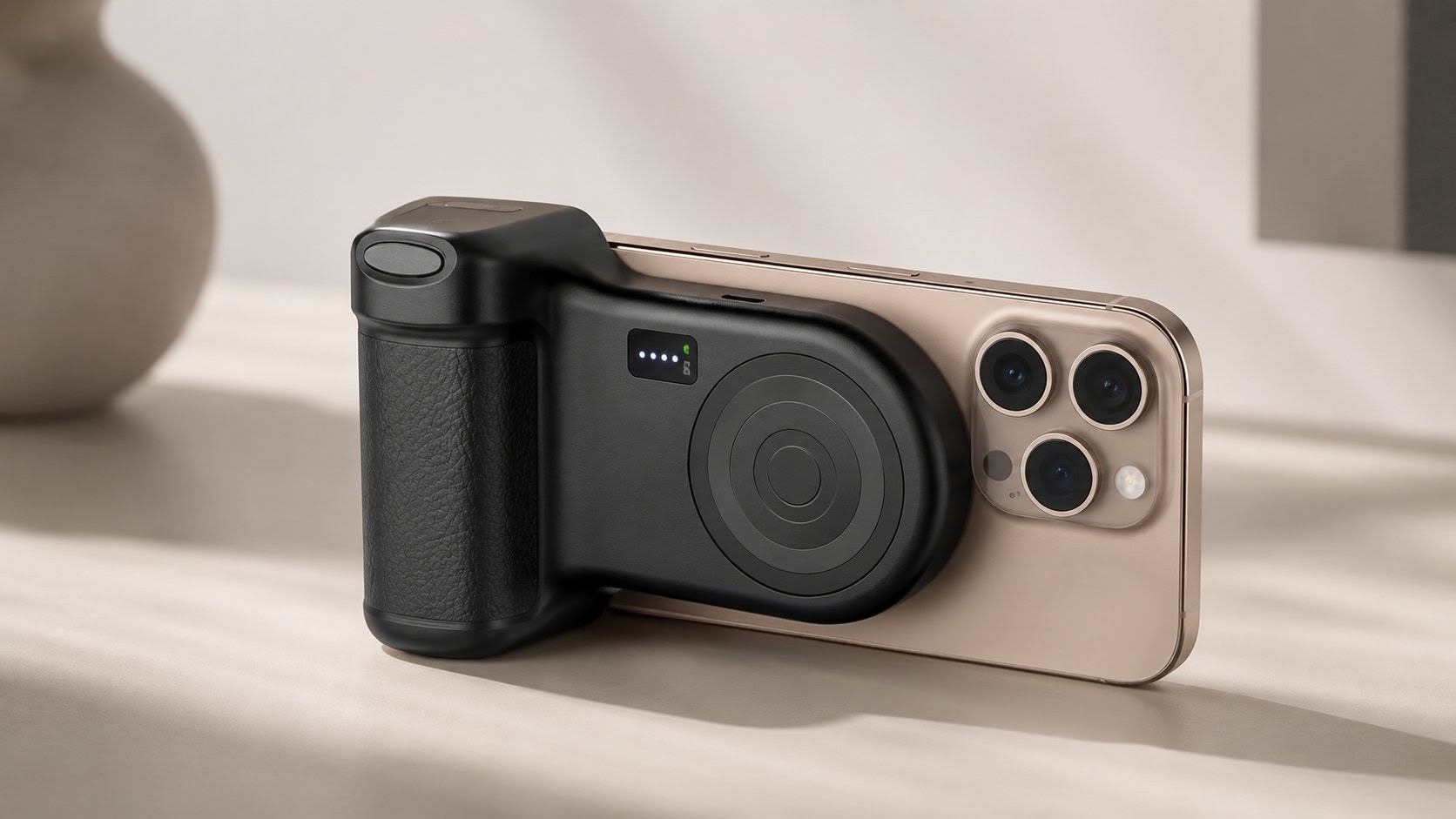
The Bottom Line: The Belkin Stage PowerGrip is a MagSafe camera grip, 9,300 mAh power bank, Bluetooth shutter, and phone stand in a single accessory — priced under $100. It delivers more battery capacity than most competing grips while coming in at a fraction of their cost. The trade-offs are a fixed (non-rotating) mount and 7.5W wireless charging rather than faster speeds. For iPhone users who want a power bank that’s always ready to double as a camera grip, it’s one of the most practical options in its price tier. TIME included it in its
Best Inventions of 2025 list.
Price range: Under $100 (US) | SKU: CTA006ttGY | Warranty: 2 years
AD — → Check availability on Amazon US
✅ Pros
- 9,300 mAh battery — more capacity than most competing MagSafe grips at this price
- 4-in-1 functionality: grip, power bank, Bluetooth shutter, and phone stand
- Built-in retractable USB-C cable (29.5 in / 75 cm) — one less cable to carry
- Charges up to 3 devices simultaneously
- Standard 1/4-inch tripod mount included
- No additional app required for Bluetooth pairing
- 2-year warranty; plastic-free packaging
⚠️ Cons
- No rotating mount — switching between portrait and landscape requires rotating your phone manually
- 7.5W wireless charging is slower than some competing grips
- Adds 271g to your phone setup — noticeably heavier than going caseless
- Android users need a separate MagSafe-compatible case to use the magnetic features
- Samsung phones: portrait stand mode not supported
Design and Build Quality
The Stage PowerGrip takes its visual cues directly from a DSLR camera body. A decorative ring on the front panel mimics the look of a camera lens, and a small LCD screen positioned beside it displays remaining battery percentage — reminiscent of the status display found on a digital camera body. It is a design choice that makes the device feel purpose-built for content creation rather than generic.
According to Belkin, the Stage PowerGrip measures 4.6 in × 3.3 in × 1.6 in (11.7 cm × 8.3 cm × 4 cm) and weighs 271g (0.56 lbs). That weight deserves a straight-up acknowledgment: combined with a typical iPhone 17 series handset, the assembled unit sits firmly in compact-camera territory rather than smartphone territory. For extended handheld shooting sessions, that added mass works in your favor — it steadies the setup the way a heavier camera body does. For pocket carries or minimal bags, it is a genuine consideration before purchase.
The grip area is textured and shaped for a right-handed hold, with three fingers resting naturally along the body and the index finger landing near the shutter button. A lanyard attachment point sits on one corner, providing an additional security option for active shooting. The build material is a dense plastic that feels solid rather than hollow. The Stage PowerGrip is available in Charcoal, Sand, and Powder Blue; the Charcoal colorway in particular reinforces the DSLR aesthetic the design is going for.
Features and Performance
MagSafe Attachment and Wireless Charging
The Stage PowerGrip attaches to compatible iPhones via their MagSafe magnet array. According to Belkin, confirmed compatible devices include the iPhone 15, 16, and 17 series. Phones and cases with magnetic wireless charging compatibility — including Qi2 (Multi-Link Operation standard) certified cases — are also supported for Android devices, though a compatible case is required separately (more on this in the Compatibility section below).
Once snapped on, the PowerGrip charges the attached iPhone at 7.5W over MagSafe. To put that in practical terms: 7.5W is enough to keep your battery level stable or slowly climbing during a shooting session, but it is not a rapid top-up. To activate wireless charging, press the power button on the top of the unit once. To switch it off — conserving the PowerGrip’s own battery when you’re only using the grip and shutter — double-press the same button. That toggle is a practical detail that lower-priced alternatives in this category often omit.
According to Belkin’s official setup guide, the magnetic connection should be tested before extended use: place your phone onto the magnetic mount and confirm it attaches firmly without sliding. If the hold feels weak, repositioning the phone or switching to a compatible case is recommended before shooting.
Bluetooth Shutter Button
The Stage PowerGrip connects to your iPhone via Bluetooth to power the physical shutter button on the grip. No third-party app is required — pairing follows the standard iOS Bluetooth workflow. According to Belkin’s official setup documentation: press and hold the power button for five seconds until the indicator light turns on, then open Settings → Bluetooth on your iPhone and select “Stage PowerGrip” from the available devices list. The indicator light stays on when connected. Once paired, the button controls both photo capture and video recording, and works in any shooting orientation.
To reset the Bluetooth connection — for example, when switching to a different iPhone — press and hold the power button for eight seconds until the indicator light flashes, then re-pair via the standard process above.
Built-in Power Bank and Multi-Device Charging
The 9,300 mAh battery is the Stage PowerGrip’s most significant competitive advantage. According to Belkin, the device charges up to three devices at once: one wirelessly via the MagSafe pad, one through the built-in retractable USB-C cable, and one through the USB-C port on top of the unit. The retractable cable extends 29.5 inches (75 cm) and outputs at up to 20W. The USB-C port also delivers up to 20W. When running multiple outputs simultaneously, the combined maximum is 15W — enough to keep a primary phone charging while powering a secondary device.
According to the official Amazon product listing, a charge of approximately 1.6× a compatible phone’s battery capacity has been achieved in Belkin’s testing with certain handsets, with the note that actual results vary by phone model and usage conditions. Charging the PowerGrip itself requires a power source rated above 20W; the retractable cable handles this without needing a separate cable, though a USB-C power adapter above 20W is not included in the box.
The LCD screen on the front of the unit shows remaining battery percentage at a glance, so there is no guesswork about how much capacity is left mid-session.
Stand and Tripod Functionality
The Stage PowerGrip doubles as a phone stand by resting on its thicker end, with the attached phone balanced in either portrait or landscape orientation. The viewing angle is fixed — there is no adjustable tilt — but the counterbalance created by the grip body holds the phone steady on flat surfaces. According to Belkin’s official support documentation, portrait stand mode is not supported for Samsung phones; landscape mode works across compatible devices.
A standard 1/4-inch screw thread on the bottom allows the Stage PowerGrip to mount directly to any compatible tripod. This is the same thread size used across the vast majority of camera tripods, so no adapter is required for standard setups. The combination of a tripod mount and a Bluetooth shutter means the PowerGrip can serve as a full remote-shooting rig: prop it on a tripod, step back, and trigger the shutter from the grip — useful for group shots or self-recording setups.
Compatibility: What Works and What Doesn’t
According to Belkin, the Stage PowerGrip is confirmed compatible with the iPhone 15, 16, and 17 series via MagSafe. For Android and Samsung devices, the magnetic attachment and wireless charging features require a MagSafe-compatible or Qi2-compatible case — the phone body alone will not attach magnetically without one. Belkin’s official documentation explicitly notes that portrait stand mode is unavailable for Samsung phones (landscape mode functions normally).
For users whose phone or case does not support magnetic attachment at all, the Stage PowerGrip still functions as a wired power bank through the USB-C port and retractable cable. However, the grip stability, wireless charging, and magnetic stand features all depend on a magnetic connection — without it, the PowerGrip is a capable but conventional power bank rather than a camera grip.
One layout detail to factor in before purchasing: the grip is designed for right-handed landscape shooting, with the shutter button positioned for the index finger on the right side. Left-handed shooters and users who primarily shoot vertical video — where a fixed mount requires manually rotating the phone — should weigh this against their specific workflow before buying.
How We Researched
This article is based on Belkin’s official US product page (belkin.com), official Belkin support documentation (support articles 337346, 337427, 337428, and 337474), the official Belkin CES 2025 press release, and the Amazon US product listing (ASIN: B0FTCCD82Q) for specification confirmation. TIME’s Best Inventions of 2025 recognition was confirmed via time.com. Editorial reviews from MacStories (October 2025), Witchdoctor (February 2026), and Yahoo Tech (March 2026) were consulted as secondary sources for contextual framing. We have not conducted hands-on lab testing. All performance figures reflect manufacturer claims or official product listing data.
✅ Pros
- 9,300 mAh battery — more capacity than most competing MagSafe grips at this price
- 4-in-1 functionality: grip, power bank, Bluetooth shutter, and phone stand
- Built-in retractable USB-C cable (29.5 in / 75 cm) — one less cable to carry
- Charges up to 3 devices simultaneously
- Standard 1/4-inch tripod mount included
- No additional app required for Bluetooth pairing
- 2-year warranty; plastic-free packaging
⚠️ Cons
- No rotating mount — switching between portrait and landscape requires rotating your phone manually
- 7.5W wireless charging is slower than some competing grips
- Adds 271g to your phone setup — noticeably heavier than going caseless
- Android users need a separate MagSafe-compatible case to use the magnetic features
- Samsung phones: portrait stand mode not supported
Final Verdict
The Belkin Stage PowerGrip occupies a practical and well-defined position in the MagSafe camera grip market. Competing grips in the $150–$300 range tend to offer a rotating mount or faster wireless charging, but both come with smaller batteries and price tags that are roughly two to four times higher. Options further up the ladder command even more, with batteries that are smaller still. The Stage PowerGrip makes a deliberate set of trade-offs: it drops the rotating mount and caps wireless charging at 7.5W in exchange for a 9,300 mAh battery and a price under $100.
That exchange holds up well for the accessory’s core audience. If you already carry a power bank — and most heavy iPhone users do — the Stage PowerGrip replaces it with something that steadies your shots, releases the shutter remotely, props your phone up for StandBy or video playback, and connects to a tripod when needed. The built-in retractable USB-C cable means one fewer item in the bag. TIME’s recognition as one of 2025’s best inventions reflects exactly this kind of practical versatility.
I’d recommend the Stage PowerGrip for iPhone 15, 16, or 17 users who shoot content regularly and want a single everyday-carry accessory that covers both battery anxiety and casual mobile photography. If rotating between portrait and landscape video is central to your workflow, or if fast wireless charging speeds are non-negotiable, the ShiftCam SnapGrip Pro is worth evaluating as an alternative. For most iPhone users, the Stage PowerGrip’s combination of capacity, versatility, and price is difficult to match at this tier.
AD — → Check availability on Amazon US | → Belkin Official Store




Comments