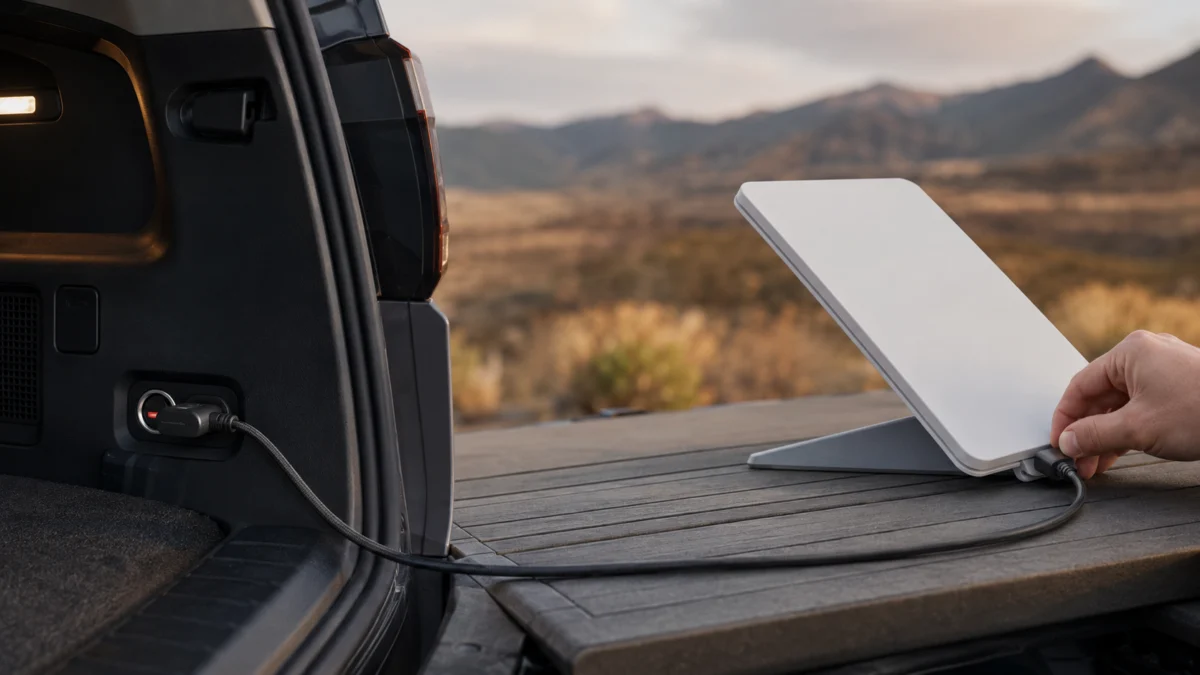
If your Starlink Mini will not power on from a car USB-C port, the port is the first thing to check — not just the cable. The official Starlink Mini USB-C cable requires a 100W USB-C Power Delivery source rated 20V/5A, and many factory-installed vehicle USB-C ports are phone-charging ports that may not offer a 20V profile. A USB-C connector that physically fits tells you nothing about what it can output.
The fix is to change the power path, not to buy another cable. Starlink documents three routes into the Mini: the Mini Car Adapter in a 12–24V accessory socket, a USB-C PD source that publishes 20V/5A on a single port, and the AC power supply included in the kit. This guide works through each in order — and explains why the LED on the cable cannot tell you whether your power source is strong enough.
Why Starlink Mini May Not Power On from a Car USB-C Port
A USB-C port’s shape is not its output. The official Mini USB-C cable requires a 20V Power Delivery profile, while many factory car ports are designed primarily for phones. If the vehicle port does not offer 20V, the Mini will not start through the official cable.
USB-C is a connector standard, not a power standard. Power Delivery (PD) is the protocol that lets a device request more than the 5V default, and a port must advertise a 20V profile before anything can draw 20V from it.
Which symptom you see narrows the search considerably.
| Symptom | What it usually points to | Where to look first |
|---|---|---|
| Nothing happens; the Mini’s rear LED stays off | No power reaching the dish, or a source with no 20V profile | Socket power state, then the port’s output rating |
| Mini boots, then restarts when you start the engine | Voltage sag during cranking | Vehicle electrical behaviour, not the cable |
| Mini shuts down every time you park | Accessory socket losing power with the ignition | Whether the socket is ignition-switched |
| Mini is powered but never comes online | Sky view, obstructions, or service status | The Starlink app — rarely a power fault |
| Stable when parked, drops while driving | Mounting, obstructions, or in-motion service conditions | Mount stability and service plan terms |
Quick Checks Before You Buy Another Cable or Charger
Five checks cost nothing and rule out the most common causes before you spend anything. Confirm the socket is live, confirm the barrel plug is fully seated, watch the Mini’s rear LED rather than the cable’s, allow a full boot cycle, and read the published output rating of the port you are using.
- Is the socket live? Many vehicle sockets and USB ports only energise with the ignition or accessory position on. Test with a phone first.
- Is the barrel plug fully seated? Starlink specifies inserting it until the plug face sits flush with the surrounding surface. A partly seated plug looks connected and still fails.
- Are you watching the right LED? Judge power from the status LED on the back of the Mini, not the light on the cable.
- Have you waited long enough? Give the Mini several minutes. It does not come up instantly.
- What does the port’s specification say? Look in the vehicle handbook or on the charger label for an explicit 20V/5A or 100W rating on that single port.
What Starlink Officially Requires on Each Car Power Path
Starlink publishes different requirements for each path in its Mini setup guide. The Mini itself accepts 12–48V DC. The official USB-C cable requires a 100W source rated 20V/5A. The Mini Car Adapter requires a 12–24V accessory socket. Meeting one requirement does not mean you meet another.
| Power path | What Starlink requires | Practical meaning |
|---|---|---|
| Mini’s DC input (any source) | 12–48V DC input range | The dish is flexible about voltage; the accessories are not |
| Official Mini USB-C cable into a USB-C PD source | 100W source, 20V/5A minimum | The single port must publish 20V/5A — total charger wattage is the wrong number |
| Mini Car Adapter into an accessory socket | 12–24V power source | Standard cigarette-lighter sockets are in range |
| AC power supply from the Mini kit | Supplied with the kit | Your reference point for testing the dish itself |
Why 100W, when the Mini only draws 25–40W?
These are two numbers describing two different things. Starlink’s Mini specifications put average consumption in the 25–40W range against a 60W input rating, while the official USB-C cable requires a 100W source at 20V/5A minimum. The larger figure describes the source profile, not the dish’s average draw.
Claims that 65W is enough commonly refer to third-party USB-C-to-barrel cables. Those are different products with their own published requirements. If you use Starlink’s official cable, treat 100W at 20V/5A as the requirement.
The official Car Adapter is not a counter-example. DISHYtech’s Mini Car Adapter review reports its USB-C output as rated at 60W, but it is a Starlink-designed pairing sold as a kit with its own cable — not a generic USB PD source.
If you choose a third-party car charger, verify that its high-output USB-C port — not merely the charger’s combined total — explicitly supports 20V/5A.

Please check the Amazon product page for the latest price and availability.
What the LEDs can and cannot tell you
LED colour is a weak diagnostic here, and treating it as a definitive readout is a common mistake. Starlink’s current LED guide describes no light as normal for the car-charger or USB-C cable path when connected to a compatible source, and red as a thermal warning — not as a wattage meter.
| Indicator | State | What it means |
|---|---|---|
| Mini status LED (rear of the dish) | Off | No power reaching the Mini |
| Mini status LED (rear of the dish) | Fast blinking, then off | Factory reset in progress |
| Car Adapter | Soft blinking | Idle — powered and ready to supply a device |
| Car Adapter | Solid | Currently powering a connected device |
| Car charger / USB-C cable path | No light | Normal when connected to a compatible power source |
| Car charger / USB-C cable path | Red | Overheating — disconnect and let it cool, then it recovers |
Do not diagnose a 20V/5A shortfall from LED colour. Nothing in the current official LED guidance maps a colour to insufficient wattage. Confirm the output rating of the vehicle port, the charger, and the cable from their published specifications instead.
Troubleshoot the Outlet, Adapter, Cable, and Connector in Order
The fix takes seven steps. Work from the vehicle socket outward to the Mini, changing one variable at a time, and stop as soon as the Mini boots. Cross-testing with a known-good power source is what separates a bad port from a bad cable.
- Confirm the socket is energised. Turn the ignition to accessory or start the engine, then plug a phone into the same port. If that does not charge, the fault is upstream of anything Starlink sells.
- Read the port’s rating. Check your vehicle handbook or the charger label for an explicit 20V or 100W figure on that single port. If it lists only 5V, 9V, or a shared total, it will not run the official cable.
- Reseat both ends. Reconnect the USB-C end, then the barrel end, pushing the barrel plug in until its face is flush with the surrounding surface.
- Watch the Mini’s rear status LED, then wait. Give it several minutes. A dark rear LED after a full wait means no usable power is reaching the dish.
- Cross-test with a different power source. Move the same cable to a power bank or portable power station that publishes 20V/5A on one port. If the Mini boots there, your vehicle port is the problem. If not, suspect the cable or the dish.
- Cross-test with a different path. If you have the Mini Car Adapter, run it from a 12–24V accessory socket instead of going through a USB-C port at all. This bypasses PD negotiation entirely.
- Measure what is actually being negotiated. If the port claims 20V and the Mini still will not start, an inline meter can show the negotiated voltage, current, and power. Our USB-C power meter guide explains what that reading can and cannot prove. Check that the meter itself is rated for the voltage and current you pass through it.
If Starlink Mini Starts but Reboots or Drops Offline
A Mini that boots and then restarts has a different problem from one that never starts. Reboots usually track vehicle power events: engine cranking, an accessory socket cutting out when you park, or a power bank splitting output across ports. Dropped connections while moving are often not a power fault at all.
Patterns owners report
In separate owner-forum threads, one Starlink Mini user reported that the dish worked from a 12V accessory socket but not from the vehicle’s USB-C port in a Winnebago Revel Forum discussion, while another reported a reboot whenever the engine started in The Grenadier Forum. These are setup-specific reports, so confirm your own port ratings and power behaviour before replacing hardware.
- Restart on engine start. Owners report that cranking pulls system voltage low enough to interrupt the dish. Some vehicles also cut accessory circuits during cranking by design.
- Shutdown when parked. Sockets that de-energise with the ignition take the Mini down with them, and it needs a full boot cycle on restart.
- A power bank that “supports 100W” but still drops the Mini. A reviewer comparing several banks found that models sharing total output across ports cut supply to the Mini when another device was plugged in. A bank keeping one port unshared held the connection.
Separating power faults from service and placement issues
Not every disconnection is a power problem. A Mini with a solid supply can still lose service to obstructions, an unstable mount, or the conditions attached to your plan. Check the Starlink app’s obstruction and status view before you spend anything else on power hardware.
In-motion use is a separate question entirely. Whether the Mini may operate while the vehicle is moving depends on your service plan, region, and installation conditions — the Car Adapter fitting your socket says nothing about it. Confirm the current terms in Starlink’s official in-motion guidance.
When to Replace the Power Source, Cable, or Adapter — or Contact Starlink
Before you replace anything, run the Mini on the AC power supply from the kit. If it boots and stays online there, the fault is in your car power path. If it fails on AC too, the problem is the Mini or its cable, and buying another charger will not help.
| What you observed | What to change |
|---|---|
| Works on AC and on a 20V/5A power bank, fails only on the vehicle USB-C port | The vehicle port. Use the Car Adapter in an accessory socket, or a car charger publishing 20V/5A on one port |
| Works on AC, fails on every USB-C source tried | None of your sources meet the profile. Verify ratings before buying another |
| Works when the engine runs, drops when parked | The socket is ignition-switched. A suitable pass-through-capable battery may bridge the interruption if it can sustain the required output while charging |
| Fails on AC as well | Stop buying power accessories and contact Starlink Support |
The official Car Adapter is sold in select markets only, so confirm availability before planning around it. When you contact Starlink Support, tell them which power paths you tested, the rating of each source, and what the Mini’s rear status LED did in each case.
A note on vehicle wiring. Hardwiring a power source to a vehicle’s electrical system, adding fused circuits, or fitting DC-DC converters is electrical work. Have it done by a qualified auto electrician or installer, and check your vehicle manufacturer’s guidance and any lease, rental, or warranty terms first. Nothing here guarantees uninterrupted operation or a particular result in your vehicle.
Frequently Asked Questions
Three questions come up repeatedly around Mini car power. The answers depend on the connector, the source’s published power profile, and whether the vehicle socket stays energised. The relevant checks and sources appear in the sections above.
Does the official Starlink Mini USB-C cable work with a 65W charger?
Starlink specifies a 100W source at 20V/5A minimum for its own USB-C cable, so a 65W charger does not meet the published requirement. Published 65W claims commonly refer to third-party USB-C-to-barrel cables, which are different products and must be assessed against their own documentation.
Why does my Mini work on the cigarette lighter but not the car’s USB-C port?
Because they are different power paths with different requirements. The Car Adapter needs a 12–24V accessory socket, which is what a cigarette-lighter socket provides. The USB-C cable needs a source that advertises 20V/5A over Power Delivery, and most factory vehicle USB-C ports only offer phone-charging profiles.
Can I keep the Mini running when the engine is off?
Only if the supply stays energised. A pass-through-capable battery may bridge an ignition-switched socket, but only if it can accept input while supplying the Mini and sustain the required output on the selected port. Verify the manufacturer’s simultaneous input/output limits and test the complete path before relying on it.
How We Researched
This article is based on Starlink’s official support articles and specification sheet for the Mini, one Starlink-focused review site that documented the Car Adapter kit in use, and owner-forum threads where the same symptoms appeared across independent posts. We have not conducted hands-on lab testing.
Power requirements are attributed to official documentation; consumption measurements and power-bank behaviour to the third-party reviewer who reported them; and recurring symptoms are identified as community reports, not verified causes. Where sources disagreed — notably on whether 65W is sufficient — we followed the official specification.
Conclusion
The decisive number here is 20V/5A on a single port. A common cause is a USB-C port that physically accepts the cable but does not advertise a 20V profile, and a cable cannot create voltage the source does not offer.
So work by power path, not by LED colour. Confirm the socket is live, read the port’s published rating, cross-test against a known-good source, and check the Mini on AC before concluding anything needs replacing. That order tells you whether you need a different charger, a different route into the dish, or Starlink Support.