
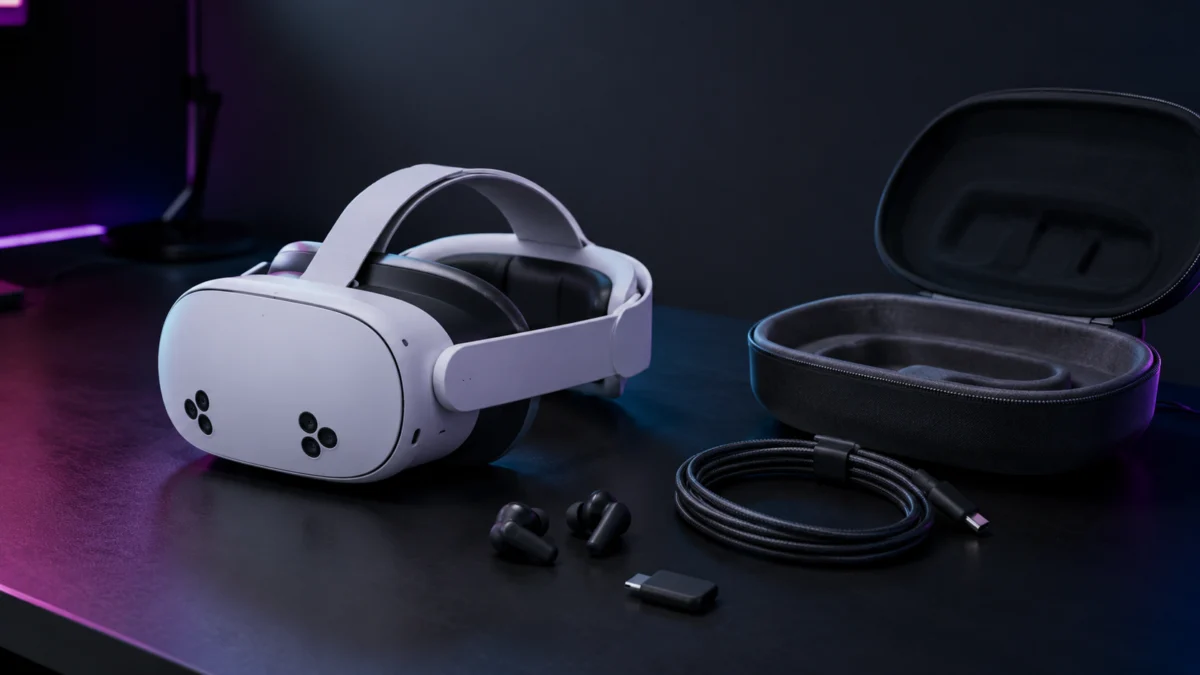
The Meta Quest 3S uses a hybrid design — the XR2 Gen 2 processor and Touch Plus controllers from the Quest 3 generation, paired with Fresnel optics and a three-position sliding IPD mechanism from the Quest 2 generation. That combination creates a compatibility problem that catches most buyers off guard: head straps from the Quest 2 won’t physically attach, facial interfaces from the Quest 3 won’t clip on, and charging docks designed for the Quest 3’s metal contact pins do nothing on the Quest 3S. The compatibility table below covers every major accessory category before you spend anything. If you already know which category you need, use the jump links to go straight there.
- What fits and what doesn’t: the compatibility guide
- Best battery head straps
- Best link cables for PC VR
- Audio, facial interface, and the single-port problem
- Best carrying cases
- Pre-purchase checklist
Some links in this article are affiliate links. See our affiliate disclosure for details.
Quick Comparison: Top Quest 3S Accessories by Category
| Category | Our Pick | Price Range | Best For |
|---|---|---|---|
| Battery Head Strap | KIWI Design H4 Boost | $70–$80 | Fast single-cable charging + comfort |
| Battery Head Strap (alt) | BOBOVR M3 Pro | $50–$60 | Hot-swap battery for unlimited sessions |
| PC VR Link Cable | INIU Smart Charging Link | Under $30 | PC VR with sustained full battery |
| PC VR Link Cable (alt) | AMVR LC5 | Under $30 | Reinforced L-plug + separate power port |
| Wireless Earbuds | PrismXR Vega T1 | Around $60 | Low-latency audio + 27W passthrough |
| Facial Interface | KIWI Design V4 | Around $35 | Anti-fog ventilation, Quest 3S-only fit |
| Carrying Case | Syntech Large M42 | Around $45 | Fits with large third-party straps attached |
User Complaints to Check Before Buying
These four problems repeat across multiple threads on r/OculusQuest and r/MetaQuestVR. All four are avoidable if you know what to look for before checkout.
- Buying the wrong charging dock. The Quest 3S has no metal contact pins on the bottom. Quest 3–specific charging docks that rely on those pins simply do not charge the Quest 3S — the headset sits on the dock and nothing happens. According to Meta’s official support page, the Quest 3S requires a magnetic USB-C connector or the Meta Compact Charging Dock (Meta charging dock compatibility). This is one of the most frequently reported misbuys in the Quest 3S community.
- Low-wattage battery straps draining instead of charging. The XR2 Gen 2 processor draws more power than the Quest 2 chip during active rendering. Multiple users on r/OculusQuest report that battery straps rated at 10W or below cannot keep up with the Quest 3S’s power draw during gameplay — the headset drains even with a strap connected. Look for straps with explicit output ratings above 15W or dual-chip smart charging.
- Controller grip sleeves causing tracking loss. The Touch Plus controllers moved their infrared LEDs from a large external ring to distributed positions on the face plate and grip base. Low-precision silicone sleeves that partially cover those LED positions cause the headset to drop tracking mid-session. Multiple reports on r/OculusQuest describe this happening during fast-motion games like Gorilla Tag and Beat Saber (r/OculusQuest: controller grips and tracking).
- USB-C splitter noise and charging conflicts. Using a cheap USB-C splitter to run earbuds and charge simultaneously typically produces audible ground-loop hum and reduces charging output below the level needed to sustain the Quest 3S under load. Most users who try this approach end up switching to a USB-C dongle-based wireless earphone instead.
The Quest 3S Compatibility Trap: What Fits and What Doesn’t
The Quest 3S shares its head strap mount with the Quest 3, its Fresnel lens barrel with the Quest 2, and its Touch Plus controllers with the Quest 3. Its facial interface fits nothing else. Check the tables below before buying any accessory, especially if it’s labeled “Quest 2 compatible” or “Quest 3 compatible” without a specific “Quest 3S” callout.
Head Straps, Facial Interfaces, Prescription Lenses, and Controller Grips
| Accessory | Quest 2 Compatible? | Quest 3 Compatible? | What to Buy for Quest 3S |
|---|---|---|---|
| Head Strap | ❌ Won’t attach (different mount) | ✅ Fits | Buy any Quest 3–compatible strap |
| Facial Interface | ❌ Won’t attach | ❌ Won’t attach | Quest 3S–specific only — no exceptions |
| Prescription Lens Insert | ✅ Fits (same Fresnel barrel diameter) | ❌ Wrong lens geometry | Buy Quest 2–format inserts |
| Controller Grip / Sleeve | ❌ Wrong ring design | ✅ Fits (same Touch Plus) | Buy Quest 3–compatible grips |
The facial interface situation is the most consequential. According to compatibility documentation from Android Central and MaeckerVR (Android Central Quest 3S accessory guide), the Quest 3S front frame has a different curve profile and different snap-clip positions than both the Quest 2 and the Quest 3. Forcing a Quest 3 face pad onto a Quest 3S will snap the plastic clips. Only accessories specifically listed as Quest 3S–compatible will fit without modification.
The prescription lens situation is the reverse: because the Quest 3S uses the same Fresnel lens barrel as the Quest 2, Quest 2–format prescription inserts fit directly and without adapters. Quest 3 inserts are designed for flat pancake lenses and are completely incompatible here.
Charging Docks, Carrying Cases, Link Cables, and Audio
| Accessory | Quest 2 Compatible? | Quest 3 Compatible? | What to Buy for Quest 3S |
|---|---|---|---|
| Charging Dock (pin-contact type) | ❌ | ❌ (Quest 3S has no charging pins) | Magnetic USB-C dock or Meta Compact Dock only |
| Carrying Case | ⚠️ Quest 3S fits, but loose — padding needed | ✅ Full fit | Quest 3–compatible cases work; large-strap users need a larger case |
| Link Cable (USB-C, data+power) | ✅ | ✅ | Any USB 3.0 / USB 3.2 Gen1 USB-C cable works for data |
| Wired Earphones (3.5mm plug) | ✅ Direct plug | ✅ Direct plug | ❌ No 3.5mm jack on Quest 3S — adapter with active DAC required |
The 3.5mm jack removal is covered in Meta’s official help documentation (Meta Quest headphone and audio support): audio output on the Quest 3S is limited to the built-in speakers, USB-C digital audio, or Bluetooth. There is no analog output. Earphones with a 3.5mm plug require a USB-C to 3.5mm adapter with an active DAC chip to function — passive adapters without a DAC do not work.
Best Battery Head Straps for Meta Quest 3S
According to Meta’s official specifications, the Quest 3S weighs 514 grams with the stock strap and is front-heavy by design. Multiple threads across r/OculusQuest document a community consensus: the stock fabric strap causes cheekbone pressure and headset shift during fast-motion games, and comfortable play beyond 30 minutes requires a rigid battery strap that distributes weight around the head. The two most-discussed options under $100 are the KIWI Design H4 Boost and the BOBOVR M3 Pro.
KIWI Design H4 Boost — Best for Fast, One-Cable Charging
The H4 Boost is in the $70–$80 range and integrates a 5,300mAh battery pack into a rigid halo-style frame with a padded rear arc. Its standout feature is a 45W dual-chip smart charging system: plug a single AC cable into the strap and it simultaneously charges both the strap’s battery and the headset at the correct voltage for each. There is no need to manage two separate cables or sequential charging steps.
The rear battery placement acts as a counterweight to the headset’s front weight. According to TrueNorthVR’s comparative analysis of the H4 Boost and M3 Pro, the H4 Boost’s weight distribution significantly reduces face pressure compared to the stock strap, with the rigid frame preventing the headset from shifting during physical movement. Multiple r/OculusQuest users report that the H4 Boost’s output is sufficient to sustain the Quest 3S battery at full charge under XR2 Gen 2 gaming loads — it does not just slow discharge, it actively maintains charge (r/OculusQuest: KIWI Design H4 community discussion).
✅ Buy if…
- You want the simplest charging routine — one cable charges everything
- Comfort over extended sessions is the top priority
- You don’t need to swap batteries mid-session
❌ Don’t buy if…
- You want to extend play indefinitely by swapping in a fresh battery pack
- You need the absolute lowest upfront cost
BOBOVR M3 Pro — Best for Hot-Swap Battery and Marathon Sessions

Please check the Amazon product page for the latest price and availability.
The M3 Pro is in the $50–$60 range and uses a detachable magnetic B2 battery pack (5,200mAh) instead of a fixed integrated cell. The magnetic attachment mechanism allows swapping in a fully charged B2 pack without powering down the headset — if you own two or more B2 packs, you can cycle them and play indefinitely. Spare B2 packs charge separately via USB-C while you play on another.
The M3 Pro’s support frame distributes weight across the forehead rather than the face, which TrueNorthVR’s comparison notes can be more comfortable for users with larger head sizes. The main trade-off versus the H4 Boost is charging convenience: the H4 Boost charges everything in place with one cable, while the M3 Pro requires managing separate pack charging. According to TrueNorthVR’s side-by-side review, the M3 Pro has a slight pressure distribution advantage for wider head shapes, while the H4 Boost wins on charging simplicity.
✅ Buy if…
- You want true unlimited play time by swapping charged battery packs
- Budget is a priority — it costs less than the H4 Boost
- You prefer forehead-supported weight distribution
❌ Don’t buy if…
- You want a single-cable charging solution with no separate pack management
- You find forehead-pressure designs uncomfortable
Best Link Cables for PC VR: What Actually Keeps Your Battery Charged
Standard USB-C link cables — including Meta’s own first-party Link Cable — carry data but draw power from the PC’s USB port. Most desktop USB ports supply between 900mA and 1.5A, which slows but does not stop battery drain during a demanding PC VR session. After two to three hours of play, the headset will have lost significant charge. The practical fix is a cable with a dedicated charging port that accepts power from a wall adapter, feeding full charge current to the headset while the data connection runs to the PC.
INIU Upgraded Link Cable with Smart Charging — Best Overall Value
Please check the Amazon product page for the latest price and availability.
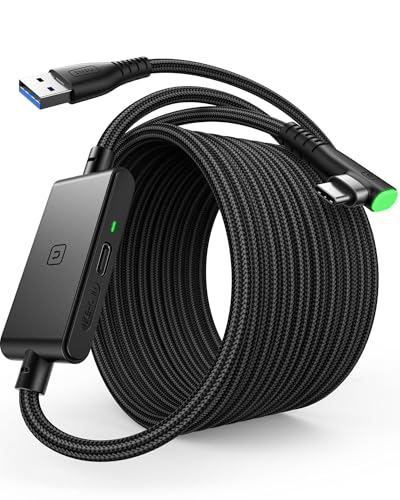
The INIU cable is under $30 and includes an inline plastic dongle partway along the cable that houses a smart IC chip and a dedicated USB-C charging port. You connect the cable normally between the Quest 3S and the PC for data. You plug your existing Quest wall charger (or any compatible USB-C PD adapter) into the dongle’s separate port. The IC chip manages power routing so the wall charger’s output goes directly to the headset rather than through the PC’s USB controller.
According to multiple verified reports across r/OculusQuest and r/virtualreality, this configuration allows the Quest 3S to maintain full charge continuously throughout a PC VR session under normal gaming loads (r/OculusQuest: link cable power delivery discussion). Note: a small number of users report occasional thermal warnings or connection instability with specific motherboard USB controllers or low-quality AC adapters. Checking the AC adapter’s PD compatibility and ensuring a secure cable connection resolves the issue in most documented cases. No single cable can guarantee performance across every PC configuration.
✅ Buy if…
- You do regular PC VR sessions and want the headset at 100% battery throughout
- You want a cost-effective alternative to the first-party cable (priced around $80)
- You already own a compatible USB-C PD wall adapter
❌ Don’t buy if…
- You primarily use Air Link or Virtual Desktop and don’t need a physical cable
- Your PC setup has known USB controller compatibility issues
AMVR LC5 — Reinforced L-Plug Build with Separate Power Port

Please check the Amazon product page for the latest price and availability.
The AMVR LC5 is also under $30 and offers the same separate-charging-port architecture as the INIU, with two design differences: an L-shaped plug at the headset end that reduces cable leverage and port stress during physical movement, and a reinforced PVC jacket rated for repeated bending. According to AMVR’s official product page, the LC5 includes built-in overheat protection and represents an updated design over the earlier LC3 and LC4 versions. The L-shaped headset connector is particularly useful if you move extensively during play, as it removes the 90-degree stress point that straight plugs create at the USB-C port.
✅ Buy if…
- You move actively during PC VR and want a cable that reduces strain on the USB-C port
- Cable durability and bend resistance matter more than brand recognition
❌ Don’t buy if…
- You prefer the INIU’s inline dongle form factor over an L-plug headset connector
- You primarily use wireless PC VR streaming
Audio and Charging: The Single-Port Problem
The Quest 3S has one USB-C port and no 3.5mm jack. That single port must handle wired charging, PC VR data, and USB-C audio — but only one at a time. Running a 2.4GHz dongle-based earphone occupies the port, so the dongle’s passthrough charging rate becomes critical: if the dongle can’t pass enough power to the headset, the battery drains during play. USB-C audio splitters (used to run earphones and charge simultaneously) are the most common workaround attempted, but most produce audible ground-loop noise and restrict charging output below the Quest 3S’s operating power requirement.
PrismXR Vega T1 — Best Low-Latency Earbuds with 27W Passthrough
Check on Amazon
/
Official site
The Vega T1 is around $60 and uses a 2.4GHz USB-C dongle that delivers 25ms latency — low enough that audio stays visually synchronized in rhythm games and action titles. The practical advantage over competing options is its Super Passthrough charging: according to PrismXR’s official product documentation and a GamesRadar hands-on review, the Vega T1 dongle supports up to 27W passthrough output while active.
That 27W ceiling matters specifically in context of the competing Anker Soundcore VR P10 (priced around $100), whose dongle limits passthrough to 18W. Multiple users on r/OculusQuest report that connecting the VR P10’s dongle while using an external battery head strap causes the Quest OS to misread battery charge levels and produce unstable charging behavior — the headset can’t correctly negotiate power delivery when the dongle’s output cap conflicts with the strap’s smart charging protocol (r/OculusQuest: Soundcore VR P10 passthrough issue). The Vega T1 avoids this because its higher passthrough ceiling leaves enough headroom for concurrent strap negotiation. According to Android Central, the Vega T1 is the recommended replacement for Quest users experiencing charging conflicts with the Soundcore earbuds (Android Central: Soundcore vs PrismXR for Quest).
✅ Buy if…
- You want low-latency wireless audio without sacrificing charging throughput
- You use a battery head strap and need reliable simultaneous charging
- Bluetooth latency has caused sync problems in rhythm or action games
❌ Don’t buy if…
- You primarily use the built-in speakers and don’t need earbuds
- You do PC VR only via wired Link (the cable occupies the USB-C port regardless)
KIWI Design V4 Ventilation Facial Interface — For Lens Fogging
Check on Amazon
/
Official site
The KIWI Design V4 is around $35 and is designed exclusively for the Quest 3S. It uses 12mm memory foam with a PU leather outer surface — easier to wipe down after workouts than the fabric default — and includes over 20 L-shaped ventilation channels along the inner edge. According to KIWI Design’s product documentation (confirmed on Knoxlabs), the L-shaped channel geometry blocks external light from entering while allowing warm air to escape through convection as it rises during extended use. This eliminates the lens fogging that occurs with the sealed stock pad during physical VR fitness sessions or long play periods.
The Meta first-party Breathable Facial Interface (in the $55–$60 range) addresses the same issue with an official design. For users who experience regular lens fogging during active play, the V4 provides comparable ventilation at a lower price point, with the added benefit of the PU leather surface for hygiene maintenance. Because the Quest 3S facial interface mount is generation-exclusive, confirm that any interface you buy is explicitly labeled for the Quest 3S — not the Quest 3.
✅ Buy if…
- Lens fogging is a regular problem during fitness VR or long sessions
- You want a surface that’s easy to wipe clean after workouts
- Budget matters — it costs less than the Meta first-party option
❌ Don’t buy if…
- You primarily play seated experiences where fogging is not an issue
- You prefer softer fabric foam over firmer memory foam contact
Best Carrying Cases That Close With Your Head Strap Attached
Most compact and medium-size cases — including the Meta first-party Quest 3 Carrying Case (priced around $70) — are sized for the Quest 3S with the stock strap only. Adding a large rigid battery strap like the KIWI H4 Boost or BOBOVR M3 Pro increases the headset’s total height and rear depth significantly. Multiple r/OculusQuest users report that forcing an oversized headset into a medium case causes the zipper to jam and puts bending stress on the pivot arm mounts. Buying the right case size upfront is easier than replacing a damaged headset mount.
Syntech Large Hard Carrying Case M42 — Best for Third-Party Straps
The Syntech M42 is around $45 and uses a rigid EVA shell with a splash-resistant fabric outer layer. According to the Syntech official product page and the Best Buy listing, the Large M42 is explicitly dimensioned to accommodate the Quest 3S with large third-party battery straps attached — unlike the same brand’s Small and Medium models, which are sized for the stock strap or Elite Strap configuration only. The interior uses organizer dividers to hold the headset, both controllers, charging adapters, and battery packs securely without components contacting each other.
The Meta first-party Quest 3 Carrying Case is well-designed for stock-strap configurations, but multiple community reports confirm it cannot close over a full-size halo-style battery strap. If you plan to add any large third-party strap, the M42 is the more practical choice and costs less than the Meta case.
✅ Buy if…
- You use or plan to use any large third-party battery head strap
- You travel with your Quest 3S and need hard-shell impact protection
- You want to carry controllers, cables, and accessories in one organized bag
❌ Don’t buy if…
- You use the stock strap only and prefer a more compact soft case
- The rigid EVA form factor is too large for your storage needs
Quest 3S Accessory Checklist: 5 Rules Before You Buy
Run through these five checks before confirming any Quest 3S accessory purchase. Each one addresses a documented compatibility failure pattern from the r/OculusQuest and r/MetaQuestVR communities.
- Match the generation label carefully. “Quest 3S compatible” is the only reliable label. “Quest 3 compatible” is safe for head straps and controller grips, but not for facial interfaces or charging docks. “Quest 2 compatible” applies only to prescription lens inserts and — with loose-fit caveats — carrying cases.
- Verify charging dock type before buying. The Quest 3S has no metal contact pins on the bottom. Any dock that uses pin contact to charge will not work on the Quest 3S. The only dock types that work are magnetic USB-C docks and Meta’s Compact Charging Dock.
- Check wattage on battery straps. Straps rated at 10W or below frequently can’t keep up with the Quest 3S under XR2 Gen 2 load. Look for straps with output ratings above 15W, or with “smart charging” or “dual-chip” callouts that describe simultaneous headset and strap charging.
- Check LED coverage on controller grip sleeves. Confirm that cutout positions on any grip sleeve leave the Touch Plus infrared LEDs fully exposed. Silicone that covers even a partial area of the LED positions causes tracking dropouts, particularly in games involving fast arm movement.
- Confirm return windows on audio accessories. USB-C audio adapters, splitters, and dongle-based earbuds vary significantly in how they interact with the Quest 3S’s power delivery and battery strap charging negotiation. Compatibility is difficult to judge from specs alone — check the seller’s return window before buying, and test the full audio-plus-charging configuration during the return period.
How We Researched
This article is based on Meta’s official product specifications and support documentation for the Quest 3S, accessories compatibility, audio output, and charging dock behavior; the Deep Research report commissioned for this article, covering manufacturer spec sheets, retailer listings across Amazon and Best Buy, and verified user reports; hardware compatibility data from VR-Compare and Android Central; and multiple threads verified across r/OculusQuest and r/MetaQuestVR covering accessory compatibility failures, battery strap power delivery, controller grip tracking issues, and USB-C audio conflicts. Comparative product analysis referenced TrueNorthVR’s KIWI Design H4 Boost versus BOBOVR M3 Pro review, GamesRadar’s PrismXR Vega T1 hands-on, and Android Central’s Quest audio accessory comparison. We have not conducted hands-on or lab testing. All performance figures reflect manufacturer documentation or community-verified findings confirmed across multiple independent reports.
Final Thoughts
The Quest 3S’s hybrid design means you cannot assume any accessory from a previous generation will fit. The safest buying approach: match head straps and controller grips to Quest 3 generation, look for Quest 3S–specific labels on facial interfaces and charging docks, use Quest 2–format prescription lens inserts, and avoid pin-contact charging docks entirely. Beyond compatibility, the most impactful first upgrades for most users are a battery head strap — which solves both comfort and battery life in one purchase — and, for PC VR users, a link cable with a dedicated power port. Audio and case upgrades are valuable but less urgent than resolving the power and comfort issues first.

Comments