
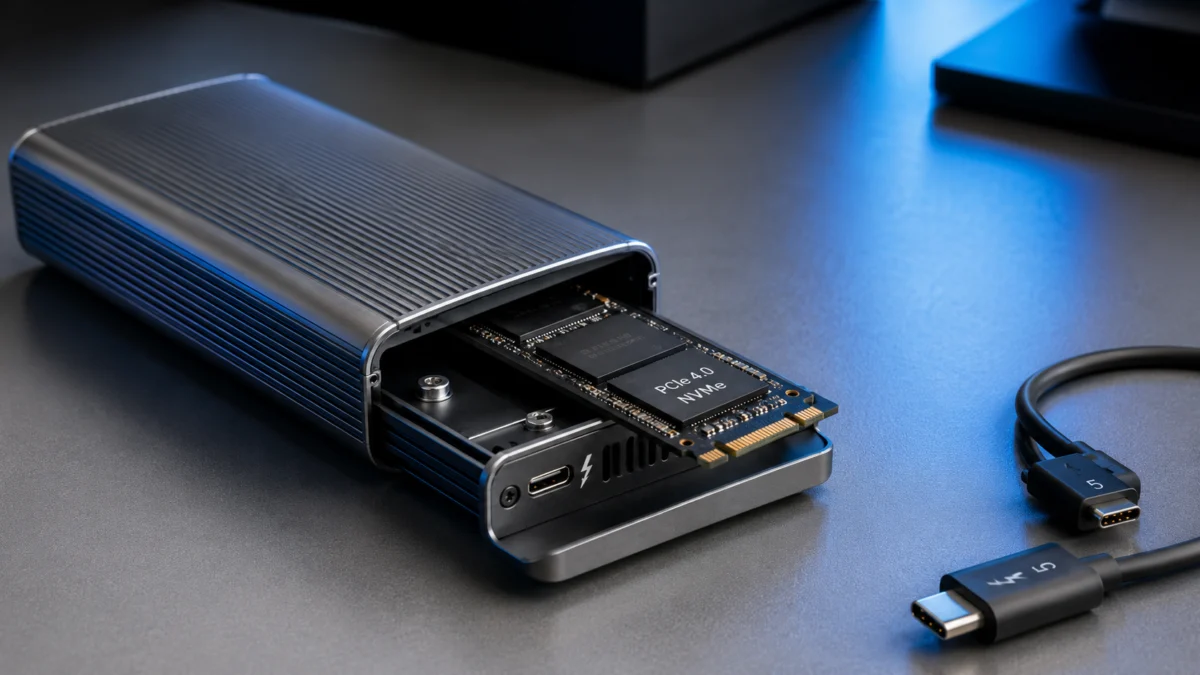
Thunderbolt 5 external SSD enclosures let you build a DIY external drive that reaches
around 6,000 MB/s — nearly matching the internal SSD speeds on an M4 Max MacBook Pro. If
you have an M4 Pro or M4 Max Mac, or a Thunderbolt 5 Windows laptop, a Thunderbolt 5
enclosure with a quality Gen 4 NVMe SSD inside delivers that speed for considerably less
than a prebuilt Thunderbolt 5 SSD. If you want zero setup and a single warranty covering
everything, a prebuilt like the OWC Envoy Ultra is worth the premium. Before you buy
either, three factors matter more than the speed number on the box: your Mac’s chip
generation, the enclosure’s cooling design, and which NVMe SSD you install. This guide
breaks down each factor, recommends enclosures by use case, and tells you when Thunderbolt
5 is overkill for your existing setup.
Jump to a Section
- Quick Answer: Enclosure or Prebuilt SSD?
- What Is a Thunderbolt 5 SSD Enclosure?
- Thunderbolt 5 vs Thunderbolt 4 vs USB4 v2
- DIY Enclosure vs Prebuilt Thunderbolt 5 SSD
- What to Check Before Buying
- Recommended Enclosures by Category
- Heat, Throttling, and the PCIe Gen 5 SSD Trap
- MacBook Pro, Windows, and USB4 Compatibility Notes
- Final Recommendation: Enclosure or Prebuilt?
- Frequently Asked Questions
Quick Answer: Should You Buy a Thunderbolt 5 Enclosure or a Prebuilt SSD?
For most users with an M4 Pro or M4 Max Mac, the best Thunderbolt 5 SSD enclosure is
the OWC Express 1M2 80G — a silent, fanless design with read speeds above 6,000 MB/s
documented in multiple third-party reviews. If your workflow involves sustained
multi-hour transfers, the actively cooled Acasis TB501 Pro is the stronger pick, and the
prebuilt OWC Envoy Ultra is the choice when zero-setup reliability matters most.
Choose a DIY enclosure if you want the most storage per dollar and are comfortable
installing an NVMe SSD yourself. Choose a prebuilt Thunderbolt 5 SSD if you need
out-of-the-box reliability with a single warranty — especially for professional fieldwork.
Either way, confirm your Mac has an M4 Pro or M4 Max chip first; a base M4 Mac tops out
at Thunderbolt 4 speeds regardless of the enclosure you attach.
| Category | Top Pick | SSD Included? | Cooling | Speed & Basis | Best For |
|---|---|---|---|---|---|
| Fanless Enclosure | OWC Express 1M2 80G | No — DIY (M.2 NVMe) | Passive (aluminum heatsink) | ~6,000 MB/s (third-party reviews) | Silent workflows, burst transfers |
| Active-Cooled Enclosure | Acasis TB501 Pro | No — DIY (M.2 NVMe) | PWM fan | ~6,000 MB/s (specs + user reports) | Long video exports, sustained transfers |
| Prebuilt SSD | OWC Envoy Ultra | Yes — factory-installed | Passive (IP67 aluminum) | >6,000 MB/s (third-party testing) | Pro fieldwork, zero-setup reliability |
| Desktop Dock + SSD Bay | Satechi CubeDock | No — DIY bay | Smart fan | ~6,000 MB/s (manufacturer rated) | Desktop Mac setups, hub + storage combo |
| Also Consider (Fanless) | ORICO X50 Pro | No — DIY (M.2 NVMe) | Passive (4-layer heatsink) | ~6,000 MB/s (manufacturer rated) | Budget-conscious DIY builds |
| Also Consider (Prebuilt) | Sabrent Rocket XTRM 5 | Yes — factory-installed | Rugged enclosure | ~6,000 MB/s (manufacturer rated) | Prebuilt alternative to Envoy Ultra |
Host requirement (all picks): an M4 Pro or M4 Max Mac, or a PC with
Thunderbolt 5 / USB4 v2 ports, is required to reach ~6,000 MB/s. On Thunderbolt 4 hosts
— including base M4, M3, M2, and M1 Macs — every option above caps at around
3,800 MB/s.
Affiliate disclosure: Product links on this page are affiliate links. We may earn a
commission if you purchase through them, at no extra cost to you.
Known Issues to Check Before You Buy
Based on reports confirmed across multiple posts on Reddit hardware forums, three issues
come up consistently in Thunderbolt 5 enclosure setups:
- PCIe Gen 5 SSD instability: Multiple users report disconnections and
thermal-related failures when pairing Thunderbolt 5 enclosures with Gen 5 SSDs
(such as the Crucial T705) under sustained high-load workloads. Gen 4 SSDs are
consistently more stable. See the Heat and Throttling
section for details. - Active-cooled enclosure fan noise: Several users on hardware forums
note that PWM fans in active-cooled enclosures run continuously when powered, with
some describing the sound as noticeably loud or high-pitched under load. - Windows idle power supply anomaly: Some Windows systems with
Thunderbolt 5 ports have been reported to supply excessive power at idle, causing
abnormal enclosure heating. Check for BIOS updates before troubleshooting
the enclosure itself.
What Is a Thunderbolt 5 SSD Enclosure?
A Thunderbolt 5 SSD enclosure is a DIY external drive chassis: you purchase the
enclosure separately, then install your own M.2 NVMe SSD inside. The enclosure contains
the Thunderbolt 5 bridge controller (in current products, Intel’s JHL9480), a thermal
management system, and an M.2 slot that accepts standard 2280-size NVMe drives. Unlike a
prebuilt Thunderbolt 5 SSD — where the drive is factory-installed and non-replaceable —
an enclosure lets you choose the NVMe drive, capacity, and brand independently.
Three distinct product types exist in this space, and they are frequently confused
in search results:
- DIY Thunderbolt 5 enclosure: A compact chassis with a single M.2
NVMe bay. You source and install the NVMe SSD yourself. Examples: OWC Express 1M2 80G,
Acasis TB501 Pro, UGREEN 80Gbps enclosure, ORICO X50 Pro. - Prebuilt Thunderbolt 5 SSD: A complete external drive with the NVMe
module factory-installed and non-removable. Examples: OWC Envoy Ultra,
Sabrent Rocket XTRM 5. - Thunderbolt 5 dock with SSD bay: A docking station combining
Thunderbolt 5 hub functions (display outputs, USB ports, Ethernet, host charging) with
an integrated M.2 NVMe storage bay. Examples: Satechi CubeDock, OWC StudioStack.
Thunderbolt 5 vs Thunderbolt 4 vs USB4 v2: What Actually Changes for External SSDs
The speed gap between Thunderbolt 5 and older interfaces comes down to one technical
factor: PCIe tunneling generation. Thunderbolt 5 uses PCIe Gen 4×4 tunneling, which
allows around 6,000 MB/s real-world read speeds. Thunderbolt 4 and standard USB4 are
capped at PCIe Gen 3×4, which tops out around 3,800 MB/s regardless of which drive
you use.
| Interface | Max Bandwidth | PCIe Tunneling | Expected Real-World Speed | Compatible Host Examples |
|---|---|---|---|---|
| Thunderbolt 5 | 80 Gbps | PCIe Gen 4×4 | ~6,000 MB/s | M4 Pro/Max Mac, Core Ultra 200 PCs |
| USB4 v2 | 80 Gbps | PCIe Gen 4×4 | ~6,000 MB/s | Latest high-end PCs with USB4 v2 ports |
| Thunderbolt 4 | 40 Gbps | PCIe Gen 3×4 | ~2,800–3,800 MB/s | M1/M2/M3 Mac, base M4 Mac, most PCs |
| USB4 (Gen 3×2) | 40 Gbps | PCIe Gen 3×4 | ~3,200–3,800 MB/s | AMD Ryzen 6000+, general PCs |
One clarification worth noting: USB4 v2 and Thunderbolt 5 share the same 80 Gbps
foundation. Most current Thunderbolt 5 enclosures — including the OWC Express 1M2 80G
and Acasis TB501 Pro — use the Intel JHL9480 controller, which supports both Thunderbolt 5
hosts and USB4 v2 hosts at full speed. If your Windows PC has USB4 v2 ports rather than
certified Thunderbolt 5 ports, you can still reach 6,000 MB/s with a compatible enclosure.
A note on the “120 Gbps Bandwidth Boost” you may see in marketing materials: this
extended bandwidth applies only to video output (display data), not to PCIe storage
transfers. For SSD use, the ceiling is 80 Gbps / PCIe Gen 4×4, which translates to
approximately 6,000–6,600 MB/s under real-world conditions.
DIY NVMe Enclosure vs Prebuilt Thunderbolt 5 SSD: Who Should Buy What?
The core trade-off is cost and flexibility versus reliability and simplicity. A DIY
enclosure with a Gen 4 NVMe SSD bought separately reaches the same ~6,000 MB/s speeds
as a prebuilt Thunderbolt 5 SSD, typically at a lower combined price. A prebuilt gives
you a single warranty, factory-optimized thermal design, and no installation steps —
at a meaningful price premium.
Why DIY Enclosures Make Sense for Power Users
The primary advantage is cost efficiency. Prebuilt Thunderbolt 5 SSDs carry a
significant premium over buying equivalent components separately. A Thunderbolt 5
enclosure (generally in the $200–$300 range) combined with a high-end Gen 4 NVMe SSD
sourced separately typically comes to substantially less than a prebuilt unit of
equivalent capacity, while delivering the same interface-limited transfer speeds. The
performance ceiling is set by the enclosure’s Thunderbolt 5 interface — not by whether
the drive was factory-installed.
Flexibility is the other major advantage. When higher-capacity NVMe drives become
available or drop in price, you can upgrade the drive inside the same enclosure without
replacing the chassis. You also choose exactly which NVMe drive you pair with the
enclosure — an important factor given that Gen 5 SSDs and Gen 4 SSDs behave very
differently in this environment (detailed in the heat section
below).
Why Prebuilt SSDs Make Sense for Professionals
The OWC Envoy Ultra’s core advantage is not speed — it is accountability. When a DIY
setup fails, diagnosing whether the problem lies in the JHL9480 controller, the NVMe
drive, the thermal interface between the drive and heatsink, or the Thunderbolt cable
means navigating multiple vendors. With a prebuilt SSD, one company covers the
entire system.
The Envoy Ultra is built to IP67 standards (dustproof and water-resistant) and is
rated for drop resistance — capabilities no current DIY enclosure matches. According to
OWC’s product documentation, the Thunderbolt 5 cable is integrated directly into the
unit, eliminating the risk of using an under-spec cable or arriving on a shoot without
a Thunderbolt 5–certified cable.
✅ Buy a DIY Enclosure if…
- You’re comfortable installing an M.2 NVMe SSD and applying a thermal pad.
- You want the most storage capacity per dollar.
- You plan to upgrade the NVMe drive to a larger capacity in the future without
replacing the chassis. - Your setup is primarily desk-based, not exposed to field conditions.
❌ Don’t Buy a DIY Enclosure if…
- You need a single warranty covering everything with no troubleshooting between
vendors. - You work in environments where dust, moisture, or physical impacts are a real
risk. - Drive downtime in the middle of a production or shoot is not acceptable.
- You’re not confident correctly seating a thermal pad against the NVMe controller
chip.
What to Check Before Buying a Thunderbolt 5 NVMe Enclosure
Three factors decide whether your enclosure investment pays off: cooling design, NVMe
SSD selection, and cable compatibility. Getting any one of these wrong leads to either
poor sustained performance or unstable operation.
1. Cooling: Fanless or Active?
Fanless aluminum enclosures (such as the OWC Express 1M2 80G and ORICO X50 Pro) are
completely silent but rely on the aluminum chassis to conduct heat away from the drive.
During burst transfers — moving a few dozen gigabytes — they handle heat without issue.
During sustained transfers of hundreds of gigabytes (a full day’s 8K footage ingest, for
instance), the chassis surface can reach temperatures where the NVMe drive’s firmware
initiates thermal throttling, dropping transfer speeds significantly. If your workflow
involves frequent large sustained transfers, an active-cooled enclosure with a PWM fan
is the safer choice.
2. NVMe SSD: Use Gen 4, Not Gen 5
This is the single most important purchasing decision for DIY builds. Thunderbolt 5’s
PCIe tunneling is capped at Gen 4×4. Installing a PCIe Gen 5 NVMe SSD does not unlock
higher speeds — the interface ceiling remains at approximately 6,000 MB/s. What Gen 5
SSDs add instead is dramatically higher power consumption, which pushes the Thunderbolt 5
bus power budget to its limit, generates excess heat, and can trigger throttling,
disconnections, or in reported cases, the NVMe drive entering a read-only protection
state. A high-performance Gen 4 NVMe drive with DRAM cache — such as the WD Black
SN850X — is the correct choice for this application.
3. Thunderbolt 5 Cable
Thunderbolt 5 requires a Thunderbolt 5–certified cable to achieve 80 Gbps speeds. A
Thunderbolt 3 or Thunderbolt 4 cable will cause the connection to negotiate at 40 Gbps,
cutting real-world speeds roughly in half. Most enclosures do not include a Thunderbolt 5
cable in the box — verify before purchasing, and budget for a certified cable separately
if needed.

Please check the Amazon product page for the latest price and availability.
Recommended Thunderbolt 5 SSD Enclosures by Category
For most M4 Pro or M4 Max users, the OWC Express 1M2 80G with a Gen 4 NVMe SSD covers
burst-heavy creative workflows silently and cost-effectively. If your work involves
sustained large transfers over many hours, step up to an active-cooled option like the
Acasis TB501 Pro. If you need field durability with zero setup, the OWC Envoy Ultra is
the prebuilt to choose. All current top-tier options use Intel’s JHL9480 controller and
reach approximately 6,000 MB/s on a Thunderbolt 5 host.
All specifications below are based on official manufacturer documentation and
publicly available third-party test data. We have not conducted hands-on lab testing.
Best Fanless Enclosure: OWC Express 1M2 80G
The OWC Express 1M2 80G is the most established Thunderbolt 5 enclosure currently
available, with real-world read speeds exceeding 6,000 MB/s documented in multiple
third-party reviews. It supports M.2 2242 and 2280 NVMe SSDs up to 8 TB, uses no
moving parts, and is CNC-machined from aluminum that functions as a passive heatsink.
According to OWC’s product documentation, it is compatible with Thunderbolt 5,
Thunderbolt 4, Thunderbolt 3, and USB4 hosts.
The trade-off is silence at the cost of sustained heat management. The aluminum chassis
becomes noticeably warm during extended transfers, and thermal throttling is a realistic
risk during sustained multi-hundred-gigabyte writes. For burst-heavy workflows — pulling
8K clips from a camera card — the fanless design is practical. For hours-long continuous
exports, the Acasis TB501 Pro is the stronger choice.
Check on Amazon
/
Official site
✅ Buy if…
- You edit in a quiet environment where fan noise is unacceptable.
- Your typical transfers are bursts under 100 GB rather than sustained multi-hour
exports. - You want the most widely reviewed and documented Thunderbolt 5 enclosure
available. - You’re pairing it with a high-performance Gen 4 NVMe SSD with a large SLC
cache.
❌ Don’t buy if…
- Your workflow involves continuous writes of several hundred gigabytes (AI model
processing, long-duration renders). - The enclosure will be placed in a warm environment with limited airflow.
Best Active-Cooled Enclosure: Acasis TB501 Pro
The Acasis TB501 Pro adds a PWM cooling fan to an aluminum chassis, making it better
suited to sustained high-load workloads than passive alternatives. Based on manufacturer
documentation and available user reports, the fan keeps NVMe drive temperatures in a
range that prevents thermal throttling during extended large transfers — the scenario
where fanless enclosures are most likely to slow down.
The known trade-off is noise. According to multiple reports on Reddit hardware forums,
the fan runs continuously when the enclosure is powered, and some users describe the
sound as noticeably loud or producing a high-pitched frequency under load.
If fan noise is a dealbreaker, the OWC Express 1M2 80G is the better alternative.
If long-duration stability matters more than acoustics, the TB501 Pro is the
stronger choice.
Check on Amazon
/
Official site
✅ Buy if…
- You run sustained transfers of several hundred gigabytes or more (long video
exports, AI dataset processing). - Fan noise during transfers is acceptable in your workspace.
- You want active cooling to minimize the risk of thermal throttling under
high load.
❌ Don’t buy if…
- You record audio or work in a studio environment where any fan noise is
a problem. - Your typical transfers are short bursts rather than sustained long writes.
- You plan to install a PCIe Gen 5 SSD — thermal and power instability risks
apply to this enclosure as well.
Best Prebuilt SSD: OWC Envoy Ultra
The OWC Envoy Ultra is the most complete solution for professionals who need field-ready
reliability without setup work. According to OWC’s product documentation, it is rated to
IP67 (dustproof and water-resistant up to 1 meter for 30 minutes), tested for drop
resistance, and ships with the Thunderbolt 5 cable built into the chassis — eliminating
cable compatibility risk entirely. Real-world read speeds documented in third-party testing
exceed 6,000 MB/s. Capacity options reach up to 8 TB.
The Envoy Ultra is priced at a significant premium over a DIY enclosure-plus-SSD
combination at equivalent capacity. That premium reflects integrated design,
single-vendor warranty, and ruggedization — not raw performance, which is comparable
across all JHL9480-based Thunderbolt 5 products.
Check on Amazon
/
Official site
✅ Buy if…
- You shoot on location and need a drive that can survive dust, rain, or drops.
- You want a single warranty covering everything — no troubleshooting between
vendors if something goes wrong. - You don’t want to source, install, or apply thermal pads to an NVMe SSD
yourself. - You need a cable that’s always ready without checking for Thunderbolt 5
certification.
❌ Don’t buy if…
- You’re primarily desk-based and the price premium is difficult to justify.
- You want to upgrade the NVMe module to a larger capacity in the future.
- You’re buying multiple drives and cost per terabyte is a primary concern.
Best Desktop Dock with SSD Bay: Satechi Thunderbolt 5 CubeDock
The Satechi CubeDock is not a portable enclosure — it is a desktop hub that integrates
a Thunderbolt 5 NVMe storage bay alongside display outputs, USB-A and USB-C ports, an
SD card reader, 2.5 GbE Ethernet, and up to 140W host charging, all through a single
Thunderbolt 5 cable. According to Satechi’s product documentation, the NVMe bay supports
M.2 2230 through 2280 drives up to 8 TB with real-world speeds around 6,000 MB/s,
managed by a smart fan control system.
This category makes the most sense for Mac Studio, Mac mini, or docked MacBook Pro
users who want to reduce cable count while adding high-speed storage. For users who also
need bulk archival storage alongside fast NVMe, the OWC StudioStack is worth comparing —
it combines a Thunderbolt 5 NVMe bay with SATA HDD expansion bays in a single unit
designed for Mac Studio and Mac Pro workflows.
Check on Amazon
/
Official site
✅ Buy if…
- You use a desktop Mac (Mac Studio, Mac mini) or dock a MacBook Pro at a fixed
workstation. - You want to consolidate hub, display output, and high-speed storage into a
single Thunderbolt 5 cable. - Portability is not a requirement.
❌ Don’t buy if…
- You need a drive you can take on location.
- You only need storage without hub features — a standalone enclosure is more
cost-effective.
Also Consider: UGREEN NVMe SSD Enclosure 80Gbps
An active-cooled alternative to the Acasis TB501 Pro, with a combined aluminum and fan
design. Maximum capacity is 8 TB, and the manufacturer publishes a 7,000 MB/s peak
specification (based on official specs; independent verification of sustained speeds is
limited at time of writing). A viable option if the Acasis TB501 Pro is unavailable
or priced higher in your region.

Please check the Amazon product page for the latest price and availability.
✅ Buy if…
- You need an active-cooled enclosure for sustained transfers and the Acasis TB501
Pro is unavailable. - You’re comfortable with limited independent sustained-speed testing data at
time of purchase.
❌ Don’t buy if…
- You want the most independently documented enclosure in its class — the Acasis
TB501 Pro has more publicly available user reports at time of writing. - Fan noise is a concern — active cooling in this price range carries similar
acoustic trade-offs as other fan-equipped models.
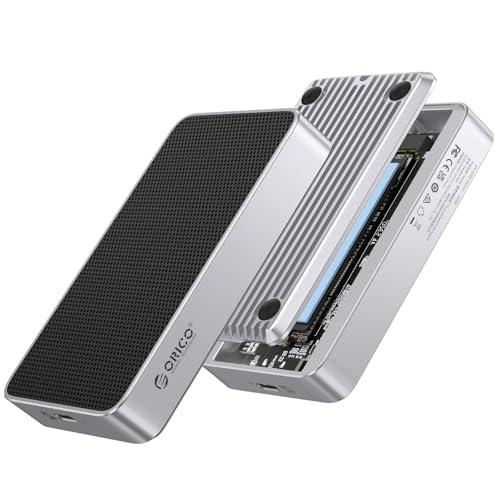
Also Consider: ORICO X50 Pro
A fanless enclosure with a 4-layer passive cooling structure, rated at 6,000 MB/s with
up to 8 TB capacity. A budget-friendlier fanless alternative to the OWC Express 1M2 80G,
with less third-party sustained-speed testing publicly available at time of writing.
Please check the Amazon product page for the latest price and availability.
✅ Buy if…
- You want a silent fanless enclosure and the OWC Express 1M2 80G is out of
your budget. - Your transfers are primarily short bursts rather than sustained large
writes.
❌ Don’t buy if…
- You require the most thoroughly documented sustained-performance data before
purchasing — the OWC Express 1M2 80G has more independently verified results
available. - Your workflow involves continuous large transfers where passive cooling is
likely to reach its thermal limit.
Also Consider: Sabrent Rocket XTRM 5
A prebuilt Thunderbolt 5 SSD alternative to the OWC Envoy Ultra, rated at 6,000 MB/s
in a rugged enclosure. Third-party verification of real-world sustained speeds is more
limited compared to the Envoy Ultra at time of writing.

Please check the Amazon product page for the latest price and availability.
✅ Buy if…
- You want a prebuilt Thunderbolt 5 SSD and the OWC Envoy Ultra is out of stock
or out of your budget. - You’re comfortable with less publicly available independent review data at time
of purchase.
❌ Don’t buy if…
- IP67-rated field durability is a firm requirement — independent verification of
ruggedness specs is more limited than the Envoy Ultra at time of writing. - A single well-documented option with a long support track record is a
priority.
Recommended NVMe SSD for DIY Enclosure Builds
For any DIY Thunderbolt 5 enclosure, a PCIe Gen 4 NVMe SSD with DRAM cache is strongly
recommended. The WD Black SN850X is the most consistently reported stable pairing across
multiple enclosures and host systems based on community reports. Available in 2 TB and
4 TB capacities, which represent the most practical options for creative workflows.

Please check the Amazon product page for the latest price and availability.
Heat, Throttling, and the PCIe Gen 5 SSD Trap
The most common and costly mistake in Thunderbolt 5 DIY builds is installing a PCIe
Gen 5 NVMe SSD. Gen 5 SSDs do not deliver higher speeds in a Thunderbolt 5 enclosure —
the interface is capped at PCIe Gen 4×4. What they add instead is substantially higher
power draw and heat, creating real operational risks.
According to Intel’s published Thunderbolt 5 specification, PCIe Gen 4×4 tunneling
is the standard for data storage transfers, and the bandwidth ceiling for external SSDs
is approximately 6,000–6,600 MB/s regardless of the NVMe drive’s rated speed.
Installing a Gen 5 SSD rated at 14,000 MB/s into a Thunderbolt 5 enclosure produces
the same interface-limited result as a Gen 4 SSD — but with significantly more heat.
Active-state power consumption for high-performance Gen 5 drives can approach 15W,
which is at or near the bus power limit available from a Thunderbolt 5 port.
According to multiple reports on Reddit, using a Gen 5 SSD such as the Crucial T705
inside a Thunderbolt 5 enclosure during sustained high-load workloads — including video
export in Premiere Pro — caused thermal and power spikes that resulted in the enclosure
disconnecting repeatedly. In some reported cases, the NVMe drive was left in a
read-only protection state after the events.
These reports do not represent a universal outcome, and results vary by host system
and workload, but the pattern is consistent enough to treat Gen 5 SSDs as
incompatible with this use case in practice.
By contrast, high-performance Gen 4 SSDs — particularly the WD Black SN850X —
are consistently reported as stable in the same enclosures under the same workloads,
based on community reports across multiple hardware forums.
Understanding SLC Cache and Sustained Write Speeds
Even with the correct Gen 4 SSD installed, large sustained transfers behave
differently than benchmark results suggest. Most NVMe SSDs use a portion of their
NAND as a high-speed SLC write cache. When transferring a few dozen gigabytes, this
cache handles the writes and speeds appear near peak. When transferring several hundred
gigabytes continuously — such as ingesting a full camera card of ProRes footage — the
SLC cache exhausts, and the drive falls back to writing directly to slower TLC NAND.
Transfer speeds drop noticeably mid-transfer. This behavior occurs regardless of
enclosure quality; it is a property of the NVMe drive itself. Drives with larger DRAM
caches and larger SLC allocation mitigate this more effectively.
MacBook Pro, Windows, and USB4 Compatibility Notes
Your host device determines whether a Thunderbolt 5 enclosure actually delivers
6,000 MB/s. Buying the wrong enclosure is a fixable mistake. Buying a Thunderbolt 5
enclosure for a host that doesn’t support Thunderbolt 5 is a permanent performance
limitation at the price of a premium product.
MacBook Pro: M4 Pro and M4 Max vs Base M4
MacBook Pro models with M4 Pro or M4 Max chips ship with Thunderbolt 5 ports (up to
120 Gb/s) and drive a Thunderbolt 5 enclosure at full ~6,000 MB/s. Base M4 MacBook
Pro, M4 MacBook Air, and M4 Mac mini models ship with Thunderbolt 4 ports (40 Gbps).
When a Thunderbolt 5 enclosure connects to a Thunderbolt 4 port, the link negotiates
to Thunderbolt 4 mode — real-world speeds cap at around 3,800 MB/s, not 6,000 MB/s.
The same limitation applies to all M1, M2, and M3 Mac models.
If you have a base M4 Mac and your workflow requires the fastest possible external
storage, a current-generation Thunderbolt 4 or USB4 enclosure at a lower price point
is the more appropriate choice. The Thunderbolt 5 premium delivers no performance
benefit on these hosts.
macOS: Format as APFS for Video Editing
Most external NVMe drives and enclosures ship formatted as exFAT for cross-platform
compatibility. Using an exFAT drive as a scratch disk or project drive in macOS video
editing applications (Final Cut Pro, DaVinci Resolve, Premiere Pro) is not recommended.
exFAT lacks journaling, which increases the risk of metadata corruption and project
file damage during intensive read/write operations. For Mac-only or Mac-primary use,
reformatting the drive to APFS using macOS Disk Utility before first use
is strongly advised.
Windows: BIOS, Drivers, and Idle Power
Thunderbolt 5 support on Windows systems — including Intel Core Ultra 200 series
(Arrow Lake) desktop platforms and 2025-generation gaming laptops — is functional but
less consistent than on Apple Silicon Macs. Windows users should confirm that
Thunderbolt firmware and Intel Thunderbolt drivers are fully updated before treating
a connection problem as a hardware defect.
Multiple reports on hardware forums describe “Code 10” errors (device cannot start)
in Windows Device Manager, which in many cases resolved after a driver or BIOS update.
Some Windows systems have also been reported to supply abnormal power levels to
Thunderbolt 5 devices at idle, causing enclosure overheating unrelated to active
transfers. If you observe unexpected heat on the enclosure at idle, check for a
BIOS update specific to your motherboard or system model before concluding the
enclosure is at fault.
Final Recommendation: Enclosure or Prebuilt?
The right choice depends on whether your priority is cost efficiency, sustained
workload performance, or operational reliability in unpredictable environments.
- Choose the OWC Express 1M2 80G if you have an M4 Pro or M4 Max
Mac, want the best value per terabyte, work in a quiet environment, and your transfers
are primarily bursts rather than hours-long sustained exports. Pair it with the WD
Black SN850X for the most stable and well-documented combination. - Choose the Acasis TB501 Pro if your workflow involves sustained
large transfers — long-duration renders, AI dataset processing, bulk footage ingest —
and fan noise is acceptable. The active cooling is worth the trade-off for
sustained workloads. - Choose the OWC Envoy Ultra if you work on location, need IP67
durability and drop resistance, and want a single vendor warranty with zero
installation steps. - Choose the Satechi CubeDock if you use a desktop Mac or dock a
MacBook Pro at a fixed workstation and want to replace multiple peripherals with a
single Thunderbolt 5 cable. - Do not buy any Thunderbolt 5 product if your Mac has a base M4,
M3, M2, or M1 chip. A Thunderbolt 4 or USB4 enclosure delivers 3,800 MB/s at a
lower price point, and the Thunderbolt 5 premium has no effect on your host hardware.
Frequently Asked Questions
What is the best Thunderbolt 5 SSD enclosure in 2026?
For most users, the OWC Express 1M2 80G — the most widely documented Thunderbolt 5
enclosure available, with read speeds above 6,000 MB/s confirmed in multiple third-party
reviews and fully silent passive cooling. If your workflow involves sustained transfers
of several hundred gigabytes, the actively cooled Acasis TB501 Pro is the stronger
choice.
Do I need a PCIe Gen 5 SSD to get full Thunderbolt 5 speed?
No. Thunderbolt 5’s PCIe tunneling is capped at Gen 4×4, so a Gen 5 drive hits the
same ~6,000 MB/s ceiling while drawing far more power and generating more heat. User
reports link Gen 5 drives such as the Crucial T705 to disconnections and thermal
failures in these enclosures. A Gen 4 drive with DRAM cache, such as the WD Black
SN850X, is the recommended pairing.
Will a Thunderbolt 5 enclosure work with a base M4 or M3 Mac?
Yes, it works — but the link negotiates down to Thunderbolt 4 mode, capping
real-world speeds at around 3,800 MB/s. On base M4, M3, M2, and M1 Macs, a
lower-priced Thunderbolt 4 or USB4 enclosure delivers the same performance, so the
Thunderbolt 5 premium buys nothing.
Do Thunderbolt 5 enclosures come with a cable?
Most do not include one. A Thunderbolt 5–certified cable is required to reach
80 Gbps; using a Thunderbolt 3 or 4 cable drops the link to 40 Gbps and roughly halves
real-world speeds. Check the box contents before purchasing and budget for a certified
cable separately if needed. The prebuilt OWC Envoy Ultra sidesteps this with an
integrated cable.
How We Researched
This article is based on Thunderbolt 5 product specifications from official
manufacturer documentation (OWC, Acasis, Satechi, UGREEN, ORICO, Sabrent), Intel’s
published Thunderbolt 5 and JHL9480 controller specifications, real-world performance
data from third-party hardware publications, and community-reported results confirmed
across multiple threads on Reddit hardware forums. We have not conducted hands-on lab
testing. All performance figures reflect manufacturer claims or documented third-party
test results unless otherwise noted. Compatibility information reflects Apple’s published
chip specifications and Intel’s published platform specifications as of 2026.
Final Thoughts
Thunderbolt 5 is a genuine performance leap for external storage. The 6,000 MB/s
ceiling shifts the bottleneck away from the interface and toward the NVMe drive itself
— specifically toward how well it manages heat and sustains throughput over long
transfers. The most important variables in a successful build are not the enclosure
brand, but the cooling design you match to your workflow, the NVMe generation you
install (Gen 4, not Gen 5), and the Thunderbolt 5 port availability on your specific
Mac. Get those three decisions right, and a Thunderbolt 5 enclosure is one of the most
cost-effective ways to build a professional-grade external storage system.








Comments