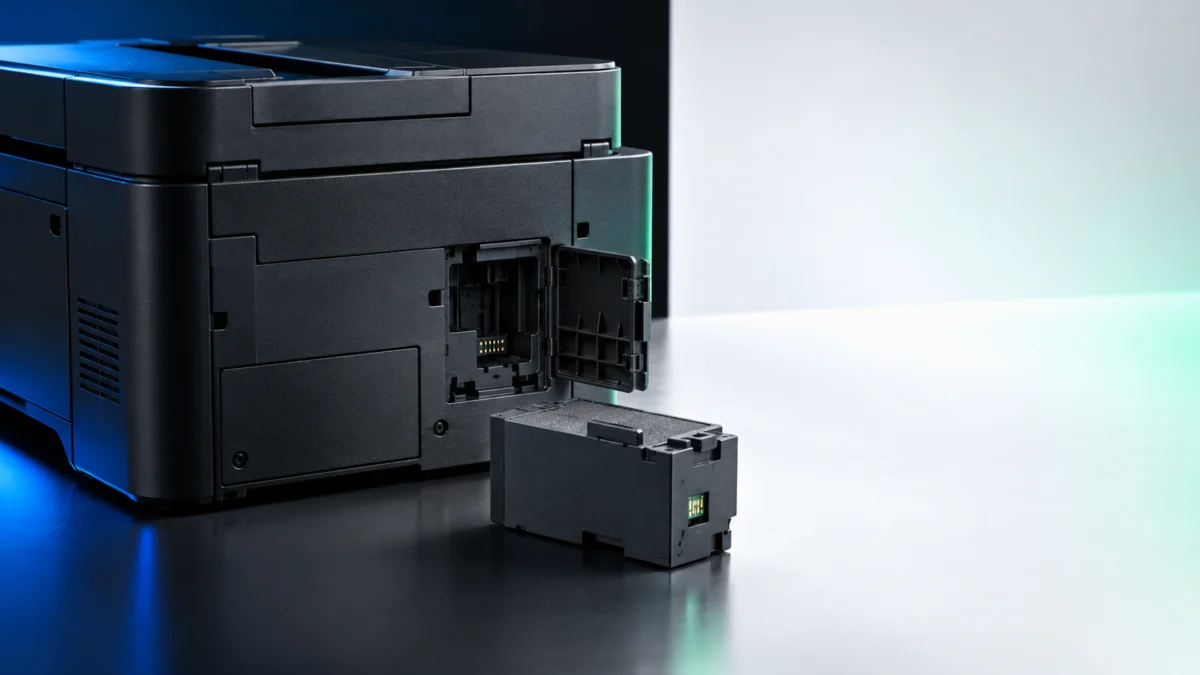
If your Epson ET-4850 reports that the maintenance box is full, the part you need is the Epson T04D1 ink maintenance box. Epson’s own accessory page lists T04D100 as the model number for that part and states that the two numbers refer to the same item, and its compatibility list includes the EcoTank ET-4850. The maintenance box cover sits on the back of the printer, and the box is a user-replaceable part you can fit yourself.
One check matters before you order anything. If the message on screen names an ink pad rather than the maintenance box, a new T04D1 will not clear it. Epson classes those pads as parts that are not user-replaceable, and that situation goes to Epson support instead.
Quick Fix Checklist
Before you order anything, confirm three things: the exact wording of the message on the LCD screen, the maintenance box level shown under the supply status icon, and the part number Epson lists for the ET-4850. Each takes under a minute and decides whether a replacement box will actually help.
- Read the full message. Note whether it names the maintenance box or an ink pad. These are different parts with different outcomes.
- Check the level on the LCD. The supply status icon on the home screen shows the remaining capacity of the maintenance box.
- Match the part number. Epson lists T04D100 for the ET-4850 and sells it as the T04D1 ink maintenance box.
- Expect printing to stop. Once the box is full, printing and print head cleaning are unavailable until it is replaced. Scanning and other operations that do not use ink still work.
- Do not swap it mid-job. Epson warns that replacing the box during printing can cause ink to leak.
Maintenance Box or Ink Pad? Read the Exact Message First
The ET-4850 reports two different waste-ink problems and only one is a part you can buy. A maintenance box message points to T04D1, which you install yourself. A message naming the borderless printing ink pad or the waste ink pads points to a service part that Epson support handles.
Both situations stop the printer in a similar way and both mention ink collection, which is why the mix-up is common. Ordering a T04D1 for an ink pad message leaves you with a part you cannot use and a printer that still will not print.
| What the message names | What it means | What to do |
|---|---|---|
| Maintenance box | The removable box that stores surplus ink from printing and print head cleaning. Epson describes it as a user-replaceable part, and it is not covered by the product warranty. | Fit a new T04D1 / T04D100 yourself. |
| Borderless printing ink pad, nearing the end of its service life | An internal pad approaching its limit. Epson states it is not a user-replaceable part and that the message will keep appearing until the pad is replaced. | Contact Epson support. Selecting OK lets you resume printing for now. |
| Borderless printing ink pad, reached the end of its service life | The same internal pad, now at its limit. | Turn the printer off and contact Epson support. Operations that do not use ink, such as scanning, still work. |
| Waste ink pads | Internal pads that collect and contain unused ink. Epson states these are not a user-replaceable part. | Within the standard warranty, Epson covers the exchange or pad replacement. Out of warranty, any Epson authorized service provider can replace them. |
See Epson’s ET-4850 product status messages
Which Part Fits the ET-4850: T04D1 and T04D100
They are the same product. Epson’s accessory page for the T04D1 ink maintenance box lists T04D100 as the model number and states directly that the two numbers refer to one part. The same page lists the EcoTank ET-4850 under the printers it works with.
The ET-4850 user’s guide comes at it from the other direction and gives T04D100 as the part number to use when ordering. A listing saying T04D1, one saying T04D100, and one saying both are all describing the same part. Expect it to sit in the low double digits, well under the cost of an ink refill set.
Check Epson’s T04D1 product page and ET-4850 compatibility list
See Epson’s ET-4850 ink and maintenance-box part numbers
Genuine or compatible?
The trade-off is narrower than it looks. Epson states that its warranties do not extend to damage caused by third-party ink or ink not designed for the printer, and that the maintenance box itself is not covered by the product warranty in any case. Every box carries a green chip on its side that Epson tells you not to touch, so handle any replacement by the body.
Buy genuine if you want to stay inside Epson’s own guidance, or if a replacement box has already refused to register. Compatible boxes usually come in multi-packs and cost less per unit, which suits a printer running frequent cleaning cycles — but confirm the listing names the ET-4850 explicitly, and do not treat a compatible box as an Epson part.
This article may contain affiliate links.
Genuine Epson option:
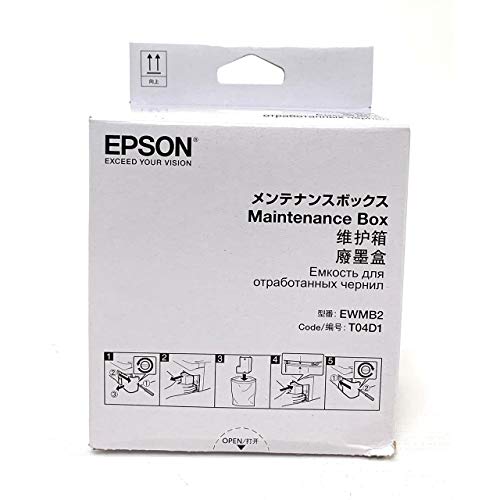
Please check the Amazon product page for the latest price and availability.
Compatible (non-genuine) option:

Please check the Amazon product page for the latest price and availability.
Check the Maintenance Box Status on the LCD Screen
You can see how much capacity is left before you order. From the home screen, select the supply status icon and the printer shows the remaining capacity of the maintenance box, then select OK to exit. This also confirms the printer is reading the box at all.
Run this check even when the error is already on screen. A display showing the box as full confirms that replacement is the relevant path. If the printer cannot show a level, reseat the installed box and check the display again before ordering another part.
See Epson’s LCD maintenance-box status steps
How to Replace the Maintenance Box on the ET-4850
The fix takes six steps. The ET-4850 user’s guide does not print a written teardown; it points you to animated instructions on the printer’s own screen and supplies the handling precautions separately. The steps below combine both so you can work through the swap without guessing at any point.
- Wait until the printer is idle. Let the current job finish before you start. Epson warns that replacing the maintenance box during printing can cause ink to leak.
- Open the on-screen guide. Press the help button, then select How To for common procedures or Troubleshooting if you are working from an error, and pick the relevant topic. The ET-4850 plays an animation for your exact model.
- Go to the back of the printer. The maintenance box cover is on the rear panel, alongside the duplexer cover and the AC, LAN, USB, EXT and LINE ports. It is not on the side and not underneath.
- Remove the used box without tipping it. Keep it level once it is out, avoid the openings, and do not touch the green chip on its side. Epson’s guidance is to leave the box and its cover alone except when actually replacing it.
- Fit the new T04D1 and refit the cover. If the cover will not go back on, Epson’s stated cause is that the box is not installed correctly — remove it and reinstall it rather than forcing the cover.
- Confirm the level on the LCD. Power the printer back on and open the supply status icon from the home screen. A correctly seated new box reports fresh capacity.
Two of Epson’s precautions are easy to miss. Keep the box out of direct sunlight and away from high or freezing temperatures, and do not drop it. Epson also advises against reusing a box that has been left uninstalled for a long period, which rules out keeping a part-used box as a spare.
Read Epson’s maintenance-box replacement precautions
Do You Need to Reset a Counter? What to Do If the Error Stays
No reset procedure appears anywhere in the ET-4850 user’s guide. Every official instruction for this model tells you to follow the on-screen prompts after fitting the new box. If the message stays after replacement, the usual causes are a box that is not seated properly or a message that was never about the box.
This is worth stating plainly, because much of the advice circulating for this printer describes a “reset counter” option in the settings menu. We went through the full contents of the ET-4850 user’s guide — part numbers, replacement, status checks, control panel settings, status messages and troubleshooting — and found no such step for this model. We have not read every Epson support article or the printed setup materials, so we can only say it is not documented in the official ET-4850 documentation we checked. What is documented, consistently, is that the printer walks you through the replacement on screen.
If the error is still there after you fit a new box, work through these in order:
- Reseat the box. Epson names incorrect installation as the reason the cover may not refit. Remove the box, fit it again, and check whether the cover and status display now behave normally.
- Re-read the message. If it names an ink pad rather than the maintenance box, no replacement box will clear it. That is a support case.
- Check the status display. If the supply status screen still shows no capacity for a brand-new compatible box, trying a genuine T04D1 can help determine whether the replacement itself is involved.
- Contact Epson. If a genuine box still does not appear correctly after you reseat it, contact Epson for further diagnosis.
How We Researched
This article is based on Epson’s official ET-4850 user’s guide, Epson’s US product page for the T04D1 ink maintenance box, and Epson’s published product status message list. We have not conducted hands-on lab testing. Part numbers, compatibility, replacement precautions, control panel steps and the user-replaceable status of each component are all attributed to those official sources. Where we say something is not documented, we mean it was absent from the official pages we opened, which we have listed above rather than implying a check of every Epson document.
We looked for recurring first-hand user reports in community forums and did not find a body of posts that met our sourcing bar, so this article has no user-reports section. We also found question-and-answer pages with conflicting part-number advice, so the guidance above relies on Epson’s documentation instead.
Frequently Asked Questions
Is T04D1 the same as T04D100?
Yes. Epson’s product page for the T04D1 ink maintenance box gives T04D100 as the model number and states that the two part numbers refer to the same item. Listings may use either number or both, but confirm that the specific listing names the ET-4850 as compatible.
Can I keep printing with a full maintenance box?
No. Epson states that when the maintenance box is full you cannot print or clean the print head until it is replaced. Operations that do not require ink, such as scanning, remain available, so you can still use the ET-4850 as a scanner while you wait for the part.
Will a compatible maintenance box void my warranty?
Epson states that the maintenance box itself is not covered by the product warranty. Its guide separately excludes damage caused by third-party ink, but that statement does not directly answer how Epson would assess a compatible maintenance box. If warranty implications matter in your case, use the genuine part or confirm the policy with Epson before installing a compatible one.
The Bottom Line
For a maintenance box message on the ET-4850, the answer is straightforward: the part is Epson’s T04D1, sold under model number T04D100, and it goes in behind a cover on the back of the printer. Check the level on the LCD first, follow the animation the printer plays for you, and confirm the new capacity on the same status screen afterwards.
The one thing not to skip is reading the message wording. Maintenance box means a part you can buy and fit in a few minutes. Ink pad means a part Epson does not let you replace, and the money is better spent on a support call than on a box that will not fix it.