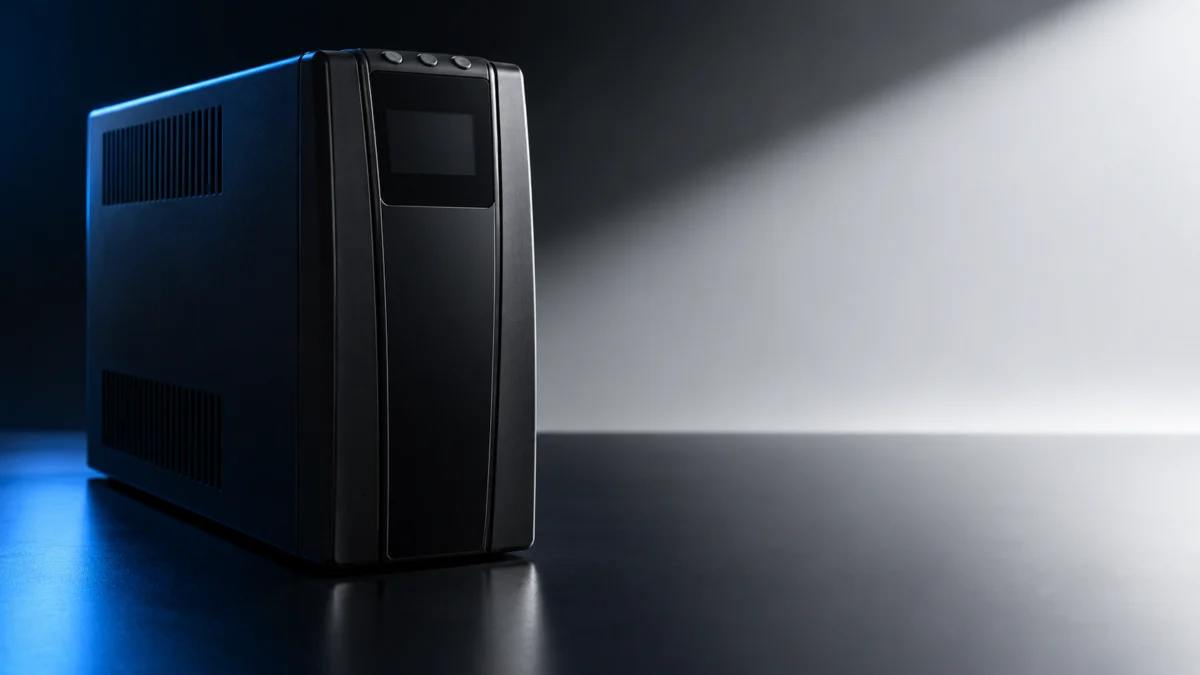
If your APC Back-UPS Pro BR1500MS2 shows the Replace Battery icon, the official manual identifies an aging battery. Once you have confirmed the warning and ruled out damage or a separate hardware fault, arrange replacement with the matched APCRBC163 cartridge. Before you order anything, confirm two things for free. First, make sure the signal really is Replace Battery and not On Battery, Overload, a disconnected battery, or a System Error code. Second, rule out the conditions that mean you should stop using the unit right now.
This guide covers only the US 120 V BR1500MS2 used with a desktop PC or workstation. It is based on official Schneider Electric (APC) documentation, not hands-on testing. The warning meanings and the cartridge listed here apply to the BR1500MS2 only; if the label on the rear panel of your UPS shows another model, use that model’s own manual.
Quick answer:
- Replace Battery icon or continuous chirping, no F-code: order an APCRBC163 cartridge.
- Chirps every 2 seconds: the battery is disconnected. Check the connection before buying.
- On Battery, Overload, F01, or F02: follow the power and load checks before deciding whether parts are needed.
- F04 through F09: contact Schneider Electric Technical Support.
- Battery overheating, electrolyte leakage, or a lit Building Wiring Fault indicator: stop using the UPS first.
Which BR1500MS2 Warning Are You Actually Seeing?
On the BR1500MS2, Replace Battery means the battery is nearing the end of its useful life. A flashing Replace Battery icon with an empty Battery Capacity icon, or continuous chirping after a failed automatic test, both point to replacement. Four beeps every 30 seconds, a continuous tone, chirps every 2 seconds, and F-codes mean something else.
The current Back-UPS Pro user manual (EN JPT92208, 04/2026) links a flashing Replace Battery symbol together with an empty charge indicator to a battery approaching retirement. Arrange a replacement promptly when that warning appears. If the LCD has dimmed in Power Saving mode, a short press of DISPLAY lights it for 60 seconds so you can read it.
| What you see or hear | What the BR1500MS2 manual says | What to do next |
|---|---|---|
| Flashing Replace Battery icon with an empty Battery Capacity icon | The battery is nearing the end of its useful life. | Replace the battery as early as possible. |
| REPLACE BATTERY indicator illuminated | The battery has reached the end of its useful life. | Replace the battery as early as possible. |
| Continuous chirping | The battery did not pass the automatic diagnostic test and should be replaced as early as possible. | MUTE pauses the chirping but does not fix the battery. Plan the replacement. |
| Chirps every 2 seconds | Battery is disconnected. | See the Connect Battery section of the manual. A new unit ships with the battery disconnected. |
| Four beeps every 30 seconds, On Battery icon | Back-UPS is running on battery. | Consider saving your work, then check wall power (next sections). |
| Continuous beeping, flashing Low Battery | Low battery condition and very low runtime. | Save your work, exit open applications, and shut down the operating system. |
| Overload icon or a continuous tone | The connected load is more than the UPS can supply. | Disconnect equipment until the Overload icon stops flashing. |
| F01 On-Battery Overload or F02 On-Battery Output Short | The manual provides load-isolation checks for these codes. | Follow the manual’s F01 or F02 steps for the Battery Backup outlets. |
| F04 through F09 | Cannot be corrected by the user. | Contact Schneider Electric Technical Support. |
| Building Wiring Fault indicator lit (rear panel) | A detected problem with the wiring in the building. | Contact an electrician immediately and do not use the Back-UPS. |
A System Error with every front panel indicator flashing is an internal detected error. Match the number on the LCD to the Detected System Errors list before deciding anything else.
When Should You Stop Using the UPS Right Away?
Stop using the BR1500MS2 if the UPS indicates a battery over-temperature condition, if you see electrolyte leakage, or if the rear Building Wiring Fault indicator is lit. These are not situations to keep testing. The manual’s battery caution is headed by a risk of hydrogen sulphide gas and excessive smoke.
- Overheating or leakage: the manual says to replace the battery immediately when the UPS indicates a battery over-temperature condition, or when there is evidence of electrolyte leakage. It then says to power off the UPS, unplug it from the AC input, disconnect the batteries, and not operate the UPS until the batteries have been replaced.
- Building Wiring Fault: the problem is in the building wiring, not the battery. Contact a qualified electrician and keep the UPS out of use.
- Hot or damaged batteries: the manual warns that failed batteries can exceed burn thresholds for touchable surfaces, and that batteries must not be opened or mutilated because the released material is harmful to skin and eyes.
Battery work requires someone who understands battery hazards and the manufacturer’s precautions, either performing or supervising the service. If you lack that knowledge, contact Schneider Electric support or a qualified service provider instead of handling the battery yourself. For a hot, leaking, swollen, or otherwise damaged cartridge, keep clear and seek support; do not attempt removal. Do not attempt internal repairs. This guide does not replace the manufacturer’s safety instructions or professional electrical advice.
What Should You Check Before Blaming the Battery?
Check where your PC is plugged in, how much load the UPS carries, whether wall power is reaching it, and whether a recent outage drained the battery. These four checks cost nothing and separate outlet, load, and power problems from a worn battery. They do not override a Replace Battery icon.
The checks take 4 steps.
- Confirm the outlet type. Put the PC and other equipment that needs outage backup on the Battery Backup outlets, following the manual’s connection guidance. The Surge Protected outlets are for printers and scanners that do not need battery power. If your PC shuts off during an outage, first make sure it is not on a Surge Only outlet.
- Read the load. Press DISPLAY to step through the LCD readings. Load shows the total watts or percentage used by devices on the Battery Backup outlets, and each Load Capacity bar represents 20% of the load. An Overload warning means the connected equipment is asking the UPS for too much power. Move non-essential equipment from the Battery Backup outlets to the Surge outlets. If the Overload icon stops flashing, the UPS will continue to operate normally.
- Check wall power if the UPS runs on battery while plugged in. The manual lists three causes: the plug has partially pulled out, the wall outlet is no longer receiving AC power, or the circuit breaker has tripped. Push the plug fully in and test the wall outlet with another device. The UPS may also be running a short automatic self test, which needs no action. If the input voltage is out of range, the manual points to adjusting the transfer voltage and sensitivity range.
- Recharge after a recent outage. If backup time is short because the battery was recently discharged by an outage and has not fully recharged, the manual’s corrective action is to charge the battery cartridge for 16 hours. That row covers short backup time after an outage. It is not presented as a way to clear Replace Battery.
Will Recharging or a Self-Test Clear the Replace Battery Warning?
Not according to the official BR1500MS2 material we checked. The manual ties Replace Battery to the end of battery life and says to replace the battery as early as possible. The 16-hour charge applies to short runtime after an outage, and the self-test is a diagnostic, not a documented way to clear the warning.
Page 14 of the current manual lists a manual Self-Test to check the internal battery. The same table notes that this test also runs automatically when the UPS is turned on or when it has previously detected a bad battery. A failed test is reported as continuous chirping, which the manual says means the battery should be replaced as early as possible.
The Detected Error Reset in the same table removes the visual indication of a detected error and returns the UPS to standby. The manuals we checked do not describe it as a fix for a worn battery, so do not treat a cleared screen as proof the battery is healthy.
Which Replacement Battery Does the BR1500MS2 Use?
The BR1500MS2 uses the APCRBC163 replacement battery cartridge. Both the 2020 BR1500MS2 manual and the April 2026 Back-UPS Pro manual list APCRBC163 for this model. Confirm BR1500MS2 on the rear-panel label before ordering, and use a genuine APC Replacement Battery Cartridge, as the current manual recommends.
- Model check: the model and serial numbers are on a label on the rear panel. Order APCRBC163 only if that label reads BR1500MS2.
- Official listing: the BR1500MS2 user manual (EN 990-6375) states that the battery replacement part for Back-UPS Pro BR1500MS2 is APCRBC163, and the battery table in the current manual matches it.
- Same type: the safety section says to replace batteries with the same number and type as originally installed.
- Genuine cartridge: the current manual says to use only genuine APC Replacement Battery Cartridges (RBC). The RBC includes instructions for battery replacement and disposal, so follow those instead of improvising.
- Where to order: the manual directs you to the Schneider Electric website, and the status table says to contact Schneider Electric Customer Service to order a replacement battery. We have not linked a retailer listing for APCRBC163.
- Do not wait: delaying replacement may corrode the batteries in the cartridge. Recycle the spent cartridge.
The manual says the battery typically lasts 3 to 5 years, less with frequent outages or elevated temperatures, and that it should be replaced at least every 5 years or at the end of its service life, whichever is earlier.
Should You Replace the Battery, Get Service, or Buy a New BR1500MS2?
Replace the battery when the warning is Replace Battery or a failed-test chirp and no F-code appears. Contact Schneider Electric Technical Support for F04 through F09, because the manual says the user cannot correct them. Consider a whole new UPS only after support confirms a hardware fault and replacement makes more sense than service.
| Situation | Best next step | Buy anything? |
|---|---|---|
| Replace Battery icon or indicator, or continuous chirping, with no F-code | Order a genuine APCRBC163 cartridge | Battery cartridge only |
| Chirps every 2 seconds | Check the battery connection per the manual | No |
| On battery while plugged in | Check the plug, wall outlet, and breaker | No |
| Overload, F01, or F02 | Follow the manual’s load-isolation steps for the specific code | Complete the checks first; seek support if the fault recurs |
| F04 Clamp Short, F05 Charge Error, F06 Relay Welding, F07 Temperature, F08 Fan Error, F09 Internal Error | Contact Schneider Electric Technical Support | Not until support confirms the cause |
| Building Wiring Fault indicator lit | Contact an electrician; do not use the UPS | No |
| Battery over-temperature or electrolyte leakage | Stop using the UPS and get the battery replaced by knowledgeable personnel or support | Battery cartridge, handled safely |
The current manual directs owners with F04–F09 to Schneider Electric Technical Support because these faults require service rather than user repair. It also marks F08 Fan Error as available only on the BR1500MS2.
If support confirms the UPS itself has failed and a like-for-like replacement makes more sense than service, match the BR1500MS2’s 1500 VA rating, 900 W maximum load, and 120 V nominal input. Its on-battery output is a sine wave. Check your Load reading first so you know your PC, monitor, and modem fit within 900 W.

Please check the Amazon product page for the latest price and availability.
- Consider it if: support has confirmed a hardware fault, replacement is the better option than service, and you need the same US 120 V, 1500 VA / 900 W unit.
- Skip it if: only the battery is worn (APCRBC163 is the fix), your problem was load or wall power, or you have not contacted support about an F04 to F09 code yet.
A UPS supplies power for a limited time during an outage. It does not guarantee your PC will stay on through every power problem, so keep saving work when the On Battery alarm sounds.
How We Researched
This article is based on two official Schneider Electric (APC) documents: the BR1500MS2 user manual (EN 990-6375, 7/2020) and the current Back-UPS Pro 120 Vac user manual (EN JPT92208, 04/2026), which lists the BR1500MS2 on its cover. Where they overlap, we relied on the current manual for safety and operating guidance. The Amazon.com listing was matched to the BR1500MS2 by its title and ASIN only; we did not verify price, stock, or seller. This article does not include community reports or videos. We have not conducted hands-on lab testing.
FAQ
Can I just mute the Replace Battery alarm?
You can silence it, but that does not solve it. The manual says pressing MUTE pauses the continuous chirping from a failed battery test, and the Mute function enables or disables the audible alarms. The battery still needs to be replaced as early as possible.
How long does a BR1500MS2 battery last?
The manual says the battery typically lasts 3 to 5 years, and less with frequent outages or elevated temperatures. Replace it at least every 5 years or at the end of its service life, whichever is earlier.
What does F08 mean on a BR1500MS2?
F08 is Fan Error, which the current manual marks as available only on the BR1500MS2. It belongs to the F04 through F09 group that the user cannot correct, so contact Schneider Electric Technical Support.
Will a new battery fix F05 Charge Error?
The manuals we checked do not list a battery swap as the fix for F05. They group F05 Charge Error with the errors the user cannot correct, so contact support before buying a battery or a new UPS.
Bottom Line
A Replace Battery icon on the BR1500MS2 means the battery is at the end of its useful life, and the documented fix is a genuine APCRBC163 cartridge. Rule out a disconnected battery, overload, and wall-power problems first, stop immediately for overheating, leakage, or a building wiring fault, and send F04 through F09 to Schneider Electric Technical Support. Buy a whole new BR1500MS2 only when support confirms the unit itself has failed.