
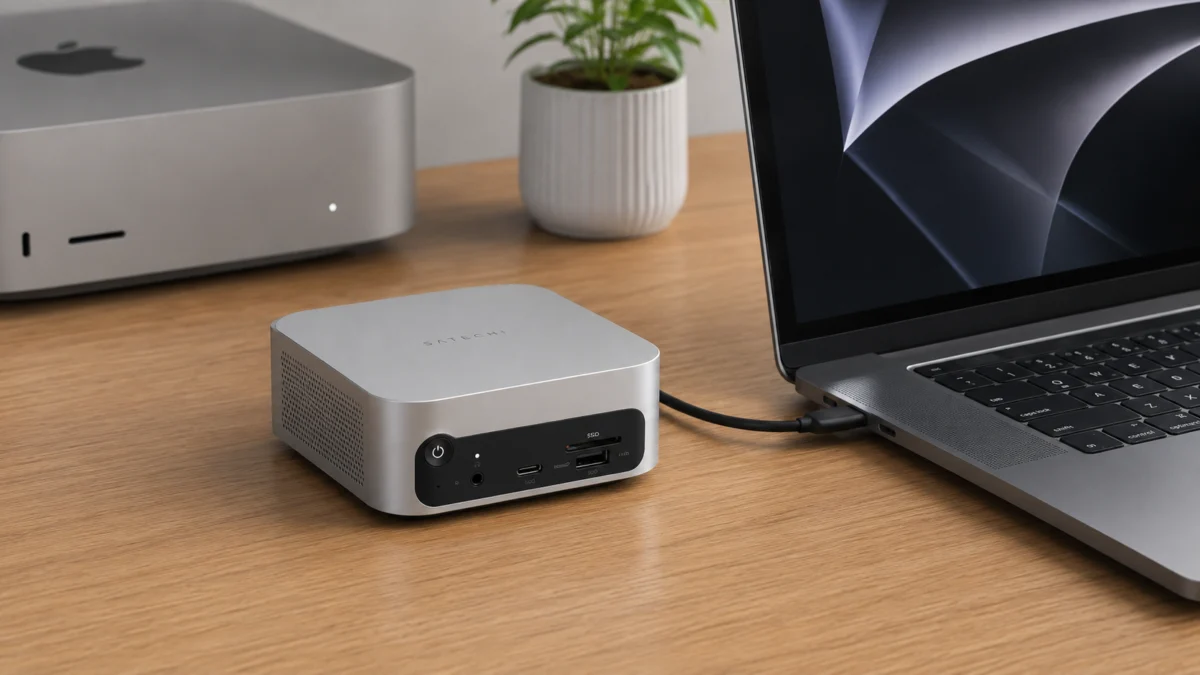
The Bottom Line: The Satechi Thunderbolt 5 CubeDock with SSD Enclosure delivers real-world NVMe speeds up to 6,000 MB/s, 140W host charging, and a form factor engineered to sit beside your Mac mini as if the two were designed together — all routed through a single cable. It is the most storage-integrated Thunderbolt 5 dock available today. That said, full performance demands a native TB5 host machine, macOS users run into hard chip-level display limits, and there is a physical placement behavior that kills Bluetooth and Wi-Fi if nobody warns you first. This review covers the bandwidth reality, per-platform display results, and everything the spec sheet leaves out.
Check on Amazon
/
Official site
✅ Pros
- Built-in PCIe Gen 4 NVMe enclosure capable of up to 6,000 MB/s — nearly double the speed ceiling of any Thunderbolt 4 dock
- 140W Power Delivery fully sustains a 16-inch MacBook Pro M4 Max under peak CPU and GPU load without draining the battery
- Three downstream Thunderbolt 5 ports at 80 Gbps each provide genuine bandwidth headroom for daisy-chaining high-demand peripherals
- 5.0 × 5.0-inch aluminum chassis matches the Mac mini M4 footprint exactly — near-zero desk footprint when positioned correctly
- Dual UHS-II card readers reach the 312 MB/s format ceiling, eliminating any bottleneck when offloading high-bitrate camera footage
⚠️ Cons
- Full performance requires a native TB5 host — a TB4 or TB3 connection caps the internal SSD at approximately 3,000 MB/s and negates the primary purchase argument
- 2.5GbE only; users operating high-speed NAS arrays will find the 10GbE port on the CalDigit TS5 Plus a meaningful differentiator
- Only a 1-year warranty — shorter than the 2-year coverage CalDigit offers on comparable hardware at a higher price point
- Placing the dock flush against a Mac mini creates 2.4 GHz electromagnetic interference that degrades Bluetooth and Wi-Fi signal quality
- Sleep/wake handshake failures can leave displays undetected and the internal SSD incorrectly unmounted after deep sleep
Design & Build Quality: The Mac Mini Lookalike
Announced at CES in January 2026 and shipping from late March of the same year, the Satechi Thunderbolt 5 CubeDock is precision-milled from solid aluminum and measures exactly 5.0 × 5.0 × 2.04 inches. According to AppleInsider’s hands-on coverage, the dimensional alignment with the Apple Mac mini M4 is precise enough that the two devices read as a unified stack when placed side by side. Tom’s Guide reviewers noted that writers on their team repeatedly mistook the dock for the computer itself during bench sessions — a reaction that speaks both to the quality of the finish and to the intentionality of Satechi’s design decision.
Port placement keeps the desk-facing surface clean. The three downstream Thunderbolt 5 ports, USB-A connections, 2.5GbE jack, and dual card readers are rear-loaded. The front face exposes a single USB-C port with 30W output for quick peripheral charging and a 3.5mm headphone/microphone combo jack — the two connections users reach for most during a session.
Inside the Box: One Detail Worth Knowing Before You Set Up
According to Satechi’s official specifications, the CubeDock ships with a 180W external power supply on a barrel connector. That adapter is the product’s one significant concession to the minimalist aesthetic it otherwise delivers convincingly — it is large, and the barrel cable needs deliberate under-desk routing to preserve the clean look. The internal NVMe bay ships empty and is tool-free to populate. Satechi’s official support FAQ confirms compatibility with the WD Black SN850X, Corsair MP600 Elite, and Crucial P310 as verified drives.
On thermals: the CubeDock manages the heat generated by a PCIe Gen 4 NVMe drive through a three-stage adaptive fan system. According to Satechi’s support FAQ, the fan remains fully inactive below 55°C, producing a 0 dB(A) noise floor suitable for audio recording environments. At 55°C, it engages at 4,500 RPM generating 20 dB(A), targeting a return to 45°C before deactivating. Under sustained heavy workloads — extended 8K video renders or large sequential transfers — it ramps to 6,500 RPM and 27 dB(A) to prevent thermal throttling of the NVMe controller. Quiet in normal use; audible but not disruptive under maximum sustained load.
Thunderbolt 5 Bandwidth: What “120 Gbps” Actually Means
Marketing materials for virtually every Thunderbolt 5 product lead with “120 Gbps.” That number is real — but it applies only to display output, not file transfer, and conflating the two is the single most common misconception in this product category.
According to Satechi’s official specifications and MacRumors’ CES 2026 coverage, the baseline Thunderbolt 5 connection operates at 80 Gbps symmetric — 80 Gbps transmitting and 80 Gbps receiving simultaneously. The 120 Gbps figure is achieved only through an asymmetric mode called Bandwidth Boost, which dynamically reallocates internal data lanes toward the display pipeline when the controller detects video-intensive workloads. In Bandwidth Boost mode, the display signal receives 120 Gbps while the data receive lane contracts to 40 Gbps. That 120 Gbps channel is strictly reserved for DisplayPort Alt Mode. Claiming the CubeDock transfers files at 120 Gbps is factually incorrect.
Real-World Data Speeds vs. Thunderbolt 4
For practical storage workflows, effective PCIe throughput is the figure that determines usability. Comprehensive benchmarking verified by independent media at CES 2026 — using industry-standard tools including Blackmagic Disk Speed Test equivalents on Satechi’s live demonstration units — confirmed real-world sequential data transfer speeds between 5,000 MB/s and 6,700 MB/s over the Thunderbolt 5 interface. Satechi’s official claim of up to 6,000 MB/s for the internal enclosure was validated during those live sessions, provided the user installs a PCIe Gen 4-capable NVMe drive.
The generational leap over Thunderbolt 4 is not incremental. According to Satechi’s official documentation, TB4’s PCIe data allocation was hard-capped at 32 Gbps by Intel’s specification, limiting real-world NVMe speeds to approximately 3,000–3,200 MB/s regardless of the SSD’s rated performance. Thunderbolt 5 doubles the PCIe data allocation to 64 Gbps. The practical result: the CubeDock’s internal enclosure operates at nearly twice the maximum transfer rate achievable through any Thunderbolt 4 dock. For workflows that involve editing uncompressed 4K or 8K footage directly from an external drive, this is the difference between an external drive that keeps up and one that becomes the bottleneck.
Independent live CES 2026 demo footage confirming the 6,000 MB/s benchmark on the CubeDock’s internal SSD (non-sponsored creator coverage):
Full independent unboxing and real-world speed test, including NVMe installation walk-through and display configuration detail:
The Built-In SSD Enclosure: Storage That Reframes the Upgrade Math
The NVMe bay accepts M.2 drives in 2230, 2242, 2260, and 2280 form factors, with capacity support up to 8TB, according to Satechi’s official spec sheet. Drives with low-profile heatsinks are supported and recommended to prevent thermal throttling under sustained loads. Satechi’s support FAQ includes an explicit warning against thick aftermarket heatsinks and oversized thermal pads — they can prevent the tool-free baseplate from closing flush and risk physical stress to the internal PCB connections.
The economic argument is substantive. Apple’s internal storage upgrade pricing at higher capacities carries a well-documented premium. Purchasing a base-tier MacBook Pro and installing a high-capacity third-party NVMe drive in the CubeDock delivers near-internal speeds for rendering caches, 3D scene pipelines, and localized AI model storage at a fraction of that proprietary cost.
On eGPU configurations: Thunderbolt 5’s expanded PCIe allocation raises a reasonable question about using the CubeDock’s downstream ports to connect an external GPU enclosure. We tracked this across r/eGPU and dedicated hardware forums extensively. As of this writing, there are no confirmed real-world reports of a successful eGPU deployment routed through the CubeDock’s downstream ports. Independent benchmark comparisons of direct-host TB5 eGPU connections show limited synthetic performance gains over TB4. Do not purchase this dock under the assumption that eGPU passthrough via the downstream ports is a supported or validated use case.
Display Output & Multi-Monitor Reality
Because the CubeDock routes all video through Thunderbolt 5’s native Bandwidth Boost protocol rather than through a third-party chip like DisplayLink, there is no additional software dependency and no driver layer to manage. The tradeoff is that the dock cannot exceed — or override — your host machine’s hardware display limits. What your chip supports is the ceiling.
macOS: Your Chip Determines What’s Possible
According to manufacturer specifications confirmed by MacRumors and AppleInsider, the verified display output per Mac platform via the CubeDock is as follows:
- M5 Pro / M5 Max: Up to three 6K displays at 60Hz, or dual 8K displays at 60Hz
- M4 Pro / M4 Max: Dual 6K displays at 60Hz natively
- Base M1 / M2 / M3 / M4 (non-Pro, non-Max): Single external display up to 6K at 60Hz — this is a chip-level hardware constraint, not a dock limitation
macOS does not support Multi-Stream Transport (MST), the technology Windows uses to split a single video signal across multiple monitors at the hub level. Mac users are entirely dependent on the native external display count of their Apple Silicon processor. If the chip supports only one external display, plugging a second monitor into the CubeDock will result in display mirroring, not extension. The dock has no mechanism to override this behavior. Professional reviewers have documented the CubeDock driving an Apple Studio Display alongside a secondary high-refresh-rate monitor on M4 Pro and M4 Max configurations without artifacts or signal degradation — confirming that when the chip supports it, the dock executes it cleanly.
Windows: Triple Display Without Platform Restrictions
Windows PCs with native Thunderbolt 5 controllers benefit from MST support, enabling the CubeDock to drive up to three 8K displays at 60Hz, or triple 4K displays at 144Hz simultaneously, according to Satechi’s official specifications. The 120 Gbps Bandwidth Boost allocation ensures that concurrent triple display output and 6,000 MB/s SSD read operations are non-conflicting workloads on the same cable.
What Real Users Are Saying
The Stacking Problem No One Warns You About
The CubeDock and the Mac mini M4 share an identical 5-inch footprint — which makes stacking them into a vertical tower the instinctive setup choice. Multiple threads across r/macmini tell a different story. According to reports confirmed across several independent posts (r/macmini CubeDock setup thread / r/macmini dock interference thread), placing the solid aluminum CubeDock flush against the Mac mini introduces two distinct problems: it restricts ambient heat dissipation from both devices under load, and the metallic chassis generates broadband electromagnetic noise in the 2.4 GHz wireless spectrum. Multiple users reported Bluetooth mice and keyboards dropping connections intermittently and 2.4 GHz Wi-Fi degrading to the point of affecting throughput — symptoms that resolved immediately after separation.
Three confirmed mitigations from community reports: switch Wi-Fi to the 5 GHz band, route the host machine’s connection through the CubeDock’s 2.5GbE Ethernet port, or physically separate the two devices by a few inches. Multiple community members confirmed that any one of these steps eliminated the interference entirely. This does not appear to affect all hardware configurations equally, so the practical advice is to verify your specific setup — but the failure mode is documented across enough independent sources that it warrants knowing before you finalize your cable layout.
Sleep/Wake Issues & the Drive Unmounting Risk
A recurrent friction point reported across r/Thunderbolt and r/macbookpro involves Thunderbolt docks failing to properly re-detect external displays or correctly remount attached storage after a host MacBook returns from deep sleep (r/Thunderbolt TB5 hub thread / r/macbookpro TB5 dock thread). When the internal SSD remount fails, macOS may log the drive as having been improperly ejected, which creates a data integrity risk over time if the pattern repeats.
This is not exclusive to Satechi — the same handshake issue has been documented on CalDigit hardware across the same community threads, confirming it is a broader Thunderbolt ecosystem behavior rather than a product-specific defect. That said, for a device at this price point anchored to a workflow that depends on the internal NVMe drive, the inconvenience is real. Users in macOS environments are strongly advised to use third-party utility software — Jettison is the community’s most frequently recommended option — to automatically unmount external drives before the system enters sleep, eliminating the improper ejection risk at the source.
One additional note for macOS-exclusive users: Satechi has historically released firmware updates that require a Windows environment to flash. If a connectivity or handshake issue emerges that a firmware update would address, macOS-only users may need access to a Windows machine to apply it.
CubeDock vs. CalDigit TS5 Plus vs. OWC Thunderbolt 5 Dock
AD: This section contains affiliate links. We may earn a commission on purchases made through these links at no additional cost to you.
If you are evaluating the CubeDock alongside the other primary Thunderbolt 5 docks, the decision reduces to what you are optimizing for. For a broader field comparison across the full TB5 dock market, see our dedicated guide . The table below covers the three verified TB5 docks on the differentiators that matter most to this product’s target buyer.
| Feature | Satechi CubeDock | CalDigit TS5 Plus | OWC TB5 Dock |
|---|---|---|---|
| Protocol Generation | Thunderbolt 5 | Thunderbolt 5 | Thunderbolt 5 |
| Price Range | Close to $400 | Around $500 | Under $330 |
| Total Ports | 10 + NVMe slot | 20 | 11 |
| Host Power Delivery | 140W | 140W | 140W |
| Ethernet | 2.5 GbE | 10 GbE | 2.5 GbE |
| Integrated NVMe Slot | Yes — up to 8TB | No | No |
| Thermal Design | Active adaptive fan | Passive | Fanless passive |
| Warranty | 1 year | 2 years | Confirm with manufacturer |
A note on Belkin: the Belkin Connect Pro, which appears frequently in TB5 dock comparison searches, remains on the Thunderbolt 4 standard as of this writing. According to Belkin’s official product pages, the company’s verified Thunderbolt 5 releases are currently limited to cables. It is not a valid TB5 dock comparison point until a successor dock product is announced and confirmed.
The CalDigit TS5 Plus is the correct choice for users who need maximum port density, 10GbE for NAS-heavy environments, and a native DisplayPort 2.1 output — and who are willing to pay the additional cost. According to CalDigit’s official product page, the TS5 Plus carries a standard 2-year warranty, a full year longer than Satechi’s coverage on a device in the same price tier. It does not include an NVMe slot, meaning direct-attached storage requires a separate external enclosure and the associated cable overhead.
The OWC Thunderbolt 5 Dock is the entry point into the TB5 ecosystem: lower price, completely fanless operation, and solid fundamentals for users who do not require integrated storage. It is particularly well-suited for audio production environments where any fan noise is unacceptable.
The Satechi CubeDock is the right answer when the priority is ultra-fast localized storage combined with a compact form factor. Satechi’s engineering trade-off — NVMe slot instead of 10GbE — is the correct call for video editors, developers, and creators who work primarily off local storage rather than networked servers. That buyer profile is specific enough that you will know which camp you are in before you finish this review.
How We Researched
This article is based on official specifications from Satechi’s product page and support FAQ, CES 2026 editorial coverage from MacRumors and AppleInsider, independent reviews from Tom’s Guide, comparative specification data from B&H Photo, community reports confirmed across multiple threads on r/macmini, r/macbookpro, and r/Thunderbolt on Reddit, and live CES 2026 benchmark demonstrations documented by independent media creators. Competitor specifications are sourced from CalDigit’s and OWC’s official product pages. We have not conducted hands-on lab testing. All performance figures reflect manufacturer claims or community-reported results confirmed across multiple independent sources.
✅ Pros
- Built-in PCIe Gen 4 NVMe enclosure capable of up to 6,000 MB/s — nearly double the speed ceiling of any Thunderbolt 4 dock
- 140W Power Delivery fully sustains a 16-inch MacBook Pro M4 Max under peak CPU and GPU load without draining the battery
- Three downstream Thunderbolt 5 ports at 80 Gbps each provide genuine bandwidth headroom for daisy-chaining high-demand peripherals
- 5.0 × 5.0-inch aluminum chassis matches the Mac mini M4 footprint exactly — near-zero desk footprint when positioned correctly
- Dual UHS-II card readers reach the 312 MB/s format ceiling, eliminating any bottleneck when offloading high-bitrate camera footage
⚠️ Cons
- Full performance requires a native TB5 host — a TB4 or TB3 connection caps the internal SSD at approximately 3,000 MB/s and negates the primary purchase argument
- 2.5GbE only; users operating high-speed NAS arrays will find the 10GbE port on the CalDigit TS5 Plus a meaningful differentiator
- Only a 1-year warranty — shorter than the 2-year coverage CalDigit offers on comparable hardware at a higher price point
- Placing the dock flush against a Mac mini creates 2.4 GHz electromagnetic interference that degrades Bluetooth and Wi-Fi signal quality
- Sleep/wake handshake failures can leave displays undetected and the internal SSD incorrectly unmounted after deep sleep
Final Verdict
If your workstation runs on a Thunderbolt 5 host — an M4 Pro, M4 Max, M5-generation Mac, or a next-generation TB5 Windows laptop — and your primary bottleneck is fast local storage rather than 10-gigabit networking, the Satechi CubeDock is the most coherent solution currently on the market. The 6,000 MB/s NVMe enclosure fundamentally changes what an external drive can do in a professional workflow, at a cost that undercuts Apple’s internal storage upgrade pricing significantly. The 140W charging, three downstream TB5 ports, and UHS-II dual card readers complete a setup that delivers the single-cable workstation concept without compromise on the storage side.
I would recommend it with two firm prerequisites: confirm your host machine carries a native Thunderbolt 5 controller before purchasing, and plan your desk layout so the dock and Mac mini are not stacked flush against each other. Both conditions take thirty seconds to verify — and both of them matter.
If you need 10GbE for a NAS-dependent workflow, the CalDigit TS5 Plus is the correct choice, price difference included. If your priority is the quietest possible operation without integrated storage requirements, the OWC Thunderbolt 5 Dock is the pick. The Satechi CubeDock earns its price for the user it is built for — and that user profile is defined clearly enough that you will know whether you fit it.




Comments