If your Galaxy SmartTag2 (EI-T5600) still reports a low battery or beeps after a CR2032 swap, start with what Samsung documents. The manual describes a normal activation sound when a battery is inserted and a sound if the battery was not properly recognised. It does not define a separate low-battery beep; battery status is checked in SmartThings. This EI-T5600 guide works through sound type, app status, cell seating, power saving mode and reset, then identifies the sensible stopping point.
Why Does a Galaxy SmartTag2 Still Beep or Show Low Battery After a CR2032 Replacement?
A fresh CR2032 fixes charge, not contact. Samsung describes insertion sounds for normal activation and an unrecognised battery, but no separate low-battery tone. Do not treat random beeping as proof that the cell is empty; check seating, recognition and app status first.
Samsung rates the Galaxy SmartTag2 at roughly 500 days of use, extended by up to 40% in Power Saving Mode. The company also states that this figure comes from internal lab simulation of typical usage, and that real battery life varies with usage pattern, device and battery manufacturer. A tag flagging low well inside that window is not automatically defective, and it is not automatically fine either.
Work through these checks in order before buying another battery.
- Identify which sound you are hearing and whether the tag was being touched.
- Open SmartThings and read the Battery entry on the tag’s card.
- Remove the battery tray, reseat the CR2032 with the correct polarity, and refit the tray the right way up.
- Check whether Power saving mode is switched on.
- Only then run Samsung’s official reset procedure.
How Do You Identify the Sound and Battery Status Your EI-T5600 Is Showing?
Record five things before changing anything: the sound pattern, whether you were touching the tag, what SmartThings shows under Battery, how long ago you replaced the cell, and whether a second known-good CR2032 reproduces the symptom. Skip these and every later step becomes guesswork rather than diagnosis.
Samsung documents three button behaviours on the EI-T5600. A single press silences the alert tone while the tag is ringing, a double press rings the paired mobile device, and a press or long press launches whichever automation you configured. A tag squeezed inside a wallet or a packed bag can trigger any of these without you noticing.
| What you hear | When it happens | Battery entry in the app | Repeats with a second known-good cell | What it may indicate | First action |
|---|---|---|---|---|---|
| A sound after the tag is pressed or compressed | The tag was pressed or compressed in a pocket or bag | Any | Not applicable | A button action or configured automation | Review your automation settings and where you carry the tag |
| A sound the moment the cell goes in | Immediately after insertion | Check whether the tag reconnects | Test if reseating fails | Normal activation is possible; Samsung also says an unrecognised battery can trigger a sound immediately after insertion | Check connection and battery status; reseat if activation fails |
| Rising tones at random, no interaction | Minutes to hours apart, tag untouched | Reported by some users as sufficient | Test required | Community reports compare it with an insertion sound; check seating before assuming low charge | Reseat, verify app status, then reset if needed |
| A ringtone that stops when you press the button | Any time | Any | Not applicable | Ring triggered from SmartThings Find | Check who else can locate the tag |
| No sound, but repeated low-battery notifications | Days to weeks after a swap | Sufficient, low, or fluctuating | Test required | Possible cell age or quality issue, or app status that has not refreshed | Check the cell’s brand and date code, then reconnect the tag |
| No sound at all, and Ring does nothing | Any time | Any | Not applicable | Power saving mode may make button and sound features unavailable | Check the Power saving mode switch |
The third row is where most of the confusion sits. According to multiple community reports, some users hear rising tones with the tag untouched and compare them with the sound made when a battery goes in, while SmartThings still shows the battery as sufficient.
Related discussions: Samsung US Community / Samsung EU Community / Samsung Members Canada / Battery-life discussion
These reports do not establish a fault rate, design defect, firmware bug or temperature threshold. The official manual says to avoid hot environments or fire; it sets no cold-weather threshold for this diagnosis.
How Do You Check the CR2032, Polarity, Battery Tray, and Reconnection?
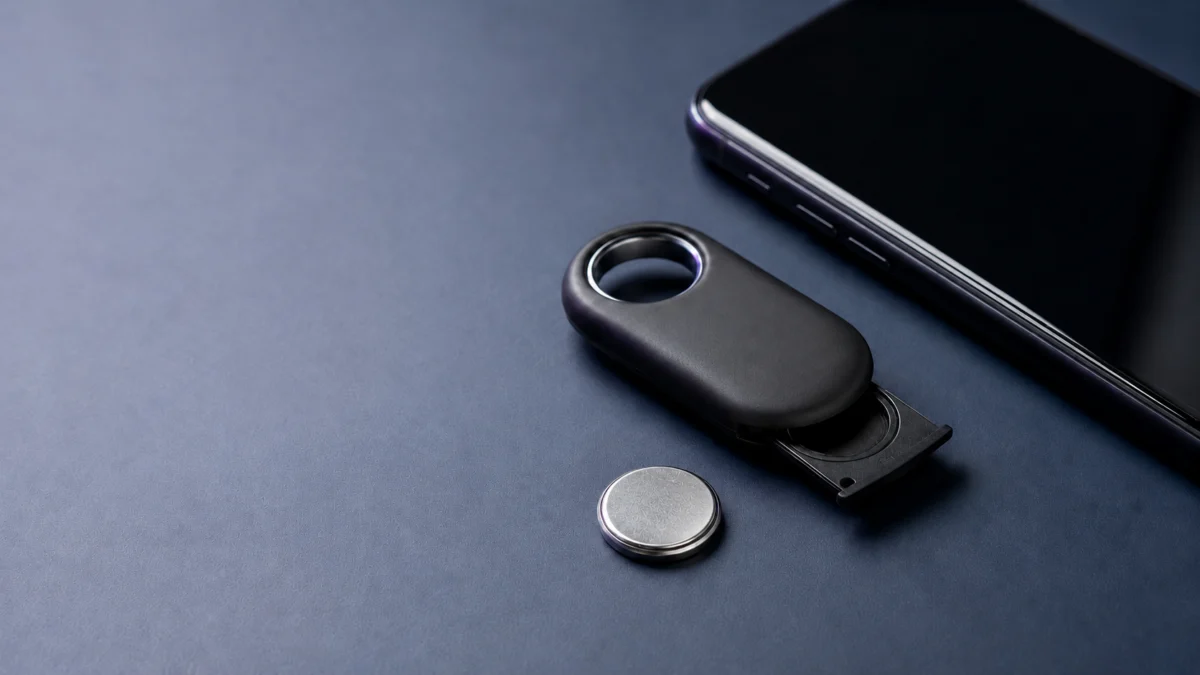
Samsung’s official battery-replacement procedure is to push the ejection pin into the battery tray hole, draw the tray out gently, seat the CR2032 with the positive terminal aligned to the plus symbol inside the product, and slide the tray back the right way up. The check takes 6 steps.
- Insert the ejection pin supplied with the product, or a small clip, into the battery tray hole on the back of the tag.
- Pull the tray out gently so you do not catch a finger or fingernail on the tray lip.
- Remove the cell and wipe the terminals. Samsung lists wiping the terminals and reinserting the battery among its official checks when the product will not turn on.
- Seat a CR2032 with the positive terminal facing up and aligned to the plus symbol inside the product. Samsung states the product will not work if the cell is inserted the wrong way round.
- Slide the tray back into the slot the correct way up. Samsung warns that fitting the tray upside down can damage the product.
- Listen and check the app. A sound on insertion may be the normal activation sound. If the tag does not reconnect or recognise the cell, repeat the insertion procedure; Samsung says an improperly recognised battery can also trigger a sound immediately after insertion.
Before you continue: a coin cell is a serious hazard around children. Samsung’s EI-T5600 user manual (Rev.1.2) states that swallowing a button cell can cause severe internal burns within about two hours and can be fatal in severe cases. Keep new and used cells away from infants and children, and seek immediate medical attention if you suspect one has been swallowed.
If the tag behaves normally, note the cell’s brand and date code. Some community participants suspected significant shelf age, but that does not establish the cause for an individual tag.
Check Energizer CR2032 batteries on Amazon / Check Duracell CR2032 batteries on Amazon
What Should You Check in SmartThings: Power Saving Mode, Software Info, and Reset?
Work through the app before resetting anything. Confirm the tag shows as connected, read the Battery entry, check whether Power saving mode is on, then open the product information. Samsung states that power saving mode can make the button and sound-related features unavailable. The check takes 5 steps.
- Open SmartThings, tap Devices, and tap your tag’s card. The Status entry shows the connection state between the tag and your phone.
- Read the Battery entry on the same screen. Community reports indicate that settings can appear greyed out until the tag has actually connected, so give it a moment rather than assuming the app is broken.
- Check the Power saving mode switch. Samsung’s manual states that some features, including the product’s button and sound-related features, may be unavailable while it is on.
- Tap the menu on the tag’s card and open Information to see the product’s software details.
- If the symptom persists, run the official reset procedure: draw out the battery tray, press and release the button once, refit the tray while pressing the button again, then hold the button for more than seven seconds until the tag sounds.
Keep the reset late in the sequence rather than early. Note also that removing the tag through Devices and Remove device is not the same thing: Samsung states the product is reset by that action, which means you have to register it again before it will appear on the map or ring.
Menu names vary. The steps above follow Samsung’s EI-T5600 manual, which describes tag management in the SmartThings app. Samsung also documents adding and locating Galaxy SmartTags from the Items tab in the Samsung Find app, so check both if a screen does not match.
When Should You Stop Replacing Batteries and Contact Samsung?
Stop buying cells once a second known-good CR2032 reproduces the same symptom and the official reset has been carried out correctly. At that point the variable you control has been ruled out, and the useful next step is Samsung support, warranty status or replacement rather than a third battery.
| Where you are | What it suggests | What to do next |
|---|---|---|
| Symptom stopped after reseating the cell or refitting the tray | A seating or recognition issue | Keep using the tag and note the cell’s date code |
| Symptom stopped after the official reset | A recoverable state on the tag | Keep using the tag and re-check the app status after a few days |
| Symptom returns within days on a second known-good cell | Not a charge problem you can solve by buying batteries | Contact Samsung support and check warranty coverage |
| Tag will not connect or respond at all after the reset | Beyond user-level troubleshooting | Contact Samsung support or an authorised service centre |
Check your model, purchase date and coverage on Samsung’s official EI-T5600 support page before you assume anything about repair or replacement. Warranty terms, service options and parts availability differ by country and by where you bought the tag, and this guide is not a substitute for Samsung’s own support decision.
If support confirms the unit is at fault and replacement is the practical option, the SmartTag2 remains a Galaxy-only tracker, so a replacement keeps you in the same ecosystem. If you would rather move to a tracker that works with a different network, our guide to Android tracker options that use Google Find Hub covers the alternatives.
Check Galaxy SmartTag2 on Amazon / Official site
How We Researched
This article uses Samsung’s EI-T5600 manual, official support FAQs and product page, plus recurring reports across Samsung Members threads. We did not conduct hands-on lab testing or present any figure as our own measurement.
Procedures, sounds, settings and warnings come from Samsung documentation. Symptom patterns are labelled as community reports and included only when they recur across threads. Personal theories and unverified firmware claims are not presented as causes.
Frequently Asked Questions
These answers separate Samsung’s EI-T5600 documentation from recurring community reports. An individual faulty unit still belongs with Samsung support.
Does the Galaxy SmartTag2 beep when the battery is low?
Samsung’s manual and support pages do not define a low-battery tone from the tag. The manual tells you to check remaining battery power in SmartThings. It also documents a normal activation sound when a battery is inserted and says an improperly recognised battery can trigger a sound immediately after insertion. Do not treat a random tone as proof of low charge.
Why does SmartThings still show low battery after I replaced the CR2032?
Check three things in order: whether the cell is seated with the positive terminal against the plus symbol, whether the tray went back the right way up, and whether the tag has actually reconnected to your phone. According to multiple community reports, the displayed status can also fluctuate between readings.
Will resetting the SmartTag2 delete it from my Samsung account?
The button-hold procedure appears under “Forcing restart” in Samsung’s manual. Removing the tag through Devices and Remove device is different: Samsung states the product is reset by that action, so you would need to register it again before it appears on the map or rings.
What to Do Next
Identify the sound before you spend anything. If it resembles the tone the tag makes when a cell goes in, do not assume that it is a low-battery warning. Check whether the tag reconnects, verify the Battery entry, reseat the cell if needed, check power saving mode, and reset last. Treat a second known-good cell as your stopping point.
This cannot rule out a fault in an individual unit. It separates user checks from support decisions so you can report the sound, app status and variables already ruled out.