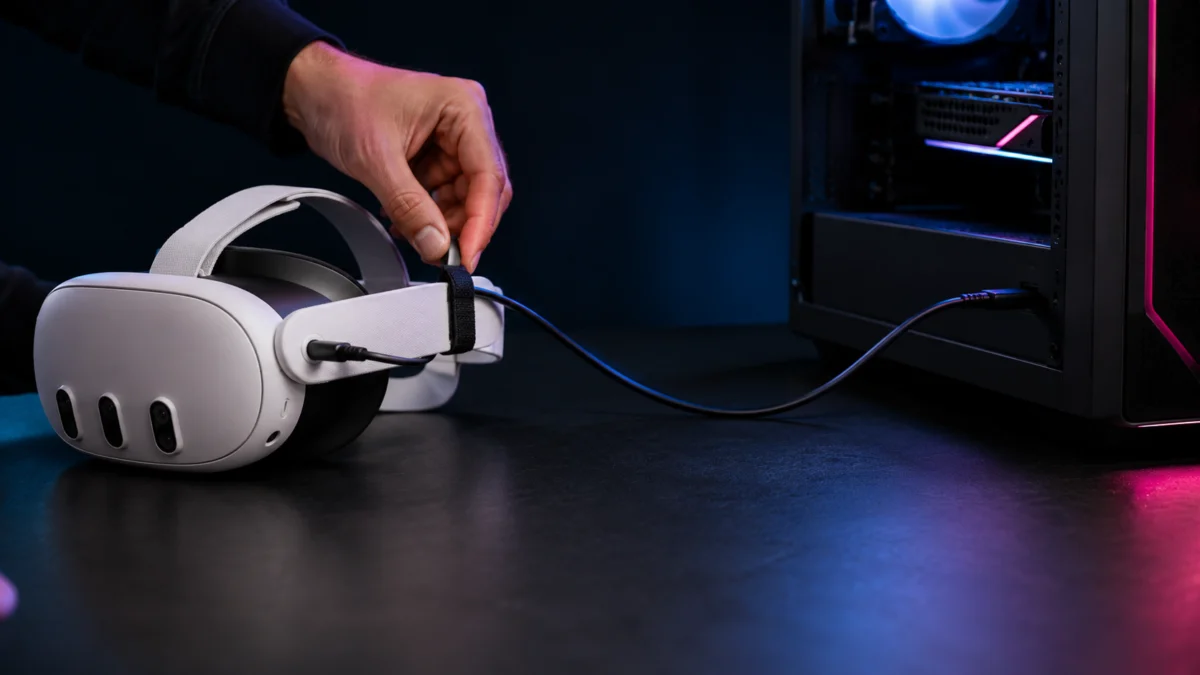
A good Meta Quest Link cable needs two things above everything else: at least 5 Gbps of data transfer (USB 3.0 / USB 3.2 Gen 1) and a length of about 10 to 16 feet so you can move freely in VR. The official Meta Quest Link Cable uses a lightweight fiber-optic design that is hard to beat for comfort and cable management. For the Meta Quest 3 and Quest 3S, though, the bigger question is power: these headsets draw far more than a USB port alone can supply, so third-party cables with a separate charging port (such as INIU or Kuject) are the practical pick for long PCVR sessions.
One thing no cable can promise: keeping the headset fully charged while you play demanding PCVR. The goal is to slow the battery drain, not reverse it. Below, we break down the official cable versus third-party options, the USB-C vs USB-A question, and the buying mistakes that cause most “random” disconnects.
Jump to a Section
- Quick Picks: Which Cable Should You Buy?
- What Makes a Good Quest Link Cable?
- Official vs. Third-Party Cables
- USB-C or USB-A: Which Is Safer for Your PC?
- Best Cable Types by Use Case
- Why Cables Disconnect: Mistakes to Avoid
- Run This USB Test First
- FAQ
Quick Picks: Which Quest Link Cable Should You Buy?
The right Quest Link cable depends on how you play. For the lightest, most flexible cable, the official Meta fiber-optic cable leads. For long Quest 3 or Quest 3S sessions, a third-party cable with a built-in charging port slows battery drain best. On a tight budget, a basic 16 ft USB 3.0 data cable is enough to get clean PCVR running.
| Use case | Pick | Why | Price tier |
|---|---|---|---|
| Best official option | Meta Quest Link Cable (16 ft / 5 m) | Fiber-optic core, very light (~224 g), 90° headset connector, official Quest 3 / 3S / Pro / 2 support | Premium tier |
| Best with charging port | INIU DI401 / Kuject Link Cable | Separate charging port injects power from the wall to slow battery drain during long PCVR sessions | Mid-range |
| Best budget data cable | Syntech / KIWI design Link Cable | Meets the 5 Gbps requirement, includes an L-shaped connector and a Velcro strap | Budget tier |
| Best for room-scale VR | Cable Matters Active USB-A to USB-C (24.6 ft / 7.5 m) | Active signal booster carries data over an unusually long run | Mid-range |
Detailed picks, including Buy if / Don’t buy if notes for each, are in the Best Cable Types by Use Case section below.
Disclosure: Fixory is reader-supported. Some links in this article are Amazon affiliate links, and we may earn a commission on qualifying purchases at no extra cost to you. This does not affect which products we recommend.
What Makes a Good Meta Quest Link Cable?
A good Quest Link cable must support at least 5 Gbps of data (USB 3.0 / USB 3.2 Gen 1) and run about 10 to 16 feet. Meta officially calls for a high-quality USB cable that handles both data and power, and recommends a length of at least 3 meters (10 feet) for comfortable movement. Beyond those basics, a handful of design details separate a frustrating cable from a reliable one.
Before you buy, check this list against any cable you are considering:
- USB 3 data support: 5 Gbps minimum. A USB 2.0 phone-charging cable will not carry the video bandwidth PCVR needs.
- Length and active-cable design: Copper cables hold a stable 5 Gbps signal up to about 5 meters; longer runs need an active (signal-boosting) cable to avoid data errors.
- USB-C vs USB-A on the PC side: match the cable to the port your PC actually has, and read the USB-C vs USB-A section before assuming USB-C is automatically better.
- Charging assist (power injection): a separate charging port lets the cable pull power from a wall charger instead of relying on your PC’s USB port.
- 90-degree headset connector: an L-shaped plug at the headset end reduces strain and keeps the cable out of your way during play.
- Cable strain relief: an included Velcro strap or clip to anchor the cable to your head strap helps prevent the connector from wiggling loose.
- Meta Link app USB test result: the Meta Horizon Link app can measure your real transfer speed (covered below).
- Return policy: USB behavior varies by motherboard, so buy from a seller that accepts returns in case the cable and your PC port do not get along.
Why power matters so much: the Quest 3 and Quest 3S use more capable processors than the Quest 2, so they draw considerably more power under a PCVR load. Wired data compatibility is the same across Quest 3, Quest 3S, and Quest 2, but power delivery is where the newer headsets are far more demanding.
Official Meta Quest Link Cable vs Third-Party Cables
The official Meta Quest Link Cable wins on comfort: its fiber-optic core makes a 16 ft (5 m) cable unusually light and flexible. Third-party cables win on price and features, especially the charging ports that the official cable lacks. Neither type is automatically more reliable, and being official does not make a cable immune to disconnects.
What the official cable does well
The official Meta cable is a 16 ft (5 m) Active Optical Cable. It uses a straight USB-C plug on the PC side and a 90-degree USB-C plug at the headset, weighs roughly 224 g, and is officially listed as compatible with Quest 3S, Quest 3, Quest Pro, and Quest 2. Because it uses fiber optics rather than thick copper, it is lighter and more flexible than most third-party cables of the same length, which is its main advantage for long, active sessions.
The trade-offs are cost and power. The official cable sits in the premium tier, and it has no charging-assist port. Its plug can carry power, but the actual wattage depends entirely on your PC’s USB-C port. According to community reports, a typical motherboard USB-C port supplies only around 15 W, while a Quest 3 under load can draw roughly 18 W to 27 W, so the battery still drains slowly during play even with the official cable.
What third-party cables do well
Most popular third-party Link cables now include a separate charging port. They carry data to your PC while pulling power from a wall charger, which compensates for a weak PC USB port. They are also far cheaper than the official cable and often come in USB-A versions, which matters if your PC’s most reliable port is a rear USB-A. The trade-off is weight and flexibility: copper cables are heavier and stiffer than the official fiber-optic cable.
| Factor | Official Meta cable | Typical third-party cable |
|---|---|---|
| Weight & flexibility | Very light, flexible (fiber-optic) | Heavier, stiffer (copper) |
| Charging-assist port | No | Often yes |
| PC-side connector | USB-C only | USB-A or USB-C options |
| Price tier | Premium | Budget to mid-range |
| Disconnect immunity | Not guaranteed | Not guaranteed |
USB-C to USB-C or USB-A to USB-C: Which Is Safer for Your PC?
Neither connector is automatically safer; the right choice depends on your specific PC. USB-C looks newer, but according to multiple community reports, some users find a rear-panel USB-A port more stable than a case’s front USB-C port, because front-panel wiring quality can introduce noise. The goal is a clean, well-wired USB 3 port, whichever shape it is.
A few practical guidelines from confirmed sources and recurring community reports:
- Use a port wired directly to the motherboard. Rear-panel ports are wired straight to the board, while front-panel ports run through internal cabling that varies in quality.
- If a USB-C connection keeps dropping, trying a USB-A-based cable is a reasonable troubleshooting step, not a downgrade.
- Charging-assist cables are commonly built as USB-A to USB-C, which pairs a widely available data port with wall power for the headset.
What to avoid believing: that USB-C is always better than USB-A for PCVR, or that any USB-C cable will work. Both ideas lead people to buy the wrong cable. Match the cable to your most reliable USB 3 port, then verify the result with the USB test described below.
Best Quest Link Cable Types by Use Case
The best cable for you comes down to a single priority: comfort, charging, budget, or cable length. Below, each pick is matched to a use case with a clear Buy if / Don’t buy if note so you can decide quickly. All compatibility and spec details come from manufacturer pages and the Deep Research report, confirmed downstream.
Best official option: Meta Quest Link Cable
This is the pick if comfort and cable management matter most. The fiber-optic build keeps a 16 ft cable light and flexible, and the 90-degree headset plug stays out of your way. It is the priciest option and has no charging port, so on a Quest 3 the battery will still drain slowly during play.
Buy if: you want the lightest, most flexible cable and you accept a premium price and slow battery drain.
Don’t buy if: you need charging assist for long sessions, or you are on a tight budget.
Best with charging port: INIU DI401 and Kuject Link Cables
These are the picks for long Quest 3 / Quest 3S sessions. Both use a USB-A data connection with a separate charging port that draws power from a wall charger, which slows battery drain significantly. The INIU DI401 is a 16 ft cable that, per the manufacturer, uses a smart chip to hold the battery around 78% and limit overcharging; Kuject’s cable comes in 16 ft and 20 ft versions and specifies a connection order (PC, then charger, then headset).
An important caveat: these cables extend your playtime, but they do not guarantee a full charge while you play. Quest 3 power draw can exceed what many charging cables inject (often capped around 18–20 W), and the built-in smart chips intentionally hold the battery in a 70–80% range to protect it. That behavior is by design, not a defect.
Buy if: you play long PCVR sessions on a Quest 3 or 3S and want to slow battery drain.
Don’t buy if: you expect the headset to reach or stay at 100% while playing, or you want the lightest possible cable.
INIU DI401 on Amazon
/
Kuject Link Cable with Charging on Amazon
Best budget data cable: Syntech and KIWI design Link Cables
These are the picks for getting clean PCVR running without overspending. Both meet the 5 Gbps data requirement, include an L-shaped headset connector and a Velcro strap, and sit in the budget tier. The Syntech M32C2 supports 18 W PD and, per the maker, switches to trickle charging after about 65%; KIWI design’s QC-8 includes an 18 W charging port and advertises a high-durability build.
Buy if: you want a reliable, low-cost cable that meets the data spec for a few hours of play.
Don’t buy if: you need the maximum charging wattage or the lightest fiber-optic feel.
Syntech Link Cable with Charging on Amazon
/
KIWI design Link Cable with Charging on Amazon
Best for room-scale VR: Cable Matters Active USB-A to USB-C
This is the pick when you need an unusually long run. At 24.6 ft (7.5 m), it uses an active signal booster to carry data past the point where ordinary USB 3.0 cables start losing the signal. The trade-offs: it is described as uni-directional, and it has no charging-assist port, so it is not ideal for long continuous sessions on a Quest 3.
Buy if: your PC is far from your play space and you need maximum reach.
Don’t buy if: you need charging assist, or a standard 16 ft cable already reaches.
Cable Matters on Amazon
/
Official site
Best for troubleshooting an unstable USB-C port
If your motherboard’s USB-C port keeps dropping the connection, a USB-A-based charging cable (such as the INIU or Syntech) is a strong workaround. It moves data over a widely supported USB-A port and pulls power from the wall, sidestepping a USB-C port that does not meet power-delivery requirements or has an unstable host controller.
Why Quest Link Cables Disconnect: Buying Mistakes to Avoid
Most “random” disconnects are not caused by a bad cable alone. According to multiple community reports, the common culprits are software handshake bugs in the Meta Horizon Link app, insufficient power delivery, and physical wiggle at the headset port. Buying a more expensive cable will not fix a problem that lives in software or in your PC’s USB settings.
Buying mistakes that cause grief
- Assuming any USB-C cable works. Cheap USB 2.0 charging cables do not carry enough bandwidth for video, so they fail or get flagged as charge-only.
- Assuming a USB 3.2 label guarantees stability. A cable can meet the spec while your motherboard’s USB host controller or power settings still cause drops.
- Assuming the official cable never disconnects. Physical connector wiggle and software bugs affect official cables too.
- Expecting guaranteed charging while you play. On a Quest 3, even a charging cable usually slows drain rather than reversing it.
Common patterns reported by users
According to multiple community reports, some users see a “Charge Only Cable Detected” message appear suddenly on a cable that previously worked. Community testing points to a software handshake bug tied to specific Meta Horizon Link updates rather than a failed cable. Reported workarounds include switching to a different USB port, disabling USB Selective Suspend, cleanly reinstalling the app, and physically flipping the USB-C connector 180 degrees. Because these come from community threads, confirm whether your setup matches before assuming the same fix applies.
A related pattern: a cable plugged into a genuine USB 3.0 port is sometimes detected as USB 2.0, capping the speed. Reports tie this to Windows USB power management, where a power-saving feature downgrades the bandwidth. A commonly shared fix is to open each USB Root Hub’s power management settings and turn off the option that lets Windows power down the device to save energy.
Finally, physical strain is a frequent cause. The USB-C plug at the headset can wiggle under the leverage of head movement, briefly breaking contact. Anchoring the cable to the back of your head strap with the included Velcro strap removes that strain and is, in practice, close to essential for both official and third-party cables.
For step-by-step recovery from persistent disconnects, see our dedicated guide.
Related discussion: charge-only cable detection
/
Related Meta Community thread
Run This USB Test Before You Blame the Cable
Before you return a cable, confirm what speed it is actually delivering. The Meta Horizon Link app on your PC includes a built-in USB test that reports your real transfer rate in Gbps. A result of at least 2.0 Gbps generally indicates the cable and port combination is working well enough for PCVR. The check takes 4 steps.
- Connect the headset to your PC and open the Meta Horizon Link app (formerly the Oculus PC app) on the PC.
- Open the Devices menu in the left sidebar and select your connected Quest headset.
- Click USB Test and follow the prompt to run it.
- Read the result: at least 2.0 Gbps means the cable and port are performing acceptably for PCVR.
If the test comes back low, or as USB 2.0, the cause is often a port or software setting rather than the cable itself. Work through the disconnect patterns above before deciding the cable is faulty.
How We Researched
This article is based on a Deep Research report drawing on Meta’s official accessory and support documentation, manufacturer product pages (INIU, Kuject, Syntech, KIWI design, Cable Matters), and community reports from Reddit and the Meta Community Forums. We have not conducted hands-on lab testing. Any performance figures, power specifications, or compatibility claims are attributed to official sources or clearly identified community reports, and recurring issues are only described where the same pattern appeared across multiple posts or threads.
FAQ: Meta Quest Link Cables for Quest 3 and Quest 3S
Can I use a USB-A to USB-C cable for PCVR?
Yes. Quest Link works over a USB-A to USB-C cable as long as it supports USB 3.0 (5 Gbps) data. In fact, according to multiple community reports, a rear-panel USB-A port is sometimes more stable than a front-panel USB-C port, so USB-A is a legitimate choice rather than a compromise.
Can a Link cable keep my Quest 3 charged while I play?
Not fully. A cable with a charging port can significantly extend your playtime by injecting power from a wall charger, but Quest 3 power draw during PCVR often exceeds what these cables supply, and their smart chips intentionally cap charging around 70–80%. Expect slower drain, not a guaranteed full charge.
Should I buy the official Meta cable or a third-party one?
Choose the official cable for the lightest, most flexible feel and official compatibility across Quest 3, 3S, Pro, and 2. Choose a third-party cable for a lower price, a charging-assist port, or a USB-A option. Neither type is guaranteed to avoid disconnects.
How long should a Quest Link cable be?
Meta recommends at least 3 meters (10 feet) for comfortable movement, and 16 ft (5 m) is the most common length. Beyond about 5 meters, you need an active (signal-boosting) cable to keep a stable 5 Gbps data connection.
Final Recommendation
For most people, the decision is simple. If comfort matters most and budget is not a concern, the official Meta Quest Link Cable is the most pleasant to wear. If you play long Quest 3 or Quest 3S sessions, a charging-port cable like the INIU DI401 or Kuject is the smarter buy because it slows battery drain. On a budget, a Syntech or KIWI design cable meets the data spec for clean PCVR. And for a large play space, the Cable Matters active cable reaches where others cannot.
One advanced alternative is worth knowing about. Some PCVR users frustrated by Meta Horizon Link’s USB connection bugs have moved to wired Virtual Desktop: they plug a power-delivery USB-C-to-Ethernet adapter into the headset and connect it to the PC’s network by LAN cable, then use the Virtual Desktop app instead of the official Link software. According to multiple community reports, this delivers very stable, low-latency wired play. It is outside the scope of a standard Link cable, but it is a strong option if official Link connectivity keeps failing you.