
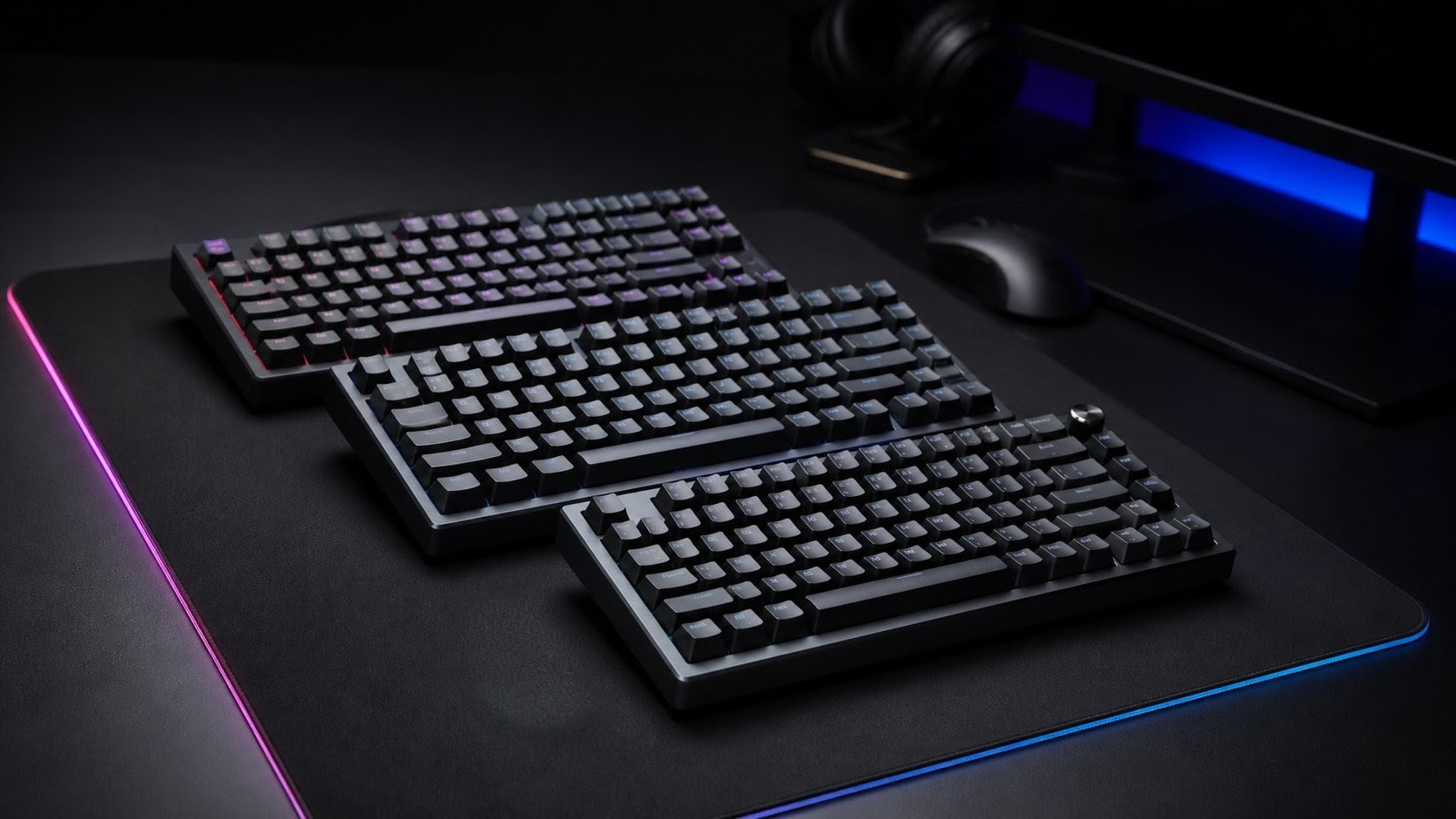
Quick Comparison: Best Hall Effect Keyboards in 2026
| Product | Best for | Key strength | Main caveat | Price tier |
|---|---|---|---|---|
| Wooting 80HE | Competitive FPS; software-first buyers | Browser-based Wootility; zero background overhead; Rappy Snappy deepest-press priority | Stock availability varies; boutique-only shipping | Under $200 |
| Gamakay NS75 | Budget 8KHz build | 8KHz polling + 0.005mm Rapid Trigger under $100 | Budget build quality; limited long-term firmware support | Under $100 |
| SteelSeries Apex Pro TKL Gen 3 | Retail access; wireless option; Protection Mode | Exclusive Protection Mode; OLED display; 2.4GHz wireless flexibility | 1KHz standard polling; premium price relative to boutique alternatives | $200–$250 |
| ATK x QK Hex80 | Enthusiast acoustics + competitive speed | CNC aluminum gasket-mount; 8KHz; deep, refined sound signature | Specialty retail only; wired-only | $190–$250 |
| NuPhy Air75 HE | macOS users; low-profile preference | Full macOS feature parity; 8KHz; browser-configurable | Low-profile travel not universally preferred; 3.3mm max actuation | $120–$140 |
| AULA WIN60 HE | Absolute budget entry into Hall Effect | Lowest-cost door into the HE ecosystem; 0.1mm–4.0mm range | 1KHz polling; 60% layout only; limited warranty recourse | Under $50 |
What to Look For Before You Buy
The short answer: For competitive FPS on Windows, prioritize 8KHz polling, a 0.1mm Rapid Trigger minimum, and a software ecosystem with no background overhead. Mac users should go straight to Wooting 80HE or NuPhy Air75 HE — both offer full macOS feature parity. If retail availability matters, SteelSeries Apex Pro TKL Gen 3 ships immediately from Amazon US and Best Buy. If budget is the hard constraint, Gamakay NS75 delivers flagship-level specs under $100.
Actuation Range and Precision
Premium Hall Effect keyboards offer actuation ranges from 0.1mm to 4.0mm. Budget models sometimes narrow this to 0.2mm–3.3mm, which is still competitive. More critical than the range is the adjustment step size: the Gamakay NS75 and ATK x QK Hex80 both offer a 0.005mm Rapid Trigger sensitivity step, a specification typically found only on flagship hardware.
Polling Rate: 1KHz vs. 8KHz
A 1,000Hz polling rate communicates inputs to the PC every 1.0 millisecond. An 8,000Hz hyper-polling rate cuts that to every 0.125 milliseconds. For competitive play, the difference is real and measurable. However, sustaining a true 8KHz connection requires significant continuous data bandwidth, which is why every 8KHz keyboard in this guide uses a wired USB-C connection. Wireless Hall Effect keyboards — including the SteelSeries Apex Pro TKL Gen 3 and the Keychron K2 HE — currently max out at 1,000Hz over their 2.4GHz RF connections to maintain battery efficiency.
Software Ecosystem
The firmware and companion software are as important as the hardware itself. Wooting’s Wootility runs entirely in a Chrome or Edge browser, requiring zero background installation and consuming zero system resources during gameplay. At the opposite end, Razer Synapse 4 and SteelSeries GG are full desktop applications with persistent background processes. For macOS users, this matters even more: Razer Synapse 4 is strictly Windows-only, meaning the Huntsman V3 Pro operates as a basic plug-and-play keyboard on a Mac with no actuation customization whatsoever.
SOCD Features and Game Compliance
SOCD resolution features like Snap Tap and Rappy Snappy are powerful — and banned in certain competitive contexts. In Counter-Strike 2, using hardware-level automation to execute perfect counter-strafes has been officially classified as macro abuse, resulting in server kicks, match disqualifications, or account restrictions. Some third-party platforms such as Faceit have temporarily permitted Snap Tap, but compliance status changes. Before enabling any SOCD feature, verify the current Terms of Service for every title and platform you compete on. Always purchase a keyboard that allows these features to be fully disabled at the hardware or software level.
Form Factor
The competitive scene heavily favors TKL (87 keys) and 75% (82–84 keys) layouts, as removing the numpad maximizes mouse swiping space for low-sensitivity aiming. Full-size keyboards (with numpad) suit productivity-heavy or MMO/simulation use cases but reduce desk real estate. 60% keyboards offer extreme portability at the cost of arrow keys and function row access.
🥇 Best Overall for Competitive FPS — Wooting 80HE
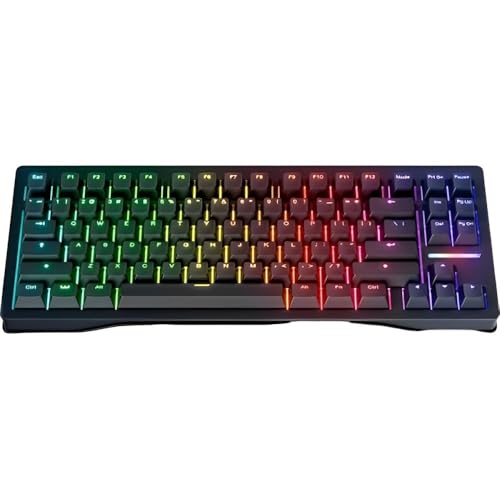
Please check the Amazon product page for the latest price and availability.
The Wooting 80HE is the keyboard that the rest of the Hall Effect market measures itself against. In a 2026 landscape where magnetic switch hardware has largely converged on similar sensor specifications, Wooting’s sustained dominance comes down to one factor: software. The browser-based Wootility configuration tool requires no installation, runs directly in Chrome or Edge, and consumes zero background system resources during play — a stark contrast to the persistent memory and CPU overhead of Razer Synapse or SteelSeries GG.
Key Specifications
| Spec | Detail |
|---|---|
| Switch | Lekker L60 V2 (Magnetic) |
| Actuation Range | 0.1mm – 4.0mm |
| Layout | 80% / 83 Keys |
| Polling Rate | 8,000Hz (Tachyon Mode) |
| Connectivity | Wired USB-C |
| SOCD Feature | Rappy Snappy (deepest-press priority) |
| Price Range | Under $200 (PCR) / Under $300 (Zinc) |
Performance Deep-Dive
The Wooting 80HE uses Lekker L60 V2 switches, offering a 0.1mm to 4.0mm adjustable actuation range. Tachyon Mode — a firmware-level optimization that intentionally bypasses non-essential matrix scanning processes including RGB rendering — achieves a stable input latency of approximately 0.125 milliseconds at a true 8,000Hz polling rate. For players in Valorant, Apex Legends, and Counter-Strike 2, this is the lowest hardware latency commercially available in 2026.
Wooting’s implementation of Rappy Snappy sets it apart from competitors: rather than simply prioritizing the most recently pressed key chronologically, the system detects which of two opposing keys is currently pressed deepest and prioritizes that input. This produces more physically intuitive counter-strafing behavior that matches player intent more accurately than standard last-input priority logic.
The primary trade-off is availability. Wooting operates through a direct-to-consumer model, frequently using Founder’s Campaign pre-orders to manage production runs. This can mean shipping delays and stock shortages, particularly for buyers outside North America or Western Europe. Wooting’s 4-year warranty is fulfilled directly from international hubs, meaning international returns involve additional complexity and cost.
✅ Buy if:
- You play competitive FPS titles and want the most refined Rapid Trigger and SOCD implementation available.
- You are on Windows or macOS — Wootility runs in any modern browser with full feature parity on both operating systems.
- You prioritize zero software overhead during gameplay above all else.
❌ Don’t buy if:
- You need the keyboard immediately — stock availability is not guaranteed and shipping timelines can be unpredictable.
- You prefer wide physical retail access (Amazon US, Best Buy) for quick delivery or easy returns.
💰 Best Value Pick — Gamakay NS75

Please check the Amazon product page for the latest price and availability.
The Gamakay NS75 represents one of the most disruptive value propositions in the 2026 peripheral market. At under $100, it delivers a true 8,000Hz wired USB polling rate — a specification that, until recently, existed only on keyboards costing more than double the price.
Key Specifications
| Spec | Detail |
|---|---|
| Switch | Outemu Magnetic |
| Actuation Range | 0.1mm – 4.0mm |
| Layout | 75% / 83 Keys |
| Polling Rate | 8,000Hz |
| Internal Scan Rate | 16,000Hz |
| RT Precision | 0.005mm sensitivity step |
| Connectivity | Wired USB-C |
| Price Range | Under $100 |
Performance Deep-Dive
The NS75 pairs its 8KHz USB polling rate with a 16KHz internal matrix scan rate, yielding an operational latency of approximately 0.06ms — a figure that rivals or beats flagship boards costing two to three times more. Its Rapid Trigger sensitivity step of 0.005mm is identical to the ATK x QK Hex80, and hardware-level Snap Tap / Last Key Priority is implemented directly in the onboard firmware, meaning no software installation is required to access counter-strafing automation.
The honest caveat: at this price tier, compromises exist in chassis rigidity, long-term firmware support, and acoustic quality. Budget Hall Effect keyboards on Amazon frequently experience price volatility — the listed price can shift significantly week to week based on promotional deals and coupon availability. Long-term software stability is also less assured compared to established brands.
✅ Buy if:
- You want 8KHz polling and sub-0.1ms hardware latency without breaking the budget.
- You are entering the Hall Effect market for the first time and want to evaluate the competitive advantages before committing to a premium board.
❌ Don’t buy if:
- Long-term firmware support and software stability are a priority — budget-tier HE brands have an inconsistent track record.
- You care about build quality and acoustic profile; the chassis and sound signature reflect the price point.
🎯 Best TKL for Esports — SteelSeries Apex Pro TKL Gen 3

Please check the Amazon product page for the latest price and availability.
The SteelSeries Apex Pro TKL Gen 3 is the most feature-rich tenkeyless Hall Effect keyboard available in 2026. Its combination of a refined magnetic switch, an exclusive Protection Mode, and a built-in OLED smart display distinguishes it from every other TKL competitor — though that feature density comes at a premium price that reviewers consistently flag.
Key Specifications
| Spec | Detail |
|---|---|
| Switch | OmniPoint 3.0 HyperMagnetic |
| Actuation Range | 0.1mm – 4.0mm |
| Layout | TKL / 87 Keys |
| Polling Rate | 1,000Hz (Standard) |
| Connectivity | Wired / 2.4GHz / Bluetooth |
| SOCD Feature | Rapid Tap |
| Price Range | In the $200–$250 range |
Performance Deep-Dive
SteelSeries states that OmniPoint 3.0 delivers 20x faster actuation and 11x quicker response times compared to standard mechanical switch equivalents. The standout exclusive feature is Protection Mode: an intelligent firmware system that dynamically reduces the actuation sensitivity of keys immediately surrounding any actively pressed key, dramatically reducing accidental “fat-finger” inputs during chaotic, high-stress gameplay moments. No competing keyboard in 2026 offers a comparable feature.
The integrated OLED Smart Display on the chassis allows real-time adjustment of Rapid Trigger settings, profile switching, and system monitoring without alt-tabbing out of an active match. The wireless flexibility — supporting 2.4GHz RF and Bluetooth in addition to wired — adds rare versatility for a gaming-grade HE keyboard, though polling over wireless is capped at 1,000Hz.
The persistent criticism from outlets including PCMag and Tom’s Hardware centers on price-to-performance value. At its MSRP, boutique alternatives with similar raw sensor specifications — including Wooting and NuPhy — cost meaningfully less. Buyers paying the SteelSeries premium are paying for the Protection Mode, the OLED display, the wireless option, and the broad retail availability at Best Buy and Amazon US.
✅ Buy if:
- You play in chaotic, high-key-count environments — Protection Mode is a genuine differentiator for reducing accidental inputs.
- You want the flexibility of wireless connectivity (2.4GHz or Bluetooth) on a Hall Effect TKL.
- You want wide retail availability with immediate delivery through Amazon US or Best Buy.
❌ Don’t buy if:
- You are on macOS — SteelSeries GG Engine for full feature access is Windows-focused; verify macOS compatibility before purchasing.
- Raw polling rate is the priority: at 1,000Hz standard, the Apex Pro TKL Gen 3 is outpaced by the Wooting 80HE, Gamakay NS75, and Razer Huntsman V3 Pro TKL on this specific metric.
🔊 Best for Typists and Enthusiasts — ATK x QK Hex80
The ATK x QK Hex80 is the answer to a question that competitive gaming has historically been unable to answer: can a Hall Effect keyboard sound and feel as good as a premium custom mechanical board? Built in collaboration between custom keyboard powerhouse Qwertykeys and gaming peripheral brand ATK, the Hex80 says yes.
Key Specifications
| Spec | Detail |
|---|---|
| Switch | Owlab Ti HE (pre-lubed) |
| Actuation Range | 0.005mm – 3.3mm |
| Layout | 80% / 88 Keys |
| Polling Rate | 8,000Hz |
| Connectivity | Wired USB-C |
| Chassis | 220-mesh anodized CNC aluminum, gasket mount |
| Keycaps | Thick frosted polycarbonate, Cherry profile |
| Price Range | In the $190–$250 range |
Performance Deep-Dive
Standard Hall Effect keyboards have a well-documented acoustic weakness: the absence of internal leaf springs in the switch housing and the open-bottom switch design required for magnetic flux to reliably reach the PCB sensor both contribute to a hollow, resonant sound signature. Qwertykeys addressed this directly. The Hex80’s 220-mesh anodized CNC aluminum chassis is paired with a flexible gasket mount structure that completely isolates the PCB from the case, absorbing bottom-out vibrations before they can resonate through the chassis walls. The Owlab Ti HE switches arrive pre-lubed from the factory, and the thick, frosted polycarbonate Cherry-profile keycaps add further acoustic dampening at the point of contact.
The result — described by hardware reviewers as a deep, refined sound signature more commonly associated with hand-assembled custom boards — arrives without sacrificing competitive specifications. The 8,000Hz polling rate and 0.005mm actuation step precision are identical to the top-tier performance hardware in this guide.
✅ Buy if:
- Acoustic quality and typing feel are as important to you as competitive speed — you use this keyboard for both gaming and extended work sessions.
- You want 8KHz polling and premium build quality in the enthusiast price bracket.
❌ Don’t buy if:
- You need wide, immediate retail availability — the Hex80 is primarily available through ATK’s official storefront and specialty retailers like MechanicalKeyboards.com, not mass-market channels.
- You need wireless connectivity: this is a wired-only board.
🍎 Best Low-Profile / Mac-Compatible — NuPhy Air75 HE
The NuPhy Air75 HE occupies a unique position in this guide: it is the only keyboard here purpose-built for both competitive gaming and seamless macOS integration. Its low-profile chassis, full macOS feature parity through the web-configurable software, and dedicated Mac keycap support make it the correct choice for players operating within the Apple ecosystem.
Key Specifications
| Spec | Detail |
|---|---|
| Switch | Low-Profile Magnetic Jade |
| Actuation Range | 0.1mm – 3.3mm |
| Layout | 75% / 84 Keys |
| Polling Rate | 8,000Hz |
| Connectivity | Wired USB-C |
| OS Support | Windows and macOS (full feature parity) |
| Price Range | In the $120–$140 range |
Performance Deep-Dive
The Low-Profile Magnetic Jade switches deliver a 0.1mm to 3.3mm actuation range and 8,000Hz USB polling, achieving an ultra-low latency response of 0.125ms. The low-profile chassis reduces finger travel distance, which can benefit users who play at very high polling rates and are sensitive to total keystroke cycle time. NuPhy has engineered full configuration capability across Windows and macOS, meaning actuation points, Rapid Trigger sensitivity, and key remapping are accessible on both operating systems without limitation — a rarity in this category.
The primary limitation for pure competitive gaming is the low-profile switch design: the reduced total travel distance (3.3mm maximum vs. 4.0mm on full-height competitors) narrows the ceiling for deep-actuation configurations used in MMO or simulation key binding.
✅ Buy if:
- You are on macOS and need full Rapid Trigger and actuation customization — this is one of the very few Hall Effect keyboards with confirmed, complete macOS feature support.
- You prefer a low-profile typing experience for extended gaming and productivity sessions.
❌ Don’t buy if:
- You prefer standard full-height switches — the low-profile key travel and feel are fundamentally different and not universally preferred.
- You need the deepest possible actuation range: the 3.3mm maximum is narrower than full-height competitors.
🚀 Best Budget Entry Point — AULA WIN60 HE

Please check the Amazon product page for the latest price and availability.
The AULA WIN60 HE serves a single, clearly defined purpose: to put Hall Effect technology in the hands of budget-constrained players at the lowest possible barrier to entry. At under $50, it delivers the core competitive advantages of magnetic switch technology — adjustable actuation and basic Rapid Trigger functionality — in an ultra-compact 60% form factor.
Key Specifications
| Spec | Detail |
|---|---|
| Switch | Outemu Magnetic Linear |
| Actuation Range | 0.1mm – 4.0mm |
| Layout | 60% / 61 Keys |
| Polling Rate | 1,000Hz |
| Connectivity | Wired USB-C |
| Price Range | Under $50 |
Performance Deep-Dive
The WIN60 HE provides a 0.1mm to 4.0mm actuation range with basic Rapid Trigger support — the foundational competitive features that define Hall Effect keyboards — at the absolute floor of the market. It does not offer 8KHz polling (1,000Hz is the cap here), and build quality, acoustic resonance, and long-term firmware support all reflect the price tier. The 60% layout removes the function row, arrow keys, and navigation cluster, which limits usability outside of pure gaming contexts.
Purchases through unauthorized third-party resellers on AliExpress or unverified Amazon storefronts carry a significant risk: parallel imports frequently void the manufacturer’s domestic warranty. In the event of a PCB or sensor failure, unrecoverable situations are common at this price tier. Purchase exclusively through AULA’s authorized retail channels.
✅ Buy if:
- Your budget is strictly under $50 and you want to experience Hall Effect actuation and Rapid Trigger functionality firsthand.
- You prefer an ultra-compact 60% footprint and are comfortable with the reduced key count.
❌ Don’t buy if:
- You need a function row, arrow keys, or any productivity-oriented key layout — the 60% format eliminates all of these.
- Long-term reliability and software support are a concern: budget HE brands have an inconsistent firmware track record, and warranty recourse is limited.
Also Considered
Razer Huntsman V3 Pro TKL — Best for 8KHz Wired TKL with Visual Feedback

Please check the Amazon product page for the latest price and availability.
The Razer Huntsman V3 Pro TKL uses Analog Optical Gen-2 switches — measuring infrared light occlusion rather than magnetic flux — to deliver a 0.1mm to 4.0mm actuation range and a native 8,000Hz polling rate. Its standout hardware feature is an onboard LED Array Indicator that lets players visually verify and adjust actuation heights and Rapid Trigger sensitivities directly on the keyboard chassis, without launching Razer Synapse. It also carries a brushed aluminum top plate and Razer’s Snap Tap SOCD mode. The critical limitation for non-Windows users: Razer Synapse 4 — required for all actuation customization, Snap Tap configuration, and firmware updates — is Windows-only. On macOS, the Huntsman V3 Pro functions as a standard plug-and-play keyboard with no HE feature access.
Logitech G PRO X TKL RAPID — Best for G HUB Ecosystem Users

Please check the Amazon product page for the latest price and availability.
Logitech’s entry into the magnetic switch market brings the brand’s well-established esports credibility and the deep G HUB software ecosystem to the Hall Effect category. The PRO X TKL RAPID features Logitech Magnetic Analog switches with a 0.1mm to 4.0mm actuation range, hot-swappable magnetic switch sockets, and tight integration with G HUB for precise actuation and Rapid Trigger tuning. Its polling rate is estimated at 1,000Hz based on available specification data. For existing Logitech G ecosystem users — particularly those already using G HUB for mice and headsets — the ecosystem integration is a genuine advantage.
Keychron K2 HE — Best for Office-to-Gaming Crossover

Please check the Amazon product page for the latest price and availability.
The Keychron K2 HE bridges the gap between a traditional mechanical typing feel and Hall Effect gaming performance, offering Gateron HE Double Rail switches with a 0.2mm to 3.8mm actuation range, wireless connectivity via 2.4GHz and Bluetooth, and a distinctive aesthetic with real wood and resin accent options. It targets players who want a single keyboard that works equally well in a professional office environment and as a gaming peripheral. Note: community reports have documented firmware issues on the Keychron C4 HE 8K — a different model — including ghost inputs. Verify whether the K2 HE shares any of the same software infrastructure before purchasing, and confirm current firmware stability via user forums.
DrunkDeer A75 Pro — Best Wired-Only Mid-Range

Please check the Amazon product page for the latest price and availability.
The DrunkDeer A75 Pro is a community-validated 75% mid-range board using Raesha magnetic switches with a 0.2mm to 3.3mm actuation range. It is a wired-only keyboard with a 1,000Hz polling rate and web-based software requiring no desktop installation, paired with an aluminum case option at a price point comfortably below the premium tier. For budget-conscious competitive players who want a proven board with strong community troubleshooting support, the A75 Pro is a reliable choice in the $110–$130 range.
Buyer Warnings: What to Watch Out For
Four risks that catch most buyers off guard: (1) Firmware instability — budget boards have a documented history of ghost inputs and bricked devices after failed updates. (2) SOCD bans — Snap Tap and Rappy Snappy are banned in Counter-Strike 2 and certain competitive platforms; verify compliance before enabling any SOCD feature. (3) macOS lockout — Razer Synapse 4 is Windows-only; the Huntsman V3 Pro has no actuation customization on Mac. (4) Import and warranty gaps — boutique and budget boards purchased through unauthorized storefronts commonly have no warranty recourse if the PCB or sensor fails.
Firmware Instability and Ghost Inputs
Hall Effect performance is entirely dependent on the quality of the onboard microcontroller and firmware filtering algorithms. Because magnetic sensors continuously read subtle voltage changes, the firmware must accurately distinguish intentional keypresses from ambient electromagnetic noise and temperature fluctuations. Cheaper implementations fail at this filtering. The Keychron C4 HE 8K — a different product from the K2 HE in this guide — has been documented by the community to produce ghost inputs on approximately 15% of keystrokes. Additionally, attempting to flash or update firmware on certain budget boards has resulted in devices becoming completely unresponsive (colloquially “bricked”) due to faulty bootloaders. Before purchasing any Hall Effect keyboard, confirm that the manufacturer provides active firmware support, clear documentation, and a safe rollback procedure.
SOCD Features and Game Bans
As noted above, Snap Tap, Rappy Snappy, and Rapid Tap are powerful — and banned in certain competitive titles. In Counter-Strike 2, Valve has classified hardware-level counter-strafing automation as macro abuse, with consequences including immediate server kicks, match disqualifications, and potential permanent account restrictions. The status of SOCD features on platforms like Faceit changes over time. Always verify compliance with the current Terms of Service for every title and competitive platform before enabling any SOCD feature. Only purchase a keyboard that provides a clear, reliable method to fully disable these features at the hardware or software level.
macOS Compatibility
Many Hall Effect keyboards lock advanced functionality behind software suites that have no macOS support. Razer Synapse 4 is Windows-only: the Huntsman V3 Pro operates as a basic plug-and-play keyboard on Mac with zero actuation customization. Keyboards with browser-based or cross-platform drivers — including the Wooting 80HE via Wootility and the NuPhy Air75 HE — provide full feature parity across Windows and macOS. Verify software compatibility with your operating system before purchasing.
Warranty and Import Risks
Boutique manufacturers like Wooting fulfill orders from international hubs — often in the Netherlands — which introduces international shipping fees, import taxes, and customs complexity for buyers in the United States. Wooting offers a 4-year warranty on the 80HE, but international returns for repair are time-consuming and potentially expensive. For budget Hall Effect keyboards purchased through AliExpress or unauthorized third-party Amazon storefronts, parallel imports almost universally void the manufacturer’s domestic warranty. A PCB failure or Rapid Trigger sensor malfunction — neither of which is user-repairable without specialized equipment — leaves parallel import buyers without any recourse. Purchase exclusively through authorized regional distributors or directly from the manufacturer’s official storefront.
What Is a Hall Effect Switch? (And Why It Beats Traditional Mechanical)
For decades, traditional mechanical keyboards operated on a binary physical principle: press a key, two metallic leaves make contact at a fixed actuation distance of around 2.0mm, and a circuit closes. This hardware design created two persistent problems for competitive players.
First, the physical collision of metal against metal causes microscopic bouncing. To prevent a single keypress from registering as multiple inputs, manufacturers bake a “debounce delay” into the firmware — and that delay adds measurable latency to every single keystroke. Second, the repeated metal-to-metal contact causes long-term wear, eventually producing chattering: unintended, repeated keystrokes that destroy consistency at the worst possible moments.
Hall Effect switches solve both problems by eliminating physical contact entirely. A permanent magnet is embedded in the descending key stem, and a Hall sensor sits on the PCB directly beneath it. As the key travels downward, the sensor reads the continuous change in magnetic flux density, mapping the exact depth of the key throughout its entire travel range. There is no physical contact, no bounce, and therefore no need for any debounce delay algorithm.
This contactless design unlocks three capabilities that traditional mechanical switches cannot offer:
- Adjustable Actuation Points: Set the trigger depth anywhere from as shallow as 0.1mm to as deep as 4.0mm, in 0.1mm increments. A feather-light 0.1mm actuation on the WASD cluster means near-instant strafing response, while a deep 3.5mm setting on ability or grenade keys prevents accidental misfires.
- Rapid Trigger: Traditional switches require the key to physically travel back past a fixed reset point before the next press can register. Rapid Trigger eliminates this deactivation latency — the key resets the instant any upward travel is detected by the sensor, regardless of current depth. In fast-paced shooters, this translates to faster jiggle-peeks, faster stop-and-strafe cycles, and cleaner micro-movements.
- SOCD Resolution (Snap Tap): When two opposing directional keys — such as A and D — are pressed simultaneously, the keyboard executes a “last key priority” or “deepest press priority” logic at the hardware or firmware level, automatically disabling the first input and prioritizing the correct one. This is marketed under proprietary names: Razer calls it Snap Tap, Wooting calls it Rappy Snappy, and SteelSeries calls it Rapid Tap.
One important note on terminology: Razer’s Huntsman V3 Pro line uses Analog Optical Gen-2 switches rather than true Hall Effect sensors. Instead of measuring magnetic flux, Razer’s switches measure the physical occlusion of an internal infrared light beam to determine exact key depth. In practice, the competitive features — adjustable actuation, Rapid Trigger, Snap Tap, 8KHz polling — are functionally equivalent, and we have included the Huntsman V3 Pro in this guide accordingly.
How We Researched
This guide is based on a structured Deep Research report compiled in April 2026, drawing on manufacturer specification pages (Wooting, SteelSeries, Razer, ATK, NuPhy, Keychron, DrunkDeer, Gamakay, AULA), benchmark and review data from PCMag, PC Gamer, TechPowerUp, TweakTown, and Cybernews, and user-reported experience from Reddit communities including r/MechanicalKeyboards, r/WootingKB, r/Keychron, and r/cs2. Pricing data reflects MSRP and retailer listings (Amazon US, Best Buy, Walmart, official storefronts) as of the date noted above. No physical hardware testing was conducted by Fixory.
Final Recommendations
The Hall Effect keyboard market in 2026 has matured to the point where virtually every budget matters and every use case has a purpose-built answer.
For competitive FPS players on any budget, the choice comes down to two boards: the Wooting 80HE if software ecosystem and Rapid Trigger granularity are the priority, and the Gamakay NS75 if maximum specifications per dollar define the decision. Both deliver 8KHz polling and sub-0.2mm actuation; only the build quality, software depth, and price separate them.
For players who want retail accessibility and premium features, the SteelSeries Apex Pro TKL Gen 3 remains the most feature-complete TKL available at major retailers — Protection Mode and the OLED display are genuine differentiators — though the price premium over boutique alternatives is real and reviewers note it consistently.
For typists and enthusiasts who refuse to compromise on acoustics, the ATK x QK Hex80 resolves the historically bitter trade-off between HE speed and mechanical sound quality. It is the only board in this guide that a custom keyboard hobbyist would not feel acoustically embarrassed to use alongside premium hand-built boards.
For macOS users, the path is clear: the NuPhy Air75 HE is the only full-featured, software-complete option in this guide that works without restriction on Apple hardware.
Whatever your pick, before enabling any SOCD feature, verify its compliance status in every competitive title and platform you play on. The hardware advantage is real. The ban risk is equally real.

Comments