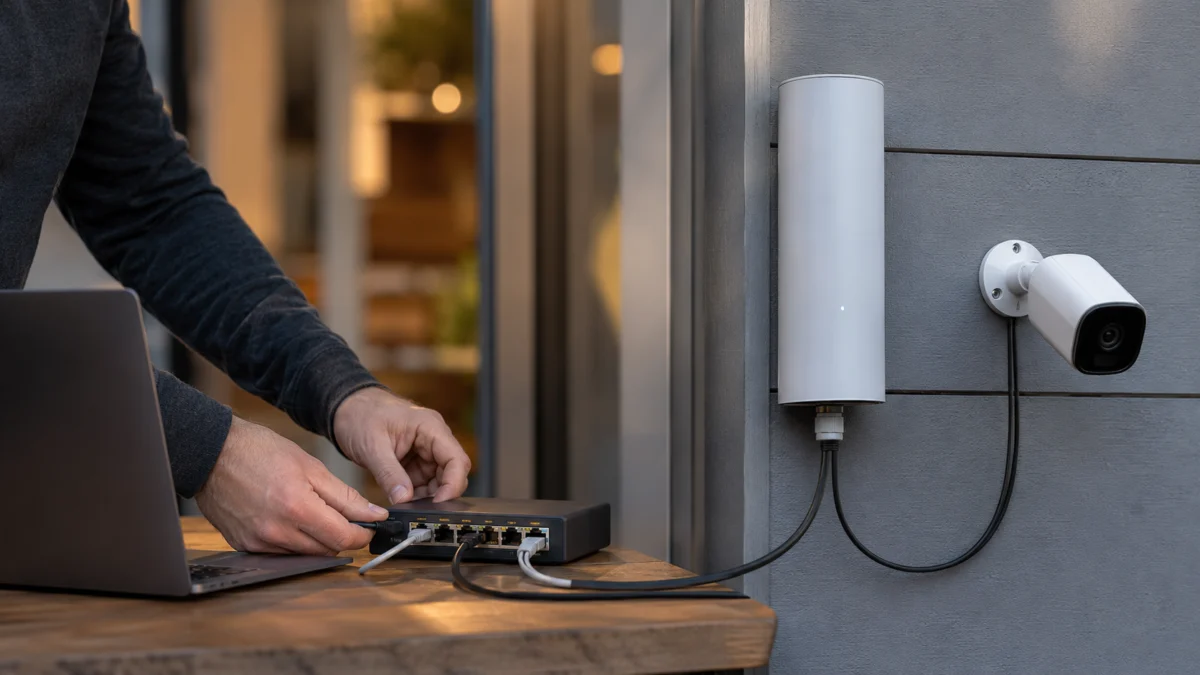
Short answer: The Deco BE25-Outdoor cannot power a PoE camera. Its PoE ports are PoE input ports, meaning the Deco itself is a device that receives power from a PoE switch or PoE injector. It does not send PoE power out to other devices such as IP cameras. If you plug a PoE camera straight into the Deco and the camera only comes to life once you add its own power adapter, that is expected: your Ethernet data link is working, but there is no power source on that port. To power a camera you need a separate PoE switch, a PoE injector, or the camera maker’s own power supply. TP-Link’s official community confirms the BE25-Outdoor can receive PoE power but cannot provide PoE power to other devices, and does not document any PoE passthrough. Running the Deco on AC power does not change this either. The rest of this guide explains the difference between PoE input, output, and passthrough, and shows the correct wiring for each setup.
Why the Deco BE25-Outdoor Won’t Power a PoE Camera
The Deco BE25-Outdoor is a powered device (PD): it accepts power over Ethernet from a PoE switch or injector, but it is not a power source. Its ports do not send PoE outward, so a directly connected camera carries data only when powered separately. TP-Link’s official community confirms the ports receive power but cannot power other PoE devices.
This trips people up because both ports are labeled “PoE,” and it is easy to read that as “this port supplies PoE.” In reality, the label describes how the Deco can be fed, not what it hands out. Both of the unit’s ports are 2.5 Gbps, and the label refers to receiving power, not delivering it.
Running the Deco on its AC adapter does not change this. Using AC power does not convert the Ethernet ports into PoE output ports. There is no documented setting or power mode that turns the BE25-Outdoor into a PoE source for a camera.
One useful diagnostic pattern is a camera that stays dark when connected to the Deco, then works once its own power adapter is plugged in. When the camera also communicates after separate power is added, the Ethernet data path is working while PoE power is absent. Power delivery and data delivery are separate problems, and this case points to the power side.
The correct picture looks like this:
- Correct: PoE switch → power and data → Deco BE25-Outdoor
- Correct: Deco BE25-Outdoor → data only → separately powered camera
- Incorrect: Deco BE25-Outdoor → expected power and data → PoE camera (no power source exists on this path)
Check the Deco BE25-Outdoor on Amazon
/
Official specifications
/
TP-Link PoE support answer
PoE Input, PoE Output, and PoE Passthrough Explained
PoE has a direction. Power Sourcing Equipment (PSE), such as a switch or injector, sends power. A powered device (PD), such as the Deco or a camera, receives it. PoE passthrough means a device receives power and re-supplies some to another. The BE25-Outdoor is a PD only, so two PDs share no source.
Because the BE25-Outdoor and a typical PoE camera are both powered devices, connecting them directly creates a link with two receivers and no sender. Neither side supplies power to the other. That is the core reason the direct wiring fails, even though the Ethernet data still passes through.
It also helps to separate the standards involved. IEEE 802.3af and 802.3at are negotiated PoE standards where the source and device agree on power delivery before power is sent. IEEE 802.3bt is a higher-power negotiated standard mentioned here for general context only; do not assume it maps to any specific BE25-Outdoor behavior. Passive PoE is different: it sends a fixed voltage with no negotiation, and using it on a device that expects negotiated PoE can be risky.
The BE25-Outdoor’s official power input is IEEE 802.3at PoE or a standard AC supply. A camera has its own official input requirement, which may be 802.3af, 802.3at, or a specific DC input. Two ports that look identical can still differ in power direction and supported standard, so always check the camera maker’s official spec for the required standard and wattage. Never try an unverified voltage, polarity, or PoE type on either device.
| Term | Sends power? | Receives power? | Carries data? | Example in this setup | Main risk |
|---|---|---|---|---|---|
| PoE switch (PSE) | Yes | No | Yes | Powers the Deco and/or camera | Insufficient per-port output or total budget |
| PoE injector (PSE) | Yes | No | Yes | Adds PoE to one line | Reversing the LAN and PoE ports |
| Deco BE25-Outdoor (PD) | No | Yes (802.3at) | Yes | Receives PoE; passes data | Expecting it to power a camera |
| PoE camera (PD) | No | Yes (check its spec) | Yes | Needs a PSE to power it | Wrong required standard or wattage |
| PoE passthrough | Yes (re-supplied) | Yes | Yes | Not documented on the BE25-Outdoor | Assuming the Deco supports it |
Check Your Current Wiring Before Buying More Hardware
Before buying anything, write down your current wiring to see which part is missing. Note how the Deco is powered, whether the camera runs on its own adapter, whether its Ethernet link LED lights, and whether it appears in the Deco app. When a camera works only on its adapter, the data path is usually fine and power is missing.
Work through each item below and record the result. The goal is to separate a power problem from a data problem before you add hardware.
- Is the Deco powered by AC or by PoE?
- Does the camera power on and work when you connect its own DC or PoE adapter?
- Does the camera’s Ethernet link LED light up when connected to the Deco?
- Does the camera show up in the Deco app or router client list?
- What is the camera’s exact model, its required PoE standard, and its maximum power draw?
- Does the camera have a separate DC input jack?
- Is any switch you already own PoE-capable? How many PoE ports, and what total PoE budget?
- What cable category and length are you using, and which sections are indoor vs outdoor?
- Which Deco port is used as WAN, and which is used for wired backhaul?
If the camera works once its own power supply is connected but not through the Deco, this is a power-sourcing gap, and the next section covers the hardware options. If the camera has power but still will not come online, that is a data or network issue, and you should move on to the troubleshooting section further down.
| Component | Model | Power method | PoE standard | Maximum wattage | Current result |
|---|---|---|---|---|---|
| Deco BE25-Outdoor | Your unit’s hardware version | AC or PoE | 802.3at input | 21W max draw | Powered / not powered |
| PoE camera | Your camera model | PoE or DC | Check maker spec | Check maker spec | Works only on own adapter? |
| PoE switch / injector | Your model (if any) | Mains | Check output standard | Per-port and total budget | In use / not present |
Use a PoE Switch, Injector, or Separate Camera Power Supply
To power the camera, add a real power source. A single 802.3at PoE switch can power the Deco on one port and the camera on another. A PoE injector suits one camera without a switch, while the camera’s own supply works when the Deco carries data only. Match each device’s standard, per-port output, and total budget.
Because the BE25-Outdoor draws up to 21W over PoE, any switch or injector powering it should comfortably exceed that on the relevant port. Confirm your camera’s required standard and wattage separately. The options below cover the common topologies.
Option A: One PoE switch powers the Deco and the camera on separate ports
Connect the Deco to one PoE port and the camera to another PoE port on the same 802.3at-compliant switch. Verify that each device’s required standard and wattage are met, and that the switch’s total PoE budget covers both at once. This is a practical, scalable approach that grows well if you later add more cameras.
Check the TP-Link TL-SG105PP-M2 on Amazon
/
Check the NETGEAR MS108EUP on Amazon
Option B: AC-powered Deco plus a PoE injector for the camera
If you have no PoE switch, run the Deco on its AC adapter and add a single PoE injector inline to the camera. Do not swap the injector’s LAN-side and PoE-side ports, and confirm the injector supports the camera’s PoE standard and power needs. This works well for a single camera.
Check the TRENDnet TPE-215GI on Amazon
/
Official specifications
Option C: PoE-powered Deco plus a separately powered camera
Power the Deco over PoE and give the camera its own maker-approved DC power supply, using the Deco’s port for data only. This is valid only when the camera officially supports that DC input. Check outdoor outlet access, weatherproofing, and the power adapter’s installation conditions.
Option D: Camera on an existing PoE switch, Deco on wireless backhaul
If you do not need wired backhaul to the Deco, connect the camera to an existing PoE switch for both power and data, and let the Deco join the mesh over Wi-Fi. This separates the camera’s data path from the Deco’s mesh backhaul.
Option E: PoE splitter (only if the maker allows it)
A PoE splitter takes negotiated PoE and outputs a separate data line plus a DC power line for a device that lacks native PoE. Consider it only when the device maker confirms support and the voltage, polarity, and connector all match. It is not a universal solution, so do not treat it as a default recommendation.
When choosing a PoE switch or injector, weigh these factors:
- IEEE standard (802.3af / 802.3at) required by each device
- Per-port power output
- Total PoE budget across all connected devices
- Number of PoE devices now and planned
- Port speed (2.5 Gbps to preserve the Deco’s multi-gig link)
- Indoor or outdoor installation rating
- Managed or unmanaged
- Surge and grounding requirements for outdoor runs
| Topology | Powers the Deco? | Powers the camera? | Carries camera data? | Additional hardware | Best use case | Important limitation |
|---|---|---|---|---|---|---|
| Camera directly on BE25-Outdoor | No | No | Yes, only if the camera is separately powered | None | Diagnosing the problem only | No power source exists on this path |
| PoE switch to Deco and camera on separate ports | Yes | Yes | Yes | 802.3at PoE switch | Multiple devices, future growth | Total PoE budget must cover both |
| AC-powered Deco plus camera PoE injector | By AC | Yes | Yes | PoE injector | Single camera, no switch | Do not reverse LAN and PoE sides |
| PoE-powered Deco plus separately powered camera | Yes | By its own adapter | Yes | Camera DC power supply | Camera supports DC input | Needs outdoor outlet and weatherproofing |
| Camera on PoE switch, Deco on Wi-Fi | By AC or PoE | Yes | Yes | PoE switch | No wired backhaul needed | Separate data paths to manage |
| Passive PoE adapter setup | Depends | Depends | Yes | Passive PoE gear | Only if specs match exactly | Not recommended unless official specs align |
Outdoor installation notes: The BE25-Outdoor’s IP65 rating applies to the unit itself and does not automatically waterproof your whole network, the camera, the connectors, or any power adapters. Follow the maker’s procedure to weatherproof outdoor Ethernet connectors, and check outdoor-rated cable, grounding, shielding, drip loops, and surge protection against your local conditions. If you place a PoE switch or injector outdoors, confirm that the product itself is rated for outdoor use, and keep indoor-only power adapters out of the rain. For runs between buildings, long outdoor runs, or areas with lightning risk, consult a qualified electrician or network installer where appropriate. This guide does not guarantee safe installation, lightning protection, or fault-free operation.
Official BE25-Outdoor support downloads
If the Camera Has Power but Still Doesn’t Connect
If the camera clearly has power but stays offline, the problem is now data or network, not power. Confirm the camera actually powers on, then check the Ethernet link, the switch or injector wiring, the camera’s IP address, and whether your network is isolating it. Work from the physical link outward to the app and network settings.
Start with the power and link layer, then move up to the network layer:
- Confirm the camera’s power LED or startup indicator shows it is on.
- Check the PoE switch port LED and any PoE-supplying status indicator, and confirm you are not over the switch’s total PoE budget.
- Verify the camera’s required PoE standard is one the switch or injector actually supplies.
- Test the Ethernet link with a different cable, then a short known-good cable, then another PoE port.
- On an injector, confirm the LAN-side and PoE-side ports are not reversed.
- Check how the Deco’s ports auto-detect as WAN or LAN in your topology.
- Look for the camera in the Deco app client list and confirm it pulled a DHCP address.
- Rule out a duplicate or conflicting static IP.
If the camera still does not appear, check whether network segmentation is keeping it isolated. Some setups place cameras on an IoT network, enable client Device Isolation, use a guest network, or apply VLAN or managed-switch rules that can keep the camera from communicating as expected. Check these one at a time, and set the camera up first with the camera maker’s own app where required. Also confirm the camera firmware is current, and try the camera on a separate simple network to see whether it works in isolation. Keep the camera-won’t-start case separate from the powers-on-but-won’t-connect case, since they point to different layers.
If you contact TP-Link or the camera maker, having these details ready speeds up support:
- Deco BE25-Outdoor hardware version and firmware
- How the Deco is powered (AC or PoE)
- Camera brand, model, required PoE standard, and maximum power
- PoE switch or injector model, its per-port output, and total PoE budget
- Cable category and approximate length
- Which link LEDs are lit
- Whether the camera works with its own separate power supply
- Whether the camera appears in the Deco client list
- Your current network topology
Use only the official firmware for your local purchase region, and check the Deco’s hardware version, since features and firmware can vary by region.
Diagnostic Quick Reference
This table maps common symptoms to the layer to check first. The “Most relevant layer” column is a starting point for diagnosis, not a definitive cause. Confirm your camera’s official power requirements and your switch or injector’s output before buying hardware.
| Symptom | Is the camera powered? | Is Ethernet data working? | Most relevant layer | First action | Hardware likely needed |
|---|---|---|---|---|---|
| Camera is completely off when connected to the Deco | No | Unknown | Power sourcing | Add a real PSE (switch or injector) | PoE switch or injector |
| Camera works only after connecting its DC adapter | Yes (by adapter) | Likely yes | Power sourcing | Confirm data is fine, then power via PSE | PoE switch or injector |
| Camera powers on via a PoE switch but stays offline | Yes | Check | Data / network | Check link, IP, and isolation settings | Usually none |
| Camera works through another router or switch | Yes | Yes | Deco-side config | Compare working vs non-working setup | Usually none |
| Deco is on AC, but the camera receives no PoE | No | Yes | Power sourcing | Add an injector or switch for the camera | PoE injector or switch |
| Deco is on PoE, but the second port does not power the camera | No | Yes | Power direction | Remember both ports are input, not output | Separate PSE for the camera |
| PoE switch powers the Deco but not the camera | No | Maybe | Budget / standard | Check per-port output and total budget | Higher-budget switch if needed |
| Both devices work alone but not in the outdoor topology | Varies | Varies | Wiring / environment | Recheck cabling, weatherproofing, ports | Outdoor-rated accessories |
Frequently Asked Questions
These answers cover the questions readers ask most about powering cameras from the Deco BE25-Outdoor. They summarize the key points on PoE direction, passthrough, the separately-powered-camera symptom, and choosing between a PoE switch and an injector, all within the sources used above. Confirm your own camera’s power spec before buying.
Can the Deco BE25-Outdoor power a PoE camera, and are its ports PoE output ports?
No to both. Both 2.5 Gbps ports are PoE input ports that power the Deco itself; they carry Ethernet data outward but do not send PoE power, whether the Deco runs on AC or PoE. TP-Link’s official community confirms it cannot power other PoE devices. Use a separate PoE switch, injector, or the camera’s own supply.
Does the Deco BE25-Outdoor support PoE passthrough?
PoE passthrough is not documented for the BE25-Outdoor. Its official power input is IEEE 802.3at PoE or a standard AC supply, and TP-Link’s community states it cannot provide power to other devices. You should not rely on any passthrough behavior, and no setting enables it.
Why does my camera work only when I connect its power adapter?
That pattern usually means the Ethernet data path through the Deco is working, but the port supplies no power. The camera boots only once its own adapter provides power. It points to a power-sourcing gap rather than a data problem, so the fix is adding a real power source.
Do I need a PoE switch or a PoE injector to power both devices?
Use a PoE switch to power the Deco and one or more cameras from separate 802.3at ports, especially if you plan to expand; confirm each device’s standard and that the total budget covers both. Use a single injector when you only need to add power to one camera line and have no switch.
How We Researched
This article is based on manufacturer documentation, official support materials, and community reports where available. We reviewed TP-Link’s official Deco BE25-Outdoor product page, datasheet, and user guide, along with TP-Link’s official community answers on PoE direction and power requirements. We have not conducted hands-on lab testing.
Any performance figures or compatibility claims are attributed to official sources or clearly identified community reports. Camera-side requirements should be confirmed against each camera maker’s own specifications, since PoE standards and power draw vary by model.
Conclusion
The Deco BE25-Outdoor cannot power a PoE camera because its PoE ports receive power rather than send it, and no passthrough is documented. If a camera only works with its own adapter attached, your data path is fine and only a power source is missing.
Add an 802.3at PoE switch to power both the Deco and the camera on separate ports, or use a PoE injector for a single camera, matching each device’s required standard, per-port output, and total PoE budget. For outdoor runs, confirm weatherproofing, grounding, and surge protection against your conditions, and consult a qualified installer where appropriate. Always verify camera power requirements against the maker’s official specifications before buying hardware.